Executive Summary / Key Takeaways
An architectural guide to designing the server/client boundary in Next.js App Router. Learn when to render on the server, when client state is necessary, and how to avoid hydration costs.
- Server Components (RSC) execute exclusively on the server, sending zero client JavaScript for data-fetching leaves.
- Client Components should be pushed to the leaves of the render tree for interactive state and event handlers.
- Proper composition boundaries drastically reduce bundle size and prevent unnecessary hydration waterfalls.
In modern web development with the Next.js App Router, few decisions impact application performance, security posture, and maintainability as fundamentally as the server/client boundary.
Since the introduction of React Server Components (RSC), Next.js defaults to rendering components on the server. While the Pages Router remains supported for backward compatibility, the App Router requires a different mental model. Too often, developers either treat Server Components as a magic bullet that makes every page faster, or reflexively declare 'use client' at the top of a layout the moment an interactive widget is needed.
Both approaches miss the fundamental architectural reality:
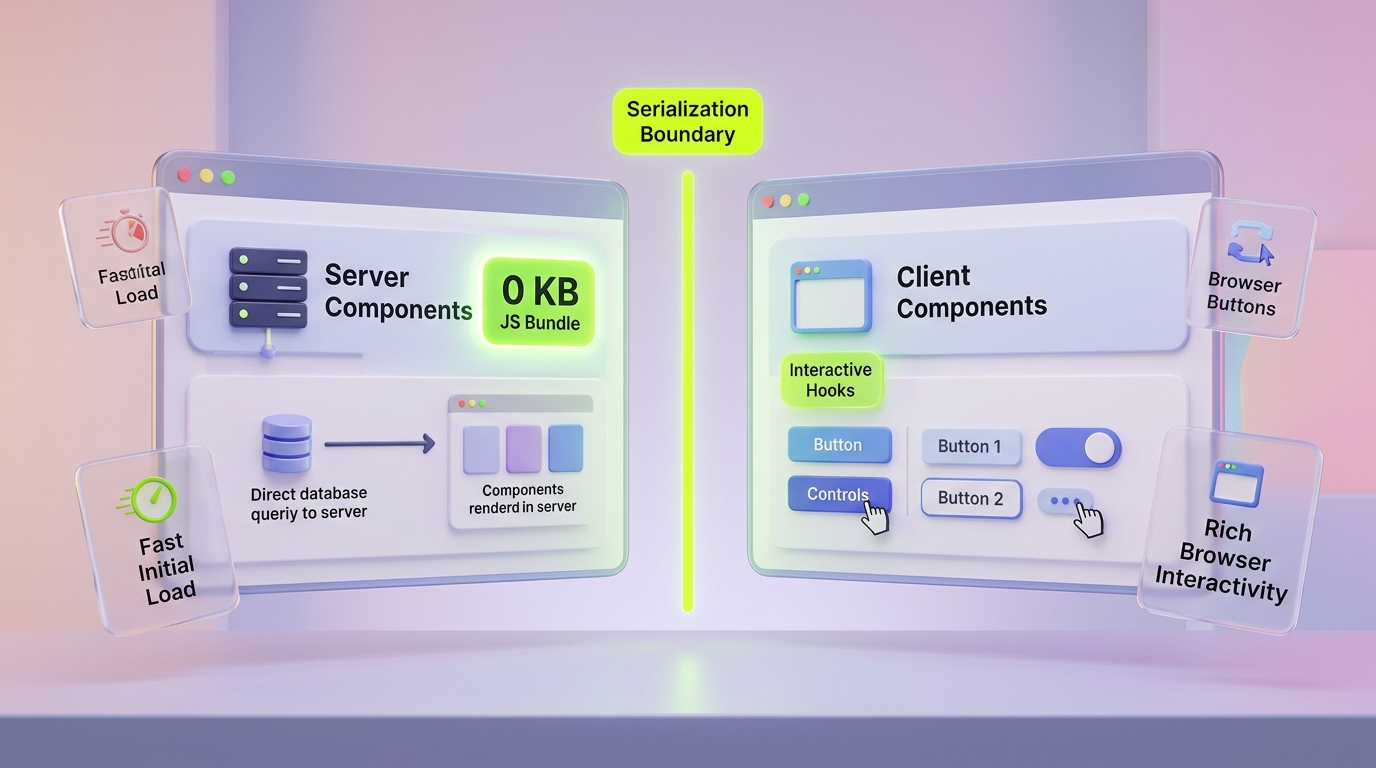
The server/client boundary is not a component divider—it is a network serialization boundary.
The boundary determines which code executes in a trusted Node.js or Edge runtime, what data crosses the wire as serialized JSON payloads, and how much JavaScript the browser must download, parse, and hydrate.
At Kawaki Studios, we treat boundary placement as a primary design decision in our custom web engineering and web application development. In this guide, we break down the mechanics of the server/client boundary, a practical decision framework, common anti-patterns, and the architectural principles needed to build high-performance Next.js platforms.
1. What the Server/Client Boundary Actually Means
To design clean component architectures, you must understand the two distinct execution environments that make up a Next.js application:
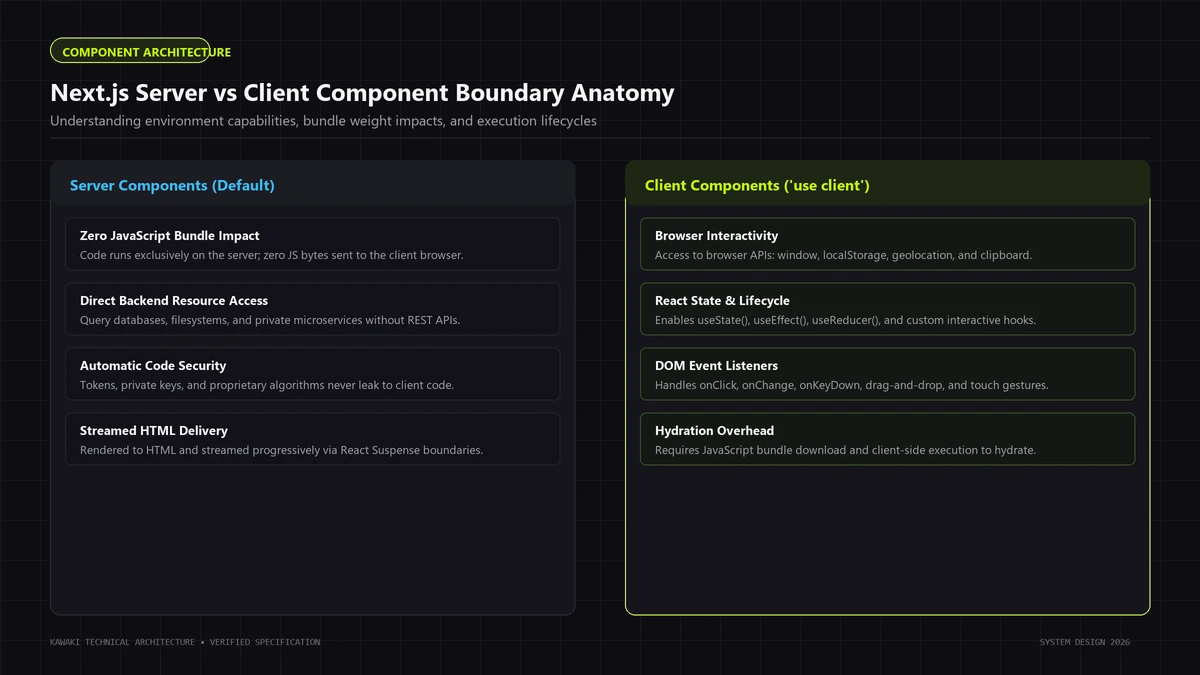
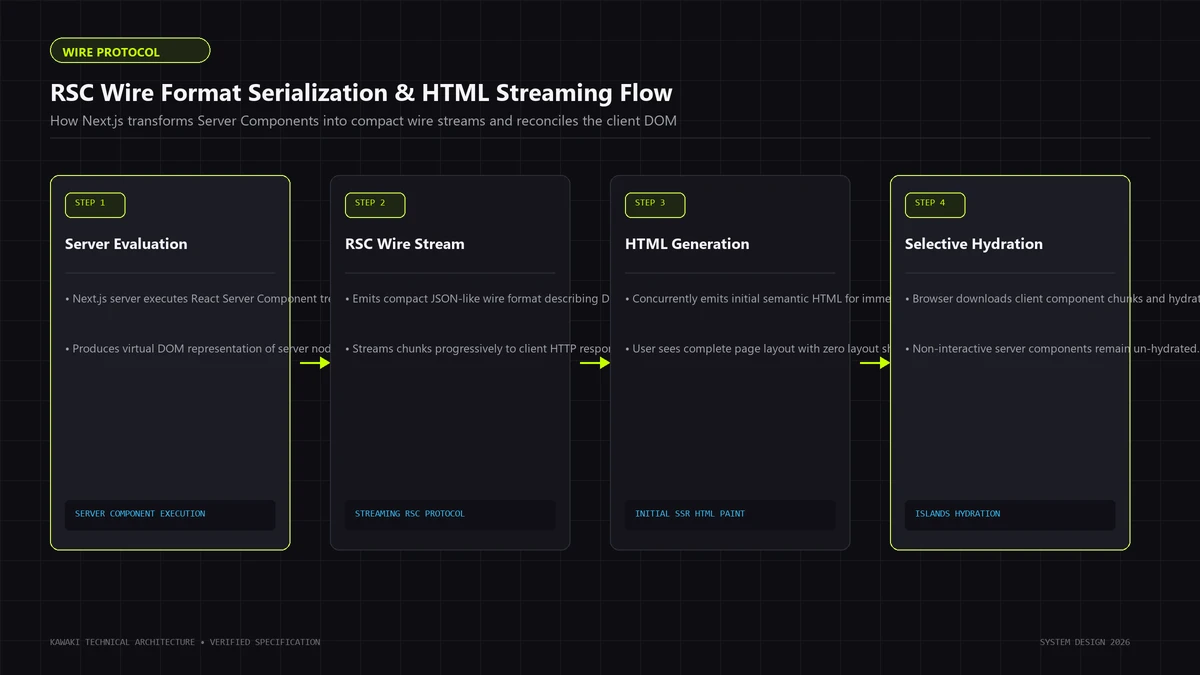
- The Server Environment: Code executing exclusively on the server (Node.js runtime or Edge workers). It has direct access to filesystem primitives, internal microservices, environment variables, databases, and private encryption keys. It produces either static HTML or an RSC stream (a serialized format describing the virtual DOM).
- The Client Environment: Code executing in the visitor's browser. It has direct access to browser APIs (DOM,
window,localStorage, Geolocation, WebGL), handles user input events (clicks, keypresses, touches), and maintains persistent client state between interactions. - The Network Boundary: The interface between these two worlds. When a Server Component renders a Client Component, the server evaluates the server portion and sends a serialized payload across the network. The client receives this payload and hydrates the interactive components into the DOM.
The boundary is not determined by file extensions or folder hierarchies. It is established explicitly by where you place the 'use client' directive in your module dependency graph.
2. Server Components: The Default Execution Model
In the Next.js App Router, all components inside the app directory are React Server Components by default (Next.js Documentation).
Key Capabilities
- Zero Client Bundle Impact: Dependencies imported exclusively by Server Components never ship to the browser. Heavy packages like Markdown parsers (
marked,remark), syntax highlighters, or date formatting utilities (date-fns) execute on the server and emit only lightweight HTML. - Direct Backend & Database Access: Server Components can directly query databases (PostgreSQL, SQLite, Prisma) or call internal microservices without needing an intermediary REST API layer.
- Secret Isolation: API keys, database connection strings, and private service tokens stay on the server. There is zero risk of leaking them into client JavaScript bundles.
- Streaming & Progressive Rendering: Server Components integrate with React
<Suspense>boundaries, allowing the server to stream initial layout shells immediately while slower data queries resolve in parallel.
Limitations
Server Components cannot:
- Use React state hooks (
useState,useReducer). - Use lifecycle or side-effect hooks (
useEffect,useLayoutEffect). - Attach event listeners (
onClick,onChange,onSubmit). - Access browser-exclusive APIs (
window,document,localStorage,navigator). - Use custom hooks that depend on client state.
Technical accuracy note: Server Components do not use a 'use server' directive. The 'use server' directive in React is used exclusively to declare Server Actions—callable server-side RPC functions (React Documentation).
3. Client Components: Handling Tactile Interactivity
A Client Component is declared by placing the 'use client' directive at the very top of a file, before any import statements (React Documentation).
The 'use client' directive is not an instruction that tells React to only run code in the browser. Rather, it marks a boundary between server-only code and code that can run in both environments. Client Components are still pre-rendered to static HTML on the server during the initial page request to provide fast First Contentful Paint (FCP); they are then hydrated in the browser to enable interactivity.
Key Capabilities
- Tactile State Management: Using
useState,useReducer, and context providers to drive dynamic UI changes. - User Event Handling: Listening for clicks, keystrokes, form submissions, and touch gestures.
- Browser API Integration: Interacting with
window.matchMedia, Intersection Observers, Canvas, Web Audio, or local device storage. - Client-Side Lifecycle Effects: Running subscriptions, animations (GSAP, Framer Motion), and imperative DOM adjustments via
useEffect.
4. How to Decide Where the Boundary Goes
When designing an application feature, use this 6-question decision framework to locate the exact component boundary:
                     [New Feature / Component]
                                 │
                 1. Requires browser-only APIs?
                     (window, localStorage, etc.)
                                ╱ ╲
                             Yes   No
                             ╱       ╲
                   [Client Component] 2. Requires interactive state
                                         or event listeners?
                                         (useState, onClick)
                                             ╱ ╲
                                          Yes   No
                                          ╱       ╲
                                [Client Component] 3. Requires server secrets,
                                                      direct DB, or heavy libs?
                                                          ╱ ╲
                                                       Yes   No
                                                       ╱       ╲
                                            [Server Component] [Server Component]
                                                               (Default)
Diagnostic Questions:
- Does this component need browser-exclusive APIs? If it interacts with
window,document, or hardware sensors, it must be a Client Component. - Does it manage interactive local state or respond to user events? If a user clicks, drags, or types and the UI must react immediately, that specific interactive element requires
'use client'. - Can the interactive portion be isolated into a small leaf component? If a page contains a 2,000-word article with a single 'Copy Link' button, only the button should be a Client Component. The article, typography, and metadata should remain Server Components.
- Does the component handle sensitive credentials or internal database queries? If yes, it must remain on the server to prevent exposing operational logic or tokens.
- Does the component import large dependencies? If a package is only used for formatting or data parsing, keeping it in a Server Component saves valuable kilobytes in browser payload.
- Can server data be passed across the boundary as serializable props? If data can be pre-fetched and serialized as plain JSON, fetch it on the server and pass it down.
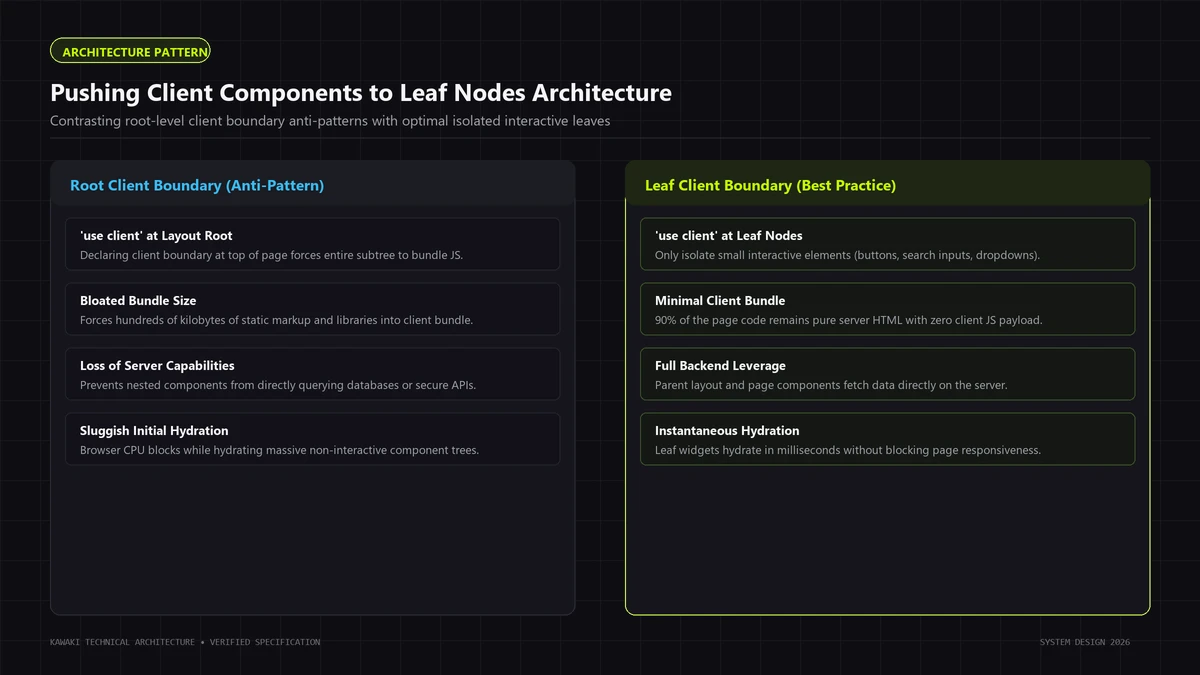
5. The Common Mistake: Making the Whole Page Client-Side
The most common architectural mistake in Next.js App Router applications is placing 'use client' at the page or layout root:
// ❌ ANTI-PATTERN: Whole page marked as client
'use client';

import { useState } from 'react';
import HeavyMarkdownParser from 'heavy-markdown-parser'; // Bundled to client!
import Sidebar from './Sidebar';                         // Forced to client!
import ArticleBody from './ArticleBody';                 // Forced to client!

export default function ArticlePage({ initialData }) {
  const [likes, setLikes] = useState(0);

  return (
    <div>
      <Sidebar />
      <ArticleBody content={HeavyMarkdownParser(initialData.text)} />
      <button onClick={() => setLikes(likes + 1)}>Like ({likes})</button>
    </div>
  );
}
Why This Degrades Architecture:
When you add 'use client' to a file, that module and all modules it imports become part of the client bundle.
In the example above, HeavyMarkdownParser, Sidebar, and ArticleBody are all forced into the browser JavaScript bundle, even if they contain zero interactive logic. This increases the total JavaScript payload that the browser must parse, compile, and execute, degrading the user's Interaction to Next Paint (INP) and consuming mobile memory.
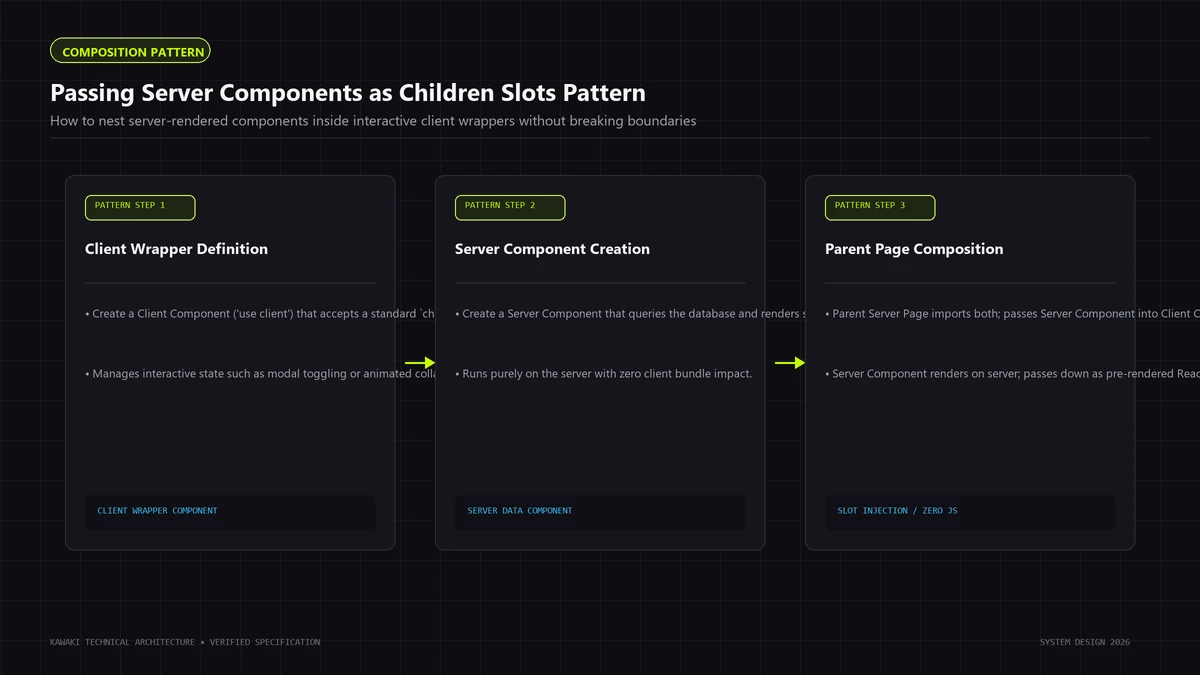
6. Composition Patterns: Passing Server Components as Props
To keep client bundles lean while retaining rich interactivity, use React's composition pattern. You can pass Server Components as children (or as other props) into Client Components:
// ✅ CORRECT PATTERN: Interactive wrapper as client, content as server

// 1. InteractiveShell.tsx (Client Component)
'use client';

import { useState } from 'react';

export default function InteractiveShell({ children }: { children: React.ReactNode }) {
  const [isOpen, setIsOpen] = useState(false);

  return (
    <div className="shell">
      <button onClick={() => setIsOpen(!isOpen)}>
        {isOpen ? 'Collapse' : 'Expand'}
      </button>
      {isOpen && <div className="shell-content">{children}</div>}
    </div>
  );
}
// 2. Page.tsx (Server Component by default)
import InteractiveShell from './InteractiveShell';
import HeavyServerContent from './HeavyServerContent'; // Never ships to browser!

export default async function Page() {
  const data = await fetchServerData();

  return (
    <main>
      <h1>Server-Rendered Article</h1>
      <InteractiveShell>
        {/* HeavyServerContent renders on the server and passes as rendered virtual DOM */}
        <HeavyServerContent data={data} />
      </InteractiveShell>
    </main>
  );
}
In this pattern, HeavyServerContent executes strictly on the server. Its code never enters the browser bundle, yet it renders seamlessly inside the interactive InteractiveShell.
7. Data Fetching and API Boundaries
Data fetching architecture differs fundamentally between Server and Client Components:
When to Fetch on the Server (RSC)
- Initial page loads, catalog listings, editorial articles, and account dashboards.
- Direct database or ORM queries where low network latency between server and database produces rapid execution.
- Parallel data loading using
Promise.all():export default async function DashboardPage() { // Parallel fetching without waterfall const [user, analytics] = await Promise.all([ getUserProfile(), getAnalyticsData() ]); return <DashboardView user={user} analytics={analytics} />; }
When to Fetch on the Client
- Dynamic search queries that update on every keystroke.
- Infinite scroll pagination triggered by viewport intersection.
- Polling for live status updates (e.g., webhook processing or queue progress).
- User-driven mutations where client state updates optimistically before server confirmation.
Architectural rule: Separate domain and business logic from the UI. Server Components should orchestrate data retrieval; Client Components should receive clean, serializable props.
8. Authentication & Security Boundaries
Securing a Next.js application requires enforcing security boundaries on the server, not in client UI state.
Security Principles:
- Never Rely on Client-Side Hiding: Hiding a button or section with
{isAdmin && <AdminPanel />}in a Client Component does not protect administrative data. If the data is included in the serialized props sent to the browser, it can be inspected in the network tab. - Authorize at the Server Data Layer: Server Components must verify session cookies or JWT signatures before querying sensitive records:
import { getSession } from '@/lib/auth'; import { redirect } from 'next/navigation'; export default async function AdminRoute() { const session = await getSession(); if (!session || session.role !== 'admin') { redirect('/login'); } const sensitiveData = await getAdminMetrics(); return <AdminDashboard data={sensitiveData} />; } - Keep Tokens Server-Side: Refresh tokens, database passwords, and third-party API secrets should never be prefixed with
NEXT_PUBLIC_.
9. Performance Implications: Hydration & Bundle Weight
Designing component boundaries is an exercise in resource optimization:
- Browser Parse & Compile Time: Every kilobyte of JavaScript shipped to the client must be downloaded, decompressed, parsed, and compiled by the browser's JavaScript engine. On low-power mobile devices, parsing 500KB of JavaScript can lock the main thread for hundreds of milliseconds.
- Hydration Overhead: Hydration is the process by which React attaches event listeners to server-rendered HTML. By keeping static sections of the tree as Server Components, React skips hydrating those DOM nodes entirely, leaving the main thread free to respond to user input.
- Data Locality: Server Components execute in close physical proximity to databases and cache stores (typically in the same cloud region), eliminating multiple roundtrips over high-latency mobile networks.
For performance-critical systems, pairing thoughtful boundary placement with website performance optimization ensures smooth Core Web Vitals across diverse client hardware.
10. When Client Components Are Exactly the Right Choice
Client Components are not an anti-pattern—they are an essential tool for rich user experiences. Use them confidently for:
- E-Commerce Cart Drawers: Instant open/close triggers, quantity increments, and optimistic cart badge updates.
- Interactive Multi-Step Forms: Step-by-step validation, client-side error states, and responsive input masks.
- Faceted Product Filters: Checkboxes, price sliders, and sort dropdowns that filter in-memory lists or update URL parameters.
- Accessible Accordions & Tabs: Keyboard-navigable UI disclosures managing local expanded/collapsed states.
- Interactive Visualizers: Canvas graphs, SVG animation controls, and 3D product viewports.
11. When Server Components Are the Better Fit
Default to Server Components for:
- Editorial & Content Pages: Articles, documentation, case studies, and marketing landing pages.
- Catalog & Product Details: Product description text, image grids, specifications, and breadcrumbs.
- Protected User Dashboards: Overview layouts, billing summaries, and audit logs.
- Metadata Generation: Dynamic
generateMetadata()functions computing OpenGraph tags and Schema.org structured data on the server. - Syntax Highlighting & Code Blocks: Rendering code snippets using Prism or Shiki without shipping the grammar tokenizer to the browser.
12. A Practical Reference Architecture
The following reference diagram illustrates a clean boundary separation in a production Next.js application:
[Route /products/analytics]
           │
           ▼
┌────────────────────────────────────────────────────────┐
│  Server Page Component (RSC)                           │
│  - Authenticates user session                          │
│  - Queries database in parallel via Promise.all()      │
│  - Computes aggregation metrics                        │
└───────────────────┬────────────────────────────────────┘
                    │
                    ├────────────────────────────────────┐
                    ▼                                    ▼
┌──────────────────────────────────────┐  ┌──────────────────────────────────────┐
│  Server-Rendered UI (RSC)            │  │  Interactive Leaf (Client Component) │
│  - Page title & semantic typography  │  │  'use client'                        │
│  - Static data tables                │  │  - Date range selector               │
│  - Breadcrumb hierarchy              │  │  - Interactive chart toggle          │
│  - Zero client JS payload            │  │  - Local filter state                │
└──────────────────────────────────────┘  └──────────────────────────────────────┘
Notice that the top-level route and layout remain on the server. Interactivity is pushed outward to small, dedicated leaf components that receive serialized data.
13. Component Boundary Decision Matrix
| Requirement | Recommended Boundary | Architectural Rationale |
|---|---|---|
| Static Prose & Typography | Server | No interactivity needed; zero client bundle cost. |
| Database or ORM Queries | Server | Direct data access; protects connection credentials. |
User Click Handlers (onClick) |
Client | Event listeners require browser DOM binding. |
| Form Inputs with Live Validation | Client | Immediate tactile feedback requires local React state. |
Browser Storage (localStorage) |
Client | API only exists within the browser environment. |
| Sensitive Authentication Logic | Server | Protects authorization checks from client tampering. |
| Heavy Markdown / Syntax Parsing | Server | Executes parser on server; ships lightweight HTML only. |
| Dynamic Modal / Drawer Shell | Client Wrapper | Houses toggle state; can wrap server-rendered children. |
14. Common Architectural Mistakes
Review your codebase against these five common traps:
- Confusing
'use server'with Server Components:'use server'does not designate a component as a Server Component. It is used strictly to declare Server Actions (callable RPC endpoints). Server Components require no directive. - Leaking Server Modules to the Client: Importing a module that uses Node.js primitives (
fs,crypto,process.env) inside a Client Component causes build errors. Use theserver-onlypackage to enforce build-time boundaries. - Prop Drilling Non-Serializable Data: Attempting to pass functions, class instances, or symbols from a Server Component to a Client Component will fail. Props crossing the boundary must be JSON-serializable.
- Creating Unnecessary Request Waterfalls: Fetching data inside nested Client Components via
useEffectforces sequential network waterfalls. Pre-fetch on the server or parallelize requests. - Overusing Root Client Context Providers: Wrapping your entire root layout in multiple client context providers effectively converts large portions of the component tree into client execution paths.
15. Frequently Asked Questions (FAQ)
What is the core difference between Server and Client Components in Next.js?
Server Components execute only on the server and emit HTML/RSC payload without shipping their JavaScript dependencies to the browser. Client Components pre-render HTML on the server and then hydrate in the browser, enabling state, effects, and event handling.
When should I use the 'use client' directive?
Use 'use client' only when a component requires browser APIs, React state hooks (useState, useReducer), lifecycle effects (useEffect), or event listeners (onClick, onChange). Keep the directive as close to the interactive leaves of your DOM tree as possible.
Are Server Components always faster than Client Components?
Not universally. Server Components reduce client-side bundle size and eliminate hydration overhead, but if a server-side data fetch is slow and un-cached, it can delay Time to First Byte (TTFB). Architectural performance depends on proper caching, parallel data retrieval, and streaming with Suspense.
Can a Server Component render a Client Component?
Yes. A Server Component can import and render a Client Component directly. The server renders the component to HTML and serializes its props into the RSC payload for client hydration.
Can a Client Component render a Server Component?
A Client Component cannot directly import a Server Component (because the server code cannot run in the browser). However, a Client Component can accept a Server Component as a children prop, allowing server-rendered content to be composed inside an interactive client shell.
Does this architecture apply to the Next.js Pages Router?
No. The server/client component boundary model is specific to the Next.js App Router. The Pages Router uses traditional SSR (getServerSideProps), SSG (getStaticProps), and full-page client-side hydration. Both routers continue to be supported by Next.js, but modern React features like RSC require the App Router.
Engineering Scalable Next.js Applications
Designing effective component boundaries requires balancing user experience, network efficiency, and security requirements.
If your team is modernizing an existing web platform, architecting a high-performance Next.js application, or resolving hydration bottlenecks, explore our custom web development services or schedule a technical briefing with Kawaki Studios.
Need Help Engineering Your Web Platform or AI Systems?
From high-performance Next.js architectures to headless Shopify storefronts, custom AI automations, and enterprise WordPress security recovery, Kawaki Studios designs resilient digital infrastructure built to scale.