
Executive Summary / Key Takeaways
Learn how Japanese keyword hacks compromise WordPress, generate spam URLs, hide via cloaking, and how to fix them with HTTP 410 and root-cause cleanup.
- Identifies cloaked user-agent conditional redirects and search-console spam injection vectors.
- Conducts forensic eradication of rogue sitemaps, injected database tables, and persistent cron hooks.
- Forces rapid Google deindexing using HTTP 410 Gone headers instead of standard 404 responses.
A business owner opens Google, searches for their company name, and discovers that their search results are filled with thousands of unfamiliar pages written in Japanese. The page titles promote counterfeit luxury watches, discount footwear, or unlicensed pharmaceuticals. Yet, when clicking the links directly or navigating to the homepage, the website appears completely normal.
This alarming discrepancy is the hallmark of the Japanese Keyword Hack—one of the most pervasive, persistent, and commercially damaging forms of search engine optimization (SEO) spam targeting WordPress environments.
What is the Japanese Keyword Hack?
The Japanese Keyword Hack is a search engine poisoning compromise where attackers exploit vulnerabilities in a WordPress site (outdated plugins, compromised credentials, or backdoors) to dynamically generate thousands of spam pages containing auto-generated Japanese text and commercial links. Attackers typically use server-side cloaking to serve spam exclusively to search engine crawlers while hiding it from human visitors, hijacking the site's domain authority on Google.
Encountering Japanese spam in search results is not an SEO glitch or an indexing anomaly; it is the visible symptom of a critical server or application security compromise. Treating this strictly as a search indexing problem—such as requesting manual URL removals in Google Search Console without remediating the underlying code—inevitably fails because the malicious generator continues to spawn new URLs.
This technical guide provides a forensic root-cause analysis of how the Japanese Keyword Hack operates in WordPress environments, how to detect sophisticated server-side cloaking, how to systematically eradicate malicious artifacts, and how to properly implement HTTP 404 and 410 status codes to deindex spam pages permanently.
1. What the Japanese Keyword Hack Is
The Japanese Keyword Hack represents an automated, financially motivated cyber compromise aimed at search engine poisoning. Attackers do not compromise your WordPress installation to deface your brand or disrupt your operations; their primary objective is to quietly exploit your established domain authority, crawl budget, and organic trust to rank illicit e-commerce networks on search engines like Google and Bing.
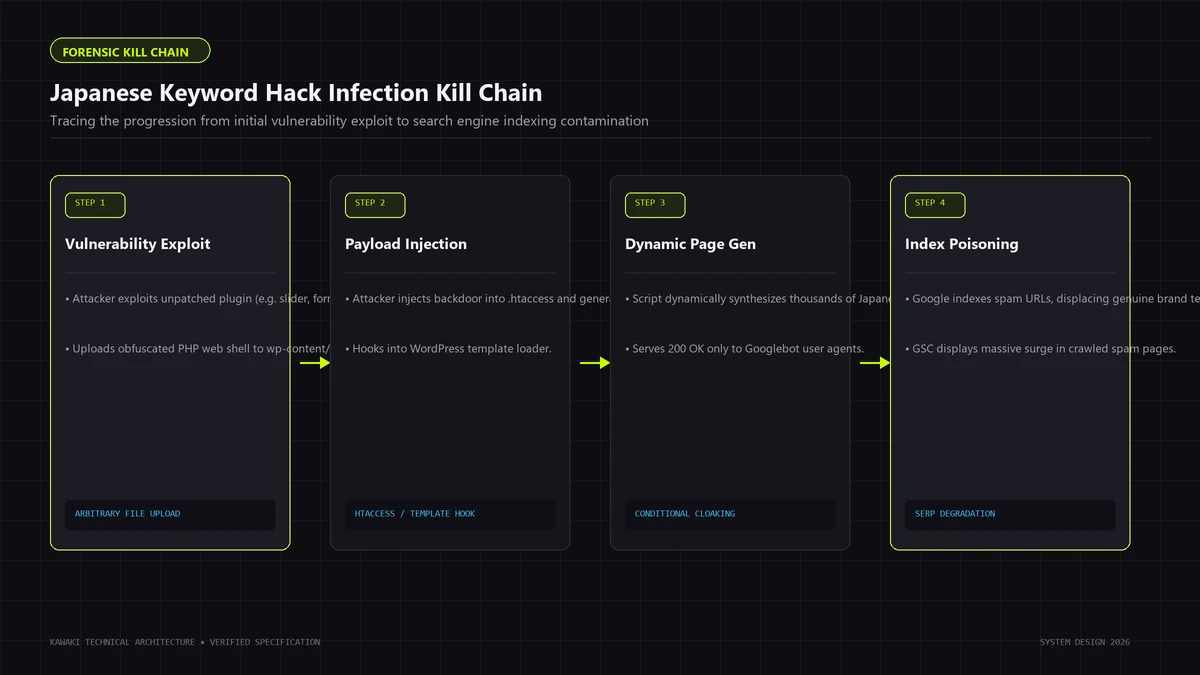
Core Operational Mechanisms
In a standard infection cycle, the compromise operates across several distinct architectural layers:
[Attacker Network]
       │ (Exploits unpatched plugin / weak credential / existing backdoor)
       ▼
[Compromised WordPress Environment]
  ├── Persistent Backdoor (Deep in uploads/, mu-plugins/, or core)
  ├── Rewrite / Routing Hooks (.htaccess or template_redirect)
  └── Dynamic Generator Script (PHP file fetching remote dictionary)
       │
       ├─► Conditional Logic: Is Request Googlebot/Bingbot?
       │        │
       │        ├─► YES: Render auto-generated Japanese doorway page
       │        │        with internal spam link graph & Schema.org markup.
       │        │
       │        └─► NO: Render normal legitimate company page (Cloaking)
       │
       └─► Rogue Sitemap Generator (Pings search engines with 10,000+ spam URLs)
- Unauthorized Content Generation: Attackers inject scripts that dynamically render pages filled with text translated into Japanese, targeting highly competitive commercial search terms (luxury goods, replica items, unauthorized digital downloads, or adult content).
- Search Index Colonization: By linking thousands of newly generated spam URLs together and submitting automated XML sitemaps, attackers induce Google to crawl and index tens of thousands of spam pages under your legitimate domain.
- Traffic Hijacking: When visitors search for targeted commercial phrases on Google and click your link, the server detects the search engine HTTP Referer and redirects the user to the attacker's illicit storefront or affiliate network.
- Conditional Cloaking: To delay discovery by the legitimate website administrator, the malicious script inspects incoming HTTP request headers. Normal direct visitors see the genuine business website, while search engine user-agents are served spam HTML.
Distinguishing Manifestations of Compromise
When diagnosing WordPress SEO spam, security investigators distinguish between four primary injection methods:
- Pure Database Injections: The malicious script creates actual rows in the
wp_poststable and registers taxonomy terms inwp_terms. These spam pages physically exist in the WordPress database and can often be queried via standard SQL. - Virtual Dynamic Routing: No physical posts are created in the database. Instead, the attacker modifies
.htaccess,nginx.conf, or hooks into WordPress'stemplate_redirectorinitactions. When a request matches a specific pattern (such as/item-12345.htmlor/?shop=...), the script intercepts execution, fetches content from a remote command-and-control (C2) server, and outputs spam HTML on the fly. - Static Filesystem Flooding: Attackers upload scripts that write tens of thousands of static
.htmlor.phpfiles across deeply nested subdirectories (often insidewp-content/uploads/). - Search-Only Cloaked Payloads: The compromise modifies existing template files (
header.php,functions.php, or single post templates) to inject hidden Japanese link farms that are rendered only when evaluated by specific search crawlers.
Understanding which of these patterns is active on your server dictates the forensic investigation and eradication methodology.
2. What a Compromised Site Can Look Like
Because attackers deliberately conceal their presence from everyday administrators, the symptoms of a Japanese Keyword Hack are often first noticed externally rather than on the website itself.
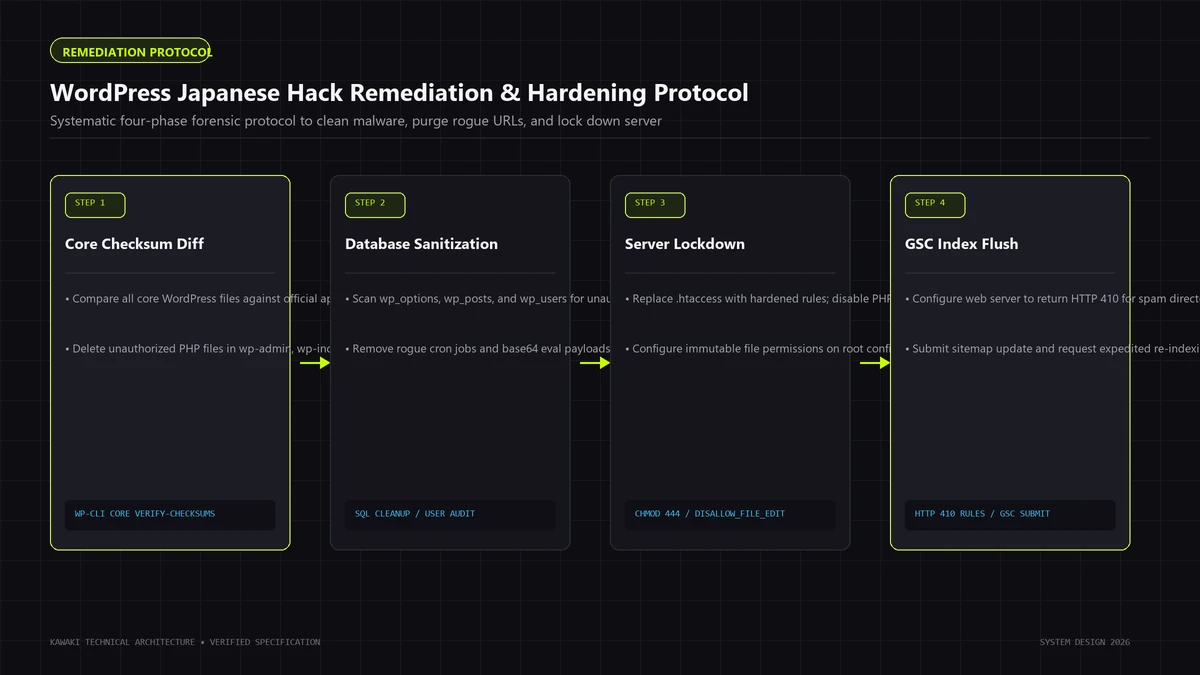
Observable Indicators
The following indicators are commonly observed in compromised environments:
- Foreign Characters in Search Engine Results Pages (SERPs): When performing a
site:yourdomain.comquery on Google, titles and meta descriptions appear in Japanese text alongside unfamiliar e-commerce terminology. - Unfamiliar URL Structures: Search engines display hundreds or thousands of URLs featuring strange patterns not native to your site hierarchy, such as:
yourdomain.com/index.php?item=3891yourdomain.com/category/japanese-term-5912/yourdomain.com/goods_list/product_821.htmlyourdomain.com/wp-content/uploads/2026/01/shop.php?id=941
- Sudden Spikes in Google Search Console Impressions: The GSC Performance report shows an exponential surge in impressions for unrelated foreign search queries, accompanied by a near-zero or erratic click-through rate (CTR).
- Security & Manual Action Warnings in Search Console: Google Search Console flags a "Security Issues: Hacked with spam" or "Hacked: Content injection" notification, warning that the site is serving deceptive or untrusted content.
- Rogue Sitemaps in Search Console: Navigating to Sitemaps in Google Search Console reveals unfamiliar sitemap submissions (e.g.,
sitemap_spam.xml,sitemaps_1.xml, or strange XML files hosted in the root or uploads directories) that were not created by your SEO plugin. - Unexpected Administrative User Accounts: The WordPress dashboard or database displays new administrator accounts with random alphanumeric usernames, disposable email domains (e.g.,
@tempmail.com), or modified capabilities. - Traffic Inconsistencies: Google Analytics displays traffic spikes from geographic regions where your business does not operate, or a sharp decline in primary keyword rankings as search engines penalize the domain for spam proliferation.
Note: Not all compromised sites exhibit every symptom simultaneously. In many sophisticated attacks, the visible footprint is restricted entirely to cloaked URLs indexed exclusively on secondary search engines.
3. Why the Website May Look Normal to the Owner: Understanding Cloaking
The most disorienting aspect of the Japanese Keyword Hack for site owners is that their live website appears pristine. When navigating through the homepage, reading blog posts, or testing navigation menus on desktop and mobile browsers, there is no visible sign of malware.
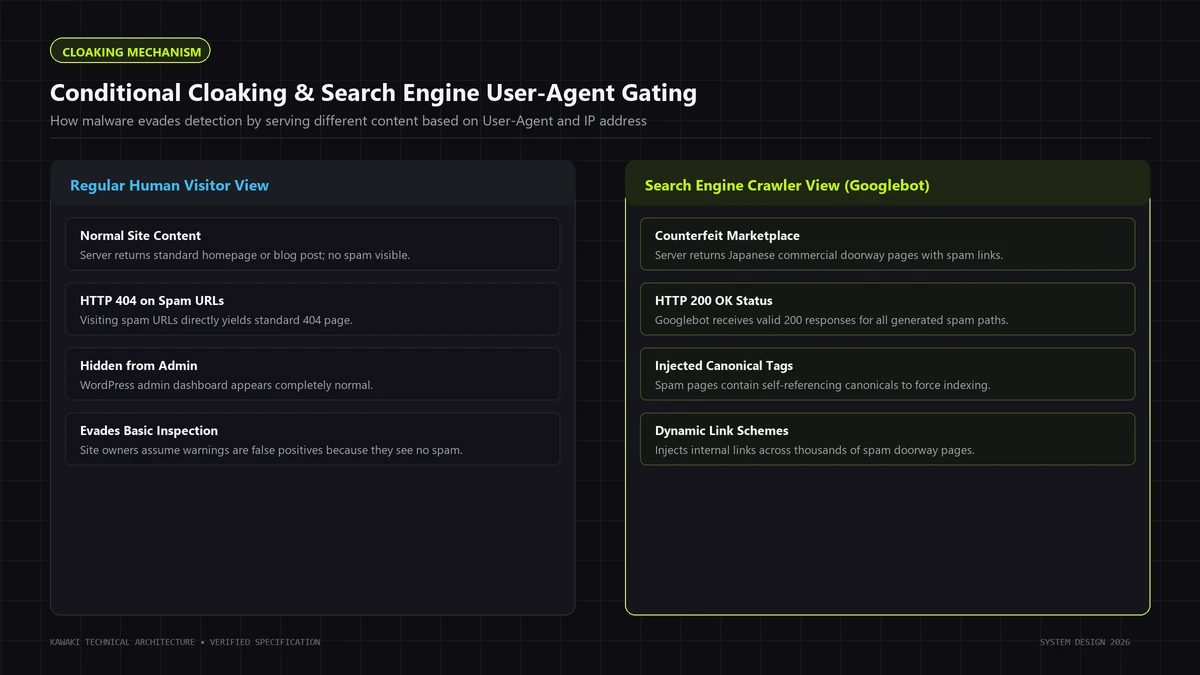
This occurs because attackers engineer conditional delivery mechanisms, commonly known in security and search engineering as cloaking.
How Server-Side Cloaking Works
Cloaking is the practice of delivering distinctly different content or status codes to search engine crawlers compared to standard human visitors. In a compromised WordPress environment, attackers accomplish this via PHP scripts or web server configuration rules that evaluate incoming request headers before rendering the page.
Incoming HTTP Request
       │
       ├── Evaluates HTTP_USER_AGENT
       │     ├─ Matches: "Googlebot", "Bingbot", "Googlebot-Mobile", "Yandex" ──► SERVE SPAM HTML
       │     └─ Does not match search crawler ───────────────────────────────────► CONTINUE CHECKS
       │
       ├── Evaluates HTTP_REFERER
       │     ├─ Matches: "google.com", "bing.com", "yahoo.co.jp" ───────────────► REDIRECT TO C2
       │     └─ Direct navigation or non-search referer ────────────────────────► SERVE LEGITIMATE SITE
       │
       └── Evaluates IP Range / Autonomous System Numbers (ASN)
             ├─ IP belongs to Google LLC (verified reverse DNS) ────────────────► SERVE SPAM HTML
             └─ Regular residential / commercial ISP ───────────────────────────► SERVE LEGITIMATE SITE
Key Cloaking Vectors
- User-Agent Discrimination: The malicious script checks
$_SERVER['HTTP_USER_AGENT']against a regex list of search crawlers:
If the User-Agent header matches a search engine bot, the script bypasses standard WordPress theme templates, outputs the malicious Japanese content payload, and terminates execution via// Conceptual pattern used by defensive analysts to detect cloaking logic $crawlers = ['googlebot', 'bingbot', 'slurp', 'duckduckbot', 'baiduspider', 'yandex'];exit;. If the user-agent is a standard desktop browser (Chrome, Safari, Firefox), the script remains dormant, allowing standard WordPress execution to proceed normally. - Referer-Based Trapping: If a human user actually clicks a spam result inside Google search, their browser sends an
HTTP_REFERERheader indicating they arrived fromgoogle.com. The malicious code intercepts this referer and executes a 302 temporary redirect to an external scam storefront or affiliate gateway. Conversely, if the site owner types their URL directly into the browser bar, the referer header is blank, and no redirect occurs. - Reverse DNS and IP Verification: Advanced malware strains maintain arrays of search engine IP blocks (or perform real-time reverse DNS lookups) to ensure they only expose spam payloads to authentic search engine bots, preventing automated security scanners running with fake user-agents from discovering the injection.
Because cloaking executes entirely on the server before HTML is transmitted to the client, browser-based inspection tools (such as viewing page source or inspecting elements in developer tools) will show completely clean code unless you explicitly simulate search engine crawler requests.
4. Common Technical Infection Surfaces
A forensic investigation requires examining all filesystem and database layers where attackers establish persistence. In WordPress, attackers rarely rely on a single injection point; they distribute multiple redundant loaders across disparate architectural components.
WORDPRESS INFECTION TAXONOMY
│
├── 1. WordPress Core Files
│     └── Modified wp-settings.php, index.php, wp-includes/load.php
│
├── 2. Themes (Active & Inactive)
│     └── Injected functions.php, header.php, obfuscated footers
│
├── 3. Third-Party Plugins
│     └── Vulnerable commercial plugins, outdated code, nulled extensions
│
├── 4. Database Persistence
│     └── wp_options (autoloaded transients), wp_posts, rogue wp_users
│
├── 5. File System & Uploads
│     └── Executable PHP scripts inside /wp-content/uploads/
│
├── 6. Web Server Configuration
│     └── Altered .htaccess, nginx.conf, rogue rewrite directives
│
├── 7. Scheduled Tasks & Drop-ins
│     └── Malicious wp-cron entries, /wp-content/mu-plugins/ backdoors
1. WordPress Core Files
Legitimate WordPress core files should never be manually modified. Attackers frequently alter files such as index.php, wp-settings.php, wp-load.php, or files deep within wp-includes/ (such as wp-includes/pluggable.php or wp-includes/post.php). They embed small obfuscated hooks (often utilizing base64_decode, gzinflate, or str_rot13) that load the primary spam payload from external storage or database records.
2. Themes (Active and Inactive)
Attackers frequently target theme files. A common persistence pattern is injecting malicious hooks into functions.php or the theme's header and footer files. Crucially, inactive themes left on the server provide ideal hiding locations; administrators rarely inspect abandoned themes, yet their PHP files remain directly executable via HTTP requests if directory permissions permit.
3. Plugins (Vulnerable, Outdated, or Abandoned)
Unpatched plugin vulnerabilities (such as unauthenticated Arbitrary File Upload, SQL Injection, or Remote Code Execution) represent the initial entry vector for over 85% of WordPress compromises. Once inside, attackers may patch a dummy script into legitimate plugins or create an entire fake plugin directory disguised as a caching or security tool (e.g., wp-content/plugins/wp-fast-cache/cache-tool.php).
4. Database Records
Persistence frequently resides directly within the MySQL database:
wp_optionsTable: Attackers store encoded PHP payloads or remote C2 endpoints inside autoloaded option names disguised as system transients (e.g.,_transient_rss_timeoutorwp_core_api_check). Every time WordPress boots, these autoloaded rows load into memory.wp_postsandwp_postmeta: Direct injection of thousands of published spam posts, often configured with random IDs or non-standard post types to avoid cluttering the primary administrative post list.wp_usersandwp_usermeta: Rogue user accounts created with administrative capabilities (administratorrole withwp_user_levelset to 10), allowing attackers to log in directly viawp-login.phpif file backdoors are erased.
5. Uploads Directory (wp-content/uploads/)
The WordPress uploads directory is designed to be writable by the web server process (www-data or nobody). Attackers exploit this write access by uploading PHP webshells disguised as image files (e.g., logo.jpg.php, thumb_banner.php, or .dotfile.php). If the web server is configured to execute PHP scripts inside the uploads directory, these files become autonomous execution vectors.
6. Web Server Configuration (.htaccess / Nginx Blocks)
Attackers frequently prepend malicious rewrite rules to the root .htaccess file. These rules intercept all 404 requests or requests matching specific URL patterns and route them to an obfuscated backdoor script, entirely bypassing the normal WordPress routing engine.
7. Must-Use Plugins (wp-content/mu-plugins/)
The mu-plugins (Must-Use Plugins) directory is an advanced WordPress feature: scripts placed here execute automatically on every page load and do not appear in the standard WordPress admin plugins list. Attackers frequently create a single drop-in loader (e.g., wp-content/mu-plugins/health-check.php) ensuring their malware executes even if all standard plugins are deactivated.
8. Scheduled Cron Tasks (wp-cron)
WordPress maintains an internal scheduled task runner (wp-cron.php). Attackers register recurring cron events that execute every few hours. If an administrator deletes the malicious PHP file from the server, the scheduled cron task fires, contacts the remote C2 repository, and re-downloads the malware, creating a continuous reinfection cycle.
5. Forensic Investigation Workflow
Remediating a Japanese Keyword Hack requires a systematic, phased forensic workflow. Attempting ad-hoc file deletions before understanding the full scope of the compromise almost always leads to immediate reinfection.
FORENSIC REMEDIATION SEQUENCE
─────────────────────────────────────────────────────────────────────────────
Phase 1: Triage & Evidence Preservation ──► Full backup (files + database)
Phase 2: Live Diagnostic Simulation    ──► Identify cloaking & status codes
Phase 3: File Integrity Verification    ──► Hash check core, themes, plugins
Phase 4: Database Sanitization         ──► Options, users, posts, transients
Phase 5: Cron & Hook Inspection        ──► Eradicate scheduled persistence
Phase 6: Web Server Hardening          ──► Restrict uploads execution & .htaccess
Phase 7: Search Index Cleanup          ──► Implement HTTP 410 & refresh sitemaps
Phase 8: Post-Recovery Validation      ──► Multi-vector integrity monitoring
─────────────────────────────────────────────────────────────────────────────
Phase 1: Preserve Evidence and Isolate the Environment
Before modifying or deleting any files:
- Take an Immediate Full Backup: Create an uncompressed, verbatim snapshot of the entire filesystem and a complete MySQL database dump using hosting tools or SSH:
Caution: Store this compromised snapshot in a secure, isolated offline environment for forensic analysis. Do not restore it to a live production server.# Safe diagnostic snapshot via terminal tar -czf site_snapshot_compromised.tar.gz /var/www/html/ mysqldump -u db_user -p db_name > database_compromised.sql - Inspect Server Access Logs: Check access logs for the exact timestamps when spam URLs were first crawled. Note the requesting IP addresses, user agents, and the specific script files that served the responses.
Phase 2: Confirm Active Cloaking via Diagnostic Requests
Simulate search engine crawler behavior in a controlled terminal session to confirm whether conditional cloaking is active. (See detailed instructions in Section 6).
Phase 3: Verify Core File Integrity via Cryptographic Hashes
WordPress.org maintains public MD5 and SHA-256 checksums for all official core releases. Using the official WP-CLI utility, you can instantly compare every core file on your server against pristine official binaries:
## Verify official WordPress core checksums (Read-only diagnostic)
wp core verify-checksums --allow-root
If core files have been modified, WP-CLI will output the exact filenames and line mismatches (e.g., File should not exist: wp-includes/wp-vhosts.php or File doesn't verify against checksum: wp-settings.php).
Phase 4: Audit Plugins and Themes Against Known Releases
Run checksum verifications across installed plugins:
## Verify plugin checksums against WordPress.org repository
wp plugin verify-checksums --all --allow-root
Note: Custom, commercial, or premium plugins not hosted on WordPress.org cannot be verified via automated checksums. These must be manually cross-referenced against original release packages obtained directly from verified vendors.
Phase 5: Database Forensic Audit
Query the MySQL database for unauthorized administrative users, suspicious options, and bulk injected posts:
-- Identify all users with administrative capabilities
SELECT u.ID, u.user_login, u.user_email, u.user_registered
FROM wp_users u
JOIN wp_usermeta m ON u.ID = m.user_id
WHERE m.meta_key = 'wp_capabilities' AND m.meta_value LIKE '%administrator%';

-- Search wp_options for suspicious autoloaded transients containing encoded payloads
SELECT option_id, option_name, LENGTH(option_value)
FROM wp_options
WHERE autoload = 'yes' AND (option_value LIKE '%eval(%' OR option_value LIKE '%base64_%')
ORDER BY LENGTH(option_value) DESC LIMIT 20;
Phase 6: Inspect Server Configuration and Hidden Drop-ins
Review the root .htaccess file, nginx.conf, wp-config.php, and check for the existence of wp-content/mu-plugins/.
6. Detecting Cloaking and Conditional Delivery
Because normal browser visits fail to reveal cloaked content, investigators must use controlled, command-line HTTP simulation tools to inspect raw server responses.
Testing Server Responses via curl
Using curl in a terminal allows you to manipulate request headers, simulating Googlebot, human search referrers, and clean desktop browsers while comparing response headers and HTML payloads.
Step 1: Normal Browser Request Simulation
Execute a baseline request mimicking a standard desktop user:
curl -I -s -A "Mozilla/5.0 (Windows NT 10.0; Win64; x64) AppleWebKit/537.36" https://www.yourdomain.com/suspect-url/
Observe the HTTP status code (e.g., 404 Not Found or 200 OK) and the content length.
Step 2: Googlebot Crawler Simulation
Execute the exact same URL request, but substitute the User-Agent header with official Googlebot strings:
## Simulate Desktop Googlebot
curl -I -s -A "Mozilla/5.0 (compatible; Googlebot/2.1; +http://www.google.com/bot.html)" https://www.yourdomain.com/suspect-url/

## Simulate Googlebot Smartphone
curl -I -s -A "Mozilla/5.0 (Linux; Android 6.0.1; Nexus 5X Build/MMB29P) AppleWebKit/537.36 (KHTML, like Gecko) Chrome/W.X.Y.Z Mobile Safari/537.36 (compatible; Googlebot/2.1; +http://www.google.com/bot.html)" https://www.yourdomain.com/suspect-url/
Step 3: Analyze the Discrepancy
Compare the headers returned in Step 1 vs Step 2:
- The Smoking Gun: If Step 1 returns
HTTP/1.1 404 Not Found(or standard theme HTML), but Step 2 returnsHTTP/1.1 200 OK(with headers likeContent-Type: text/html; charset=UTF-8and a differentContent-Length), conditional server-side cloaking is confirmed.
Step 4: Extract the Rendered Cloaked HTML Payload
To view the exact content served to Google without executing malicious scripts in your browser:
curl -s -A "Mozilla/5.0 (compatible; Googlebot/2.1; +http://www.google.com/bot.html)" https://www.yourdomain.com/suspect-url/ | head -n 40
Inspect the output. In a Japanese Keyword Hack, you will immediately see Japanese characters, <meta name="keywords"> arrays targeting commercial items, and hidden links linking to thousands of other doorways.
7. Finding Spam URLs: Building a Comprehensive Inventory
To remediate the search index, you must compile an exhaustive inventory of all generated spam URLs. Relying solely on manual Google searches is insufficient because search engines only display a small fraction of indexed pages.
Data Sources for URL Inventory Collection
┌────────────────────────────────────────────────────────┐
│               COMPREHENSIVE URL INVENTORY              │
└────────────────────────────────────────────────────────┘
        ▲                   ▲                   ▲
        │                   │                   │
┌───────┴───────┐   ┌───────┴───────┐   ┌───────┴───────┐
│ Google Search │   │ Server Access │   │   Database    │
│    Console    │   │     Logs      │   │    Queries    │
│ (Export 1000+ │   │ (Filter 200s  │   │ (wp_posts     │
│  indexed URLs)│   │  on Googlebot)│   │  doorway scan)│
└───────────────┘   └───────────────┘   └───────────────┘
- Google Search Console (Index Coverage / Pages Report):
- Navigate to Pages (or Index Coverage) in Google Search Console.
- Filter by "Indexed, not submitted in sitemap" or inspect pages categorized under "Discovered – currently not indexed".
- Export the complete table to CSV. This provides the exact list of URLs Google currently tracks.
- Server Access Log Pattern Extraction:
- Run command-line utilities across server logs to isolate all requests made by Googlebot that returned a
200 OKon non-standard paths:# Example: Extract URLs requested by Googlebot returning 200 OK grep "Googlebot" /var/log/nginx/access.log | grep " 200 " | awk '{print $7}' | sort -u > indexed_spam_candidates.txt
- Run command-line utilities across server logs to isolate all requests made by Googlebot that returned a
- Inspect Rogue Sitemap Files:
- Attackers frequently store their URL inventory directly on the server inside rogue XML sitemaps to ensure Google crawls them efficiently.
- Check your web root (
/var/www/html/or/public_html/) and/wp-content/uploads/for files named:sitemap_index_spam.xmlsitemap1.xml,sitemap2.xmlgooglesitemap.xml- Static text files ending in
.txtcontaining thousands of lines of URL paths.
- Google Search Operators:
- Perform advanced search queries on Google:
site:yourdomain.comsite:yourdomain.com inurl:itemsite:yourdomain.com inurl:shopsite:yourdomain.com -inurl:wp-content - Caution: Google search results cap visible pagination at a few hundred URLs. Use this for initial diagnostic confirmation, not exhaustive inventory building.
- Perform advanced search queries on Google:
8. Root-Cause Analysis: Symptoms vs. Root Causes vs. Remediation
The most common failure in WordPress malware removal is confusing symptoms with the root cause.
| Dimension | Definition | Typical Manifestation in Japanese Keyword Hack | Correct Action Required |
|---|---|---|---|
| Symptom | The visible external consequence of the compromise. | Thousands of Japanese spam pages appearing in Google SERPs. | Catalog URLs; configure HTTP 410 headers for clean deindexing. |
| Active Mechanism | The executable code generating the symptom. | Obfuscated PHP generator script hooked into .htaccess or template_redirect. |
Identify, trace, and eradicate the malicious scripts and database hooks. |
| Root Cause | The initial vulnerability that allowed the attacker entry. | Abandoned plugin with arbitrary file upload flaw, or stolen SFTP password. | Patch or remove vulnerable extension; rotate salts, hosting, and DB credentials. |
[VULNERABILITY: Root Cause]
Outdated Plugin / Weak Password / Insecure Host
       │
       ▼
[INTRUSION & PERSISTENCE: Active Mechanism]
PHP Webshell in uploads/ + Hook in wp-settings.php
       │
       ▼
[EXPLOITATION: Active Mechanism]
Dynamic Japanese Content Generator + Cloaking Engine
       │
       ▼
[INDEXATION: Symptom]
Google indexes 10,000 spam URLs in SERPs
Critical Takeaway: Deleting the indexed spam URLs or configuring 410 status codes treats only the Symptom. If you do not isolate the Active Mechanism and seal the Root Cause, the attacker's script will regenerate the spam pages within hours, rendering your cleanup efforts useless.
9. How to Remove Malicious Content Systematically
Eradicating a Japanese Keyword Hack requires a coordinated, step-by-step restoration of system integrity.
1. Place the Site into Controlled Maintenance
Temporarily prevent public traffic and search bots from interacting with compromised scripts while repairs are underway. This stops ongoing spam delivery and prevents the infection from logging secondary credentials:
## Enable WordPress native maintenance mode via WP-CLI
wp maintenance-mode activate
2. Replace WordPress Core Files with Pristine Releases
Do not attempt to manually edit compromised core files. Replace the entire core file structure (excluding wp-config.php and wp-content/):
## Reinstall pristine WordPress core files cleanly
wp core download --version=$(wp core version) --force --skip-content
Note: Verify that index.php in the root directory and wp-config.php do not contain unauthorized obfuscated code before proceeding.
3. Replace Plugins and Themes from Authoritative Sources
- Delete and Reinstall Plugins: Do not rely on "cleaning" plugin files. Completely remove all third-party plugins in
wp-content/plugins/and reinstall fresh copies directly from WordPress.org or verified commercial developers. - Audit Active Theme: Reinstall the active theme from the original source. If custom code was developed in-house, compare the theme directory line-by-line against your offline Git version control repository to isolate injected code.
- Delete Unused Themes: Delete all inactive default themes (
twentytwenty,twentytwentyone, etc.). Every unused theme is an unmonitored attack surface.
4. Sanitize the Database
- Audit Users: Delete all unauthorized accounts from
wp_usersandwp_usermeta. - Clean Injected Posts: If the malware created physical posts, run SQL queries to remove posts matching the spam pattern, along with orphaned postmeta and term relationships:
-- Example: Remove spam posts by post_type or date range (Ensure backup exists first!) DELETE FROM wp_postmeta WHERE post_id IN (SELECT ID FROM wp_posts WHERE post_type = 'spam_type'); DELETE FROM wp_posts WHERE post_type = 'spam_type'; - Sanitize
wp_options: Search for and delete rogue options identified in your Phase 5 forensic audit.
5. Inspect and Lockdown wp-content/uploads/
Scan the uploads directory for any file ending in .php, .phtml, .php5, .suspected, or hidden dotfiles (.ico files that are actually PHP scripts):
## Find any executable scripts inside the uploads directory
find /var/www/html/wp-content/uploads/ -type f -name "*.php*"
Delete any executable files found. Legitimate media uploads (images, PDFs, videos) never require executable PHP extensions.
6. Review .htaccess and Server Configurations
Replace .htaccess with the standard, clean WordPress configuration:
## BEGIN WordPress
RewriteEngine On
RewriteRule .* - [E=HTTP_AUTHORIZATION:%{HTTP:Authorization}]
RewriteBase /
RewriteRule ^index\.php$ - [L]
RewriteCond %{REQUEST_FILENAME} !-f
RewriteCond %{REQUEST_FILENAME} !-d
RewriteRule . /index.php [L]
## END WordPress
7. Rotate All Authentication Salts and Passwords
Even if you remove every malicious file, the attacker may hold active administrator session cookies or direct database credentials.
- Rotate Security Keys & Salts: Generate fresh salts from the official WordPress API (
https://api.wordpress.org/secret-key/1.1/salt/) and replace the keys inwp-config.php. This instantly invalidates all existing user cookies and active sessions across the web. - Change Passwords: Reset database user passwords, hosting control panel credentials, SFTP/SSH passwords, and all WordPress administrator passwords.
10. HTTP 404 vs. HTTP 410 for Hacked Spam URLs
Once the malicious generator is removed from the server, any request for a spam URL will no longer be handled by the malware. Now, the web server must return an explicit HTTP status code to inform search engine crawlers that the resource is gone.
The industry frequently debates whether to return HTTP 404 Not Found or HTTP 410 Gone. Understanding the technical and operational distinction between these two status codes is critical for effective SEO recovery.
Technical Comparison: HTTP 404 vs. HTTP 410
| Attribute | HTTP 404 Not Found | HTTP 410 Gone |
|---|---|---|
| RFC 9110 Semantic Meaning | The origin server did not find a current representation for the target resource. May be temporary. | The target resource is no longer available at the origin server and this condition is likely to be permanent. |
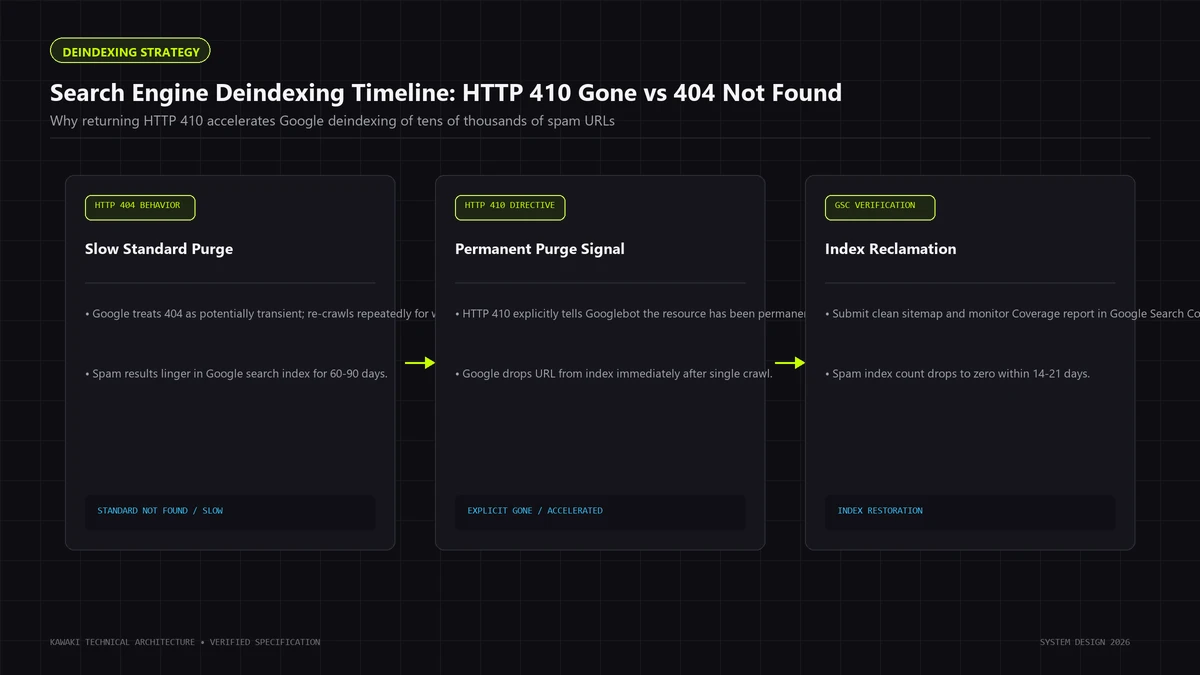
| Googlebot Crawl Treatment | Googlebot logs a 404 and typically re-tests the URL multiple times over subsequent days or weeks to ensure it was not a temporary misconfiguration. | Googlebot recognizes the resource is intentionally and permanently deleted. It often purges the URL from the primary index faster than with a 404. |
| Handling of Inbound Links | Crawlers may periodically re-check the URL if external backlinks continue pointing to it. | Crawlers treat external links as pointing to an intentionally retired resource, accelerating link equity depreciation. |
| Server Configuration | Native default behavior for non-existent paths across WordPress and Apache/Nginx. | Requires explicit server configuration (via .htaccess, Nginx map, or specialized security drop-in). |
| Risk of Misconfiguration | Low. Legitimate missing files naturally return 404. | High if misapplied. If legitimate company URLs accidentally return 410, they will be swiftly deindexed. |
Practical Guidance for WordPress Spam Deindexing
Google Search Central documentation and public statements from Google's search relations team confirm that both 404 and 410 ultimately achieve the exact same outcome: the URL is removed from the Google search index.
However, for a site recovering from thousands of Japanese spam URLs:
- HTTP 410 is Preferred for Known Spam Inventories: Returning
410 Gonesends an unambiguous, definitive signal to search engine crawlers that the page was intentionally destroyed and should not be re-crawled repeatedly. - Standard 404 is Completely Acceptable as a Baseline: If your server environment makes configuring custom 410 rules technically complex, standard
404 Not Foundresponses will successfully deindex the spam pages over time. - Never Return 200 OK or 301 Redirect to Homepage:
- Do NOT redirect spam URLs to your homepage: This creates a massive Soft 404 penalty and confuses search crawlers regarding your site's topical relevance.
- Do NOT use
noindexheaders on deleted pages: Returning anoindextag requires the server to return a200 OKstatus, forcing Google to download the full HTML page just to read the robots tag. Returning 404 or 410 terminates processing immediately and saves server resources.
Implementing HTTP 410 via .htaccess (Example)
If your spam URLs share a distinct prefix or query signature (e.g., /item- or /goods/), you can return an immediate 410 status code at the web server layer before WordPress even boots:
## Return HTTP 410 Gone for known legacy spam patterns
<IfModule mod_rewrite.c>
RewriteEngine On
RewriteRule ^goods/ - [G,L]
RewriteRule ^item-([0-9]+)\.html$ - [G,L]
RewriteRule ^shop_list/ - [G,L]
</IfModule>
Note: The [G] flag instructs Apache to deliver an immediate HTTP 410 Gone response. Always verify rewrite rules in a staging environment to ensure no legitimate customer or marketing URLs are impacted.
11. Search Console and Reindexing After Cleanup
Once malicious code is eradicated and correct 404/410 status codes are verified, you must manage search engine reconciliation through Google Search Console.
The Post-Cleanup Search Console Workflow
┌────────────────────────────────────────────────────────┐
│               SEARCH CONSOLE RECOVERY FLOW             │
└────────────────────────────────────────────────────────┘
                           │
       1. Request Security Review (If Flagged)
          └─ Provide concise forensic summary of code removal
                           │
       2. Submit Clean XML Sitemaps
          └─ Contains ONLY pristine, legitimate canonical URLs
                           │
       3. Inspect Sample Spam URLs (URL Inspection Tool)
          └─ Verify Googlebot sees 404 / 410 Gone
                           │
       4. Monitor Index Coverage Over Time
          └─ Observe gradual transition from "Indexed" to "Not Found (404/410)"
- Request a Security Review (If Flagged with Manual Action):
- If Google Search Console displays a red security warning ("Hacked with spam"), navigate to Security Issues and click Request Review.
- Provide a concise, professional explanation detailing the remediation:
"The site experienced an unauthorized content injection via a compromised third-party plugin. We have restored clean core files, removed all unauthorized PHP scripts and backdoors, sanitized the database, rotated all security keys and passwords, and verified that all injected spam URLs now return HTTP 410 Gone. Please review the environment."
- Avoid emotional appeals or vague statements. Google reviewers require technical confirmation that the vulnerability is closed.
- Submit Clean XML Sitemaps:
- Ensure your SEO plugin (or static sitemap generator) contains only legitimate canonical URLs.
- Resubmit the primary sitemap (
sitemap.xml) in Google Search Console to encourage Googlebot to prioritize your authentic pages.
- Use the Removals Tool Selectively (Temporary Hiding):
- The Removals tool in Search Console only temporarily hides search results for approximately 6 months; it does not permanently deindex pages.
- If a few high-profile spam URLs appear prominently for your brand name search, you may use the Removals tool to hide them immediately while Googlebot processes the underlying 410 status codes.
- Realistic Deindexing Timelines:
- Deindexing is not instantaneous. Search engines operate on crawl schedules governed by your domain's crawl budget. If an attack generated 50,000 spam URLs, it may take several weeks or months for Googlebot to re-crawl every URL, confirm the 404/410 status, and remove it from the index.
- Do not panic if Search Console reports thousands of 404 errors under "Not Indexed". This is the desired outcome; it confirms Google is discovering that the spam pages are gone.
12. How to Validate That the Site Is Actually Clean
A website cannot be considered clean simply because the homepage renders properly. A comprehensive forensic validation framework requires verifying every layer of the technology stack.
Forensic Validation Checklist
VECTOR                VALIDATION METHOD                                    STATUS
─────────────────────────────────────────────────────────────────────────────────
1. Core Integrity     wp core verify-checksums returns zero errors          [ ]
2. Plugin Hashes      wp plugin verify-checksums matches official repo      [ ]
3. File System        No unknown .php files inside /wp-content/uploads/    [ ]
4. Database Users     Zero unauthorized administrators in wp_users          [ ]
5. Autoload Records   wp_options scanned for encoded eval/base64 strings    [ ]
6. Cron Schedule      wp cron event list contains only known tasks          [ ]
7. Drop-ins           wp-content/mu-plugins inspected and verified          [ ]
8. Web Server         .htaccess matches standard WordPress rewrite rules    [ ]
9. Crawler Test       curl request with Googlebot UA returns clean HTML/410 [ ]
10. Live Logs         Server access logs show no recurring C2 pingbacks     [ ]
─────────────────────────────────────────────────────────────────────────────────
Reproducing the Attack Simulation
Execute your curl tests against multiple previously infected URLs using both mobile and desktop Googlebot user-agents. If any request returns a 200 OK with unexpected content or redirects to an external domain, residual malware remains active.
13. Common Failed Cleanup Approaches
Many website owners endure recurring reinfections because they rely on intuitive but technically flawed cleanup shortcuts.
11 Remediation Anti-Patterns to Avoid
- Deleting Visible Posts While Leaving the Loader Active: Removing spam posts from the WordPress admin without deleting the underlying backdoor script results in the malware regenerating all posts within 24 hours.
- Restoring an Uninspected Backup: Restoring a backup from two weeks ago often fails because attackers typically plant dormant backdoors weeks or months before triggering visible spam generation. Restoring the backup simply restores the dormant backdoor.
- Blocking Googlebot via
robots.txt: AddingDisallow: /or disallowing spam directories inrobots.txtprevents Googlebot from crawling the URLs. Consequently, Googlebot cannot see the 404/410 status codes, leaving the spam snippets frozen in Google search results indefinitely. - Using
noindexWithout Removing the Malware: Adding meta noindex tags requires the server to continue hosting and executing the attacker's payload. - Changing Passwords Without Eradicating Webshells: Changing your WordPress admin password has zero effect on standalone PHP webshells uploaded to the filesystem, which operate independently of WordPress authentication.
- Relying Exclusively on Automated "One-Click" Security Plugins: Automated scanner plugins look for known signature patterns. Custom obfuscation, dynamic database hooks, and environmental rewrites frequently bypass automated scanners entirely.
- Redirecting All Spam URLs to the Homepage (301 Catch-All): Redirecting thousands of dead spam URLs to your homepage destroys your domain's topical authority, triggers Soft 404 penalties, and confuses search algorithms.
- Deleting
.htaccessand Forgetting Nginx Configurations: On servers running Nginx as a reverse proxy, rewrite rules and header injections may reside inside/etc/nginx/conf.d/rather than.htaccess. - Manually Submitting Every URL to Google: Submitting thousands of URLs manually through the GSC URL Inspection tool is impossible due to daily quota limits. Rely on XML sitemaps and natural crawler discovery of 410 headers.
- Ignoring Inactive Themes and Plugins: Leaving disabled plugins on the server leaves their executable PHP files exposed to the internet.
- Assuming HTTP 410 Produces Instant Deindexing: Expecting Google to deindex 20,000 URLs in 24 hours leads to premature panic. Search engines must allocate crawl budget over time to retire URLs.
14. Prevention After Recovery: Hardening the Environment
Once recovery is verified, implement defensive hardening measures to ensure the vulnerability that permitted the initial intrusion is permanently closed.
1. Enforce Web Server Execution Restrictions
The single most effective defense against recurring WordPress malware is configuring the web server to refuse to execute PHP files located inside the uploads directory.
For Nginx Servers:
## Deny direct PHP execution inside uploads and wp-includes
location ~* ^/(?:wp-content/uploads|wp-includes)/.*\.php$ {
    deny all;
    internal;
}
For Apache Servers (/wp-content/uploads/.htaccess):
<Files *.php>
deny from all
</Files>
2. Disable the Native WordPress File Editor
Prevent compromised administrative accounts from directly modifying theme and plugin code from the WordPress dashboard by adding this directive to wp-config.php:
// Disable file editing in wp-admin
define('DISALLOW_FILE_EDIT', true);
3. Implement Strict Least-Privilege Access and 2FA
- Enforce multi-factor authentication (2FA) for all user accounts with
EditororAdministratorprivileges. - Audit SFTP and SSH keys; remove obsolete developer accounts.
- Ensure database users possess only necessary DML permissions (
SELECT,INSERT,UPDATE,DELETE) and restrict DDL operations (DROP,ALTER) where application architecture allows.
4. Deploy Web Application Firewalls (WAF)
Deploy a reverse-proxy or DNS-level WAF (such as Cloudflare Enterprise or AWS WAF) with managed OWASP rulesets to filter malicious payloads, block known vulnerability exploits, and throttle automated brute-force attacks before requests reach your web server.
5. Architectural Upgrade to Modern Content Platforms
For enterprise organizations where legacy WordPress plugin dependencies repeatedly introduce security vulnerabilities, consider decoupling your content layer. Migrating presentation layers to modern static and serverless architectures (such as Next.js frontends powered by headless CMS backends) completely isolates customer-facing visitors from database execution, eliminating PHP-based SEO spam vulnerabilities by design.
15. When to Use Professional WordPress Malware Remediation
While minor infections can occasionally be cleaned using command-line checksum tools and database queries, certain compromise scenarios demand specialized incident response engineering.
Criteria Requiring Senior Security Intervention
- Persistent Reinfection Loops: The site is cleaned, but identical Japanese spam URLs or new administrative accounts reappear within 24 to 72 hours, indicating an unidentified root backdoor or rogue cron process.
- Server-Level / Multi-Tenant Lateral Movement: If your WordPress site shares a hosting server or cPanel account with other websites, malware can spread laterally across account directories via symlinks. Cleaning one site is futile if the neighboring account remains compromised.
- Complex Polymorphic Webshells: Attackers have deployed deeply obfuscated, multi-tiered loaders that evade automated scanners and dynamically reassemble payloads in memory.
- Severe Domain Blacklisting and Deindexing: Search engines have placed red warning interstitial screens ("Deceptive site ahead"), hosting providers have suspended server execution, or Google Search Console has issued formal manual penalties.
- Core Business Disruption: E-commerce transactions, user authentication, or enterprise lead flows are directly compromised, requiring guaranteed chain-of-custody forensic investigation.
If your organization is dealing with a severe or recurring compromise, explore our specialized engineering services:
- WordPress Malware Removal & Security Recovery: Forensic investigation, complete backdoor extraction, database sanitization, and security review coordination.
- WordPress SEO Spam Removal: Specialized eradication of Japanese keyword hacks, doorway scripts, rogue sitemaps, and search index poisoning.
- WordPress Backdoor Removal: Deep filesystem analysis, checksum verification, and eradication of persistent stealth access vectors. For in-depth forensic indicators and obfuscation decoding, consult our guide to WordPress Backdoors & Stealth Web Shells.
- WordPress Malicious Redirect Removal: Forensic investigation of conditional
.htaccesshijacks, injected JavaScript event listeners, and mobile-only traffic redirection. For complete diagnostic triage, read our guide on WordPress Malicious Redirects: Forensic Investigation & Remediation. - Website Security Hardening: Zero-trust server configurations, PHP execution lockdowns, and proactive security architecture.
16. Japanese Keyword Hack Remediation Checklist
Keep this operational checklist accessible during incident triage:
Phase 1: DETECT
- Verify symptoms via
site:yourdomain.comqueries on Google. - Export full list of affected URLs from Google Search Console Pages report.
- Check GSC Security Issues for formal manual action notices.
- Inspect server access logs for anomalous Googlebot traffic patterns.
Phase 2: INVESTIGATE
- Execute
curltests with Googlebot user-agent to confirm conditional cloaking. - Run
wp core verify-checksumsto identify modified core files. - Run
wp plugin verify-checksumsacross all repository plugins. - Query
wp_usersandwp_usermetafor unauthorized administrators. - Inspect
wp_optionsfor large, autoloaded transients containing encoded code. - Check
wp-content/mu-plugins/and active cron jobs (wp cron event list).
Phase 3: ERADICATE
- Take an offline diagnostic backup of files and database for evidence.
- Activate WordPress maintenance mode (
wp maintenance-mode activate). - Replace all WordPress core files with pristine official binaries.
- Delete and cleanly reinstall all plugins from official repositories.
- Reinstall or git-diff the active theme; delete all inactive themes.
- Delete all non-image executable files from
wp-content/uploads/. - Purge unauthorized database users, options, and injected posts.
- Restore default
.htaccessrewrite rules. - Rotate security salts in
wp-config.phpand reset all account passwords.
Phase 4: VALIDATE
- Re-run core and plugin checksum verifications.
- Repeat
curlsimulation to confirm suspect URLs no longer serve spam or cloaked HTML. - Confirm that non-existent spam URLs return HTTP 404 or HTTP 410.
- Deactivate maintenance mode.
Phase 5: RECOVER
- Submit security review request in Google Search Console (if manual action flagged).
- Resubmit clean XML sitemaps containing only authentic canonical URLs.
- Configure web server HTTP 410 rules for known spam path signatures.
- Monitor GSC Index Coverage reports weekly to track deindexing progression.
Phase 6: HARDEN & MONITOR
- Block PHP execution inside
/wp-content/uploads/at web server level. - Add
define('DISALLOW_FILE_EDIT', true);towp-config.php. - Implement two-factor authentication (2FA) for all administrative roles.
- Schedule regular WordPress Security Audits and file integrity monitoring.
17. Frequently Asked Questions
What is the Japanese Keyword Hack in WordPress?
The Japanese Keyword Hack is a search engine poisoning attack where intruders exploit an application or server vulnerability to inject scripts that dynamically generate thousands of spam pages targeting Japanese commercial search terms. It typically uses server-side cloaking to show spam to search engine crawlers while hiding it from ordinary site visitors.
Why are Japanese spam pages appearing on my website?
Japanese spam appears because an attacker gained unauthorized access to your WordPress environment—most commonly through an unpatched plugin, a stolen password, or an existing backdoor. The attacker injected automated code that dynamically generates commercial spam pages to exploit your site's domain authority on search engines.
Can a WordPress site look completely normal while still being hacked?
Yes. Attackers frequently implement server-side cloaking, checking the visitor's HTTP User-Agent and Referer headers. If a human visits the site directly, the server renders the authentic company website. If Googlebot or Bingbot visits, the server returns the spam payload.
How do I find Japanese spam URLs on my WordPress site?
You can discover spam URLs by checking the Pages and Security Issues reports in Google Search Console, inspecting server access logs for Googlebot requests returning 200 OK on unfamiliar paths, reviewing rogue XML sitemaps, and performing site:yourdomain.com searches on Google.
Does deleting the spam pages fix the hack?
No. Deleting the visible spam pages or posts only addresses the symptom. If the underlying vulnerability (such as a compromised plugin or persistent PHP backdoor) is not identified and eradicated, the malicious script will simply regenerate the spam pages automatically.
Should hacked spam URLs return HTTP 404 or HTTP 410?
Both HTTP 404 (Not Found) and HTTP 410 (Gone) will permanently deindex pages in Google Search over time. However, HTTP 410 Gone is preferred for known spam inventories because it sends an explicit, permanent signal to crawlers that the page was intentionally destroyed, which can expedite deindexing and reduce repetitive re-crawling.
How does cloaking make WordPress spam harder to detect?
Cloaking hides malicious content from standard browser sessions by evaluating incoming HTTP request headers on the server. Because the script serves legitimate theme HTML to regular human visitors and restricts spam payloads exclusively to search crawlers, site owners often remain unaware of the compromise until Google Search Console issues a security alert.
Why did Google index pages that I cannot find on my server?
Attackers frequently use virtual dynamic routing rather than generating physical files on disk. The malware intercepts web server requests via .htaccess or WordPress routing hooks, dynamically rendering spam content on the fly. Because no physical HTML files exist on your server, standard file searches cannot locate them.
Can a malware cleanup remove the spam from Google immediately?
No. While security cleanup can instantly stop your server from serving spam, search engine deindexing depends on Google's crawl budget and re-crawl frequency. It typically takes several weeks for Googlebot to re-crawl thousands of affected URLs, register the 404/410 status codes, and retire them from the search index.
How do I prevent Japanese SEO spam from returning?
Prevent reinfection by disabling PHP execution in the /wp-content/uploads/ directory, maintaining updated plugins and themes, enforcing two-factor authentication, rotating all database and salt credentials, implementing a Web Application Firewall (WAF), and establishing continuous file integrity monitoring.
18. Conclusion: Remediation as an Engineering Discipline
The Japanese Keyword Hack is not fundamentally a content problem or an SEO glitch; it is an infrastructure and application integrity failure that manifests visibly through search engine indexes.
Attempting to resolve search engine poisoning by submitting URL removal requests or deleting surface posts will never yield lasting recovery. Sustainable remediation requires following a disciplined engineering sequence:
$$\text{Triage & Isolate} \longrightarrow \text{Detect Cloaking} \longrightarrow \text{Eradicate Root-Cause Persistence} \longrightarrow \text{Validate Clean State} \longrightarrow \text{Enforce HTTP 410} \longrightarrow \text{Harden Architecture}$$
By methodically verifying core checksums, purging database transients, locking down web server execution permissions, and serving unambiguous HTTP 410 signals to search crawlers, your organization can successfully reclaim its domain authority and protect its digital reputation.
If your team requires senior incident response or architectural security hardening:
- Explore our dedicated WordPress SEO Spam Removal Service
- Learn about our complete WordPress Malware Removal & Security Recovery capabilities
- Discover proactive infrastructure protection with Website Security Hardening
- Review our engineering philosophy across All Studio Services or Schedule an Architectural Briefing with Kawaki Studios.
Need Help Engineering Your Web Platform or AI Systems?
From high-performance Next.js architectures to headless Shopify storefronts, custom AI automations, and enterprise WordPress security recovery, Kawaki Studios designs resilient digital infrastructure built to scale.