
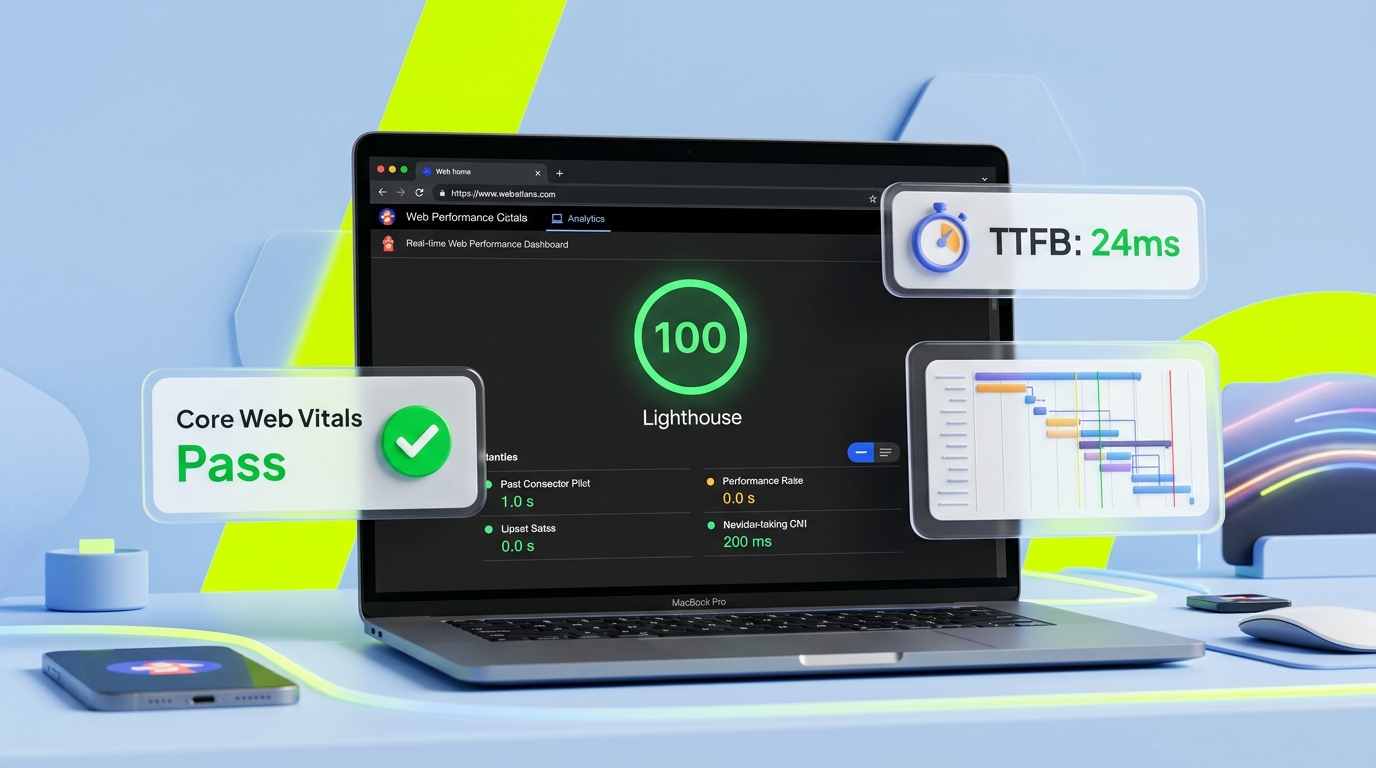
Executive Summary / Key Takeaways
An architectural guide to Next.js performance. Learn how rendering models, JavaScript bundle budgets, next/image, next/font, and caching affect Core Web Vitals.
- Leverages Incremental Static Regeneration (ISR) and streaming SSR to deliver instant first paints.
- Granular bundle splitting and dynamic imports minimize main-thread execution time.
- Optimizes Core Web Vitals (LCP < 1.2s, CLS = 0, INP < 100ms) on real-world mobile network profiles.
In modern full-stack web engineering, performance is rarely a matter of superficial polish. Minifying stylesheets, compressing JPEG banners, and deferring analytics tags are necessary maintenance tasks, but they cannot rescue an application whose underlying architecture is fundamentally flawed.
In our first two architectural resources, we examined the foundational mechanics of the Next.js App Router:
- Next.js Server vs Client Components established that the component boundary is fundamentally a network serialization boundary.
- State Management & API Boundaries in Next.js demonstrated how state ownership and data flow determine where computation occurs.
This resource explains how Next.js architecture influences rendering, JavaScript delivery, asset loading, and Core Web Vitals.
When engineering web platforms at Kawaki Studios, we treat performance not as a post-launch audit checklist, but as a system of physical constraints: network bandwidth, device memory, CPU execution time, and browser layout engines. In this guide, we break down how to design Next.js architectures that systematically satisfy Google's Core Web Vitals—Largest Contentful Paint (LCP), Interaction to Next Paint (INP), and Cumulative Layout Shift (CLS)—without sacrificing visual expressiveness or feature complexity.
1. The Performance Geometry of Next.js
Too many engineering teams approach web performance through isolated metrics. They run a Lighthouse audit, see an amber LCP score, and arbitrarily add fetchpriority="high" to an image, only to find their Interaction to Next Paint (INP) regresses on mobile devices.
Performance in Next.js is governed by a connected chain of dependencies:
┌─────────────────────────┐     ┌─────────────────────────┐     ┌─────────────────────────┐
│  Component Boundaries   │ ──► │     Data Flow & APIs    │ ──► │    Runtime Physics      │
│  (Server vs Client)     │     │  (Direct DB vs Network) │     │ (Parse, Hydrate, Paint) │
└─────────────────────────┘     └─────────────────────────┘     └─────────────────────────┘
            │                               │                               │
            ▼                               ▼                               ▼
   Zero Client JS for              Eliminates Loopback             Determines Real-World
   Server Subtrees                 Network Waterfalls              LCP, INP, and CLS
If you place a 'use client' directive at the root of a page layout, you force that component and every library it imports into the browser's JavaScript bundle. That bundle must be downloaded over the user's network, decompressed, parsed by the V8 or JavaScriptCore engine, compiled to bytecode, and executed during hydration. Even if your server responds quickly, the visitor's mobile CPU remains locked, degrading INP and delaying interactive readiness.
Architectural performance means making conscious trade-offs at each layer: deciding what renders statically at build time, what streams dynamically from the edge, what executes exclusively on the server, and what minimal JavaScript crosses the wire to hydrate interactive UI controls.
2. Rendering Paradigms & Execution Budgets
The Next.js App Router provides multiple rendering strategies. Selecting the appropriate paradigm for each route segment is the single most consequential architectural decision for initial page responsiveness.
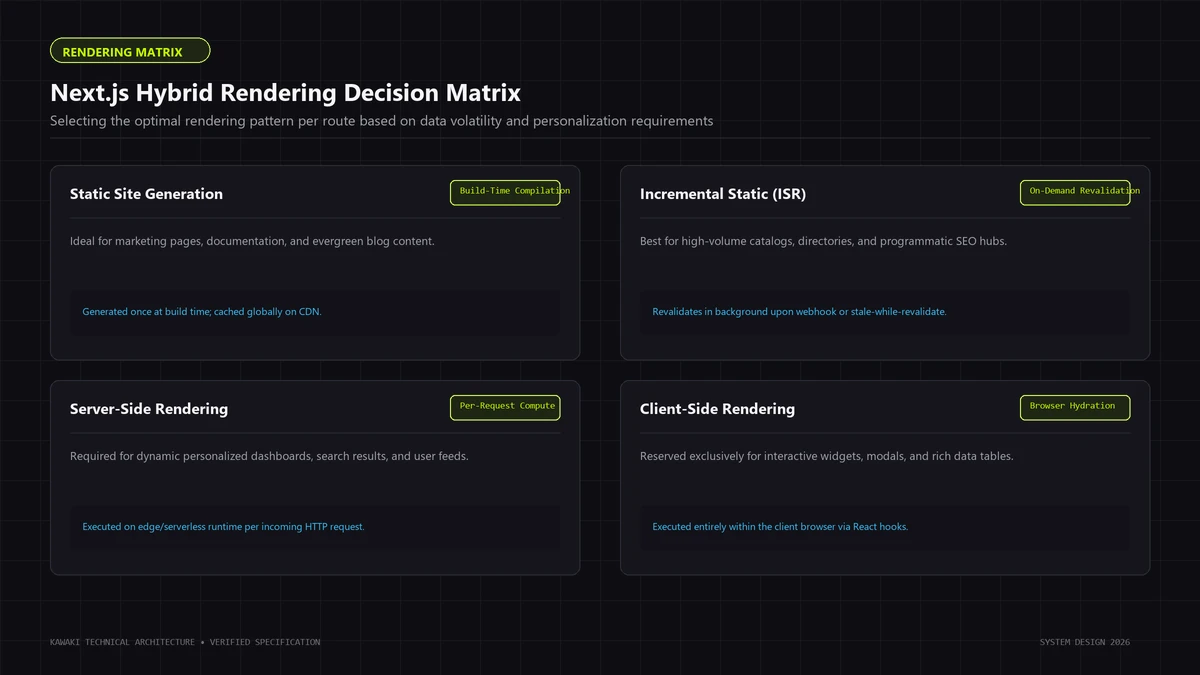
The Modern Rendering Spectrum
Static Prerendering (Build-Time / Edge-Cached):
- The route HTML is generated ahead of time and served directly from an edge CDN.
- Performance Profile: Delivers optimal Time to First Byte (TTFB) and First Contentful Paint (FCP) because no backend computation occurs during the request.
- Best Fit: Marketing pages, documentation, editorial essays, and public catalog indexes.
Dynamic Server Rendering:
- The server evaluates the request, reads cookies or headers, executes database queries, and renders HTML on-demand for every visitor.
- Performance Profile: TTFB depends directly on database query latency and server execution time. Without caching, dynamic rendering over slow networks can delay LCP.
- Best Fit: Highly personalized account dashboards, checkout flows, and real-time administrative interfaces.
Streaming with Suspense:
- The server streams an initial HTML shell immediately, allowing the browser to begin parsing styles and loading fonts. Slower data queries wrapped in
<Suspense>stream into the DOM as chunks as they resolve. - Performance Profile: Drastically reduces perceived loading time and initial TTFB, but requires careful layout reservation to prevent visual shifts when dynamic chunks arrive.
- The server streams an initial HTML shell immediately, allowing the browser to begin parsing styles and loading fonts. Slower data queries wrapped in
Cache Components & Partial Prerendering (PPR):
- Current Next.js releases introduce the Cache Components model powered by
use cache, alongside Partial Prerendering (PPR). - In this model, static layout shells and navigational chrome are prerendered and served instantly from the cache, while dynamic holes within the page are streamed concurrently over the same HTTP connection.
- Furthermore, modern Next.js client routers leverage partial prefetching, fetching static layout segments in the background so client-side navigation feels instantaneous.
- Current Next.js releases introduce the Cache Components model powered by
// app/dashboard/page.tsx (Modern Streaming with Suspense)
import { Suspense } from 'react';
import StaticDashboardHeader from './StaticDashboardHeader';
import MetricsGridSkeleton from './MetricsGridSkeleton';
import DynamicMetricsGrid from './DynamicMetricsGrid';

export default function DashboardPage() {
  return (
    <main>
      {/* 1. Static shell renders and streams immediately */}
      <StaticDashboardHeader />

      {/* 2. Dynamic database query streamed in parallel */}
      <Suspense fallback={<MetricsGridSkeleton />}>
        <DynamicMetricsGrid />
      </Suspense>
    </main>
  );
}
Execution Budgets by Metric:
- TTFB Target: Aim for under 200ms on static or cached routes. Dynamic routes should target under 600ms, recognizing that actual TTFB varies based on geographic distance, cache state, network quality, and backend database load.
- FCP Target: Under 1.0s on median 4G mobile connections.
- LCP Target: Under 2.5s (Google's "Good" threshold), with ambitious performance architectures targeting under 1.2s.
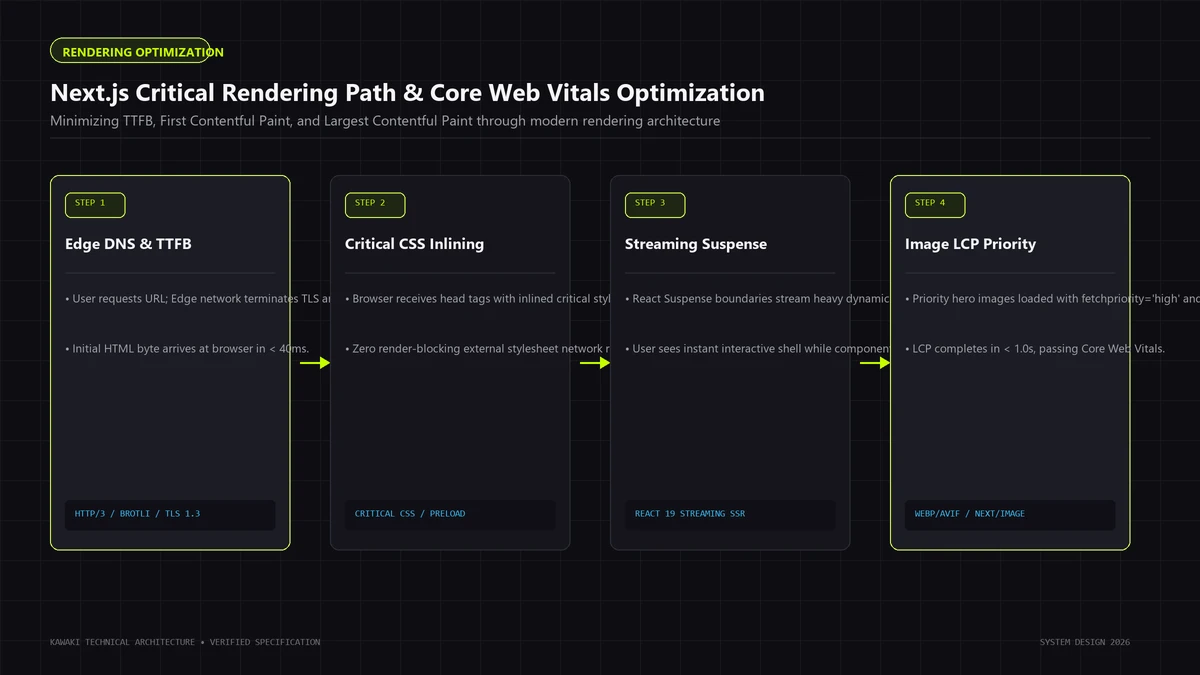
3. JavaScript Payload & Hydration Economics
In web development, byte-for-byte, JavaScript is significantly more expensive than HTML, CSS, or images.
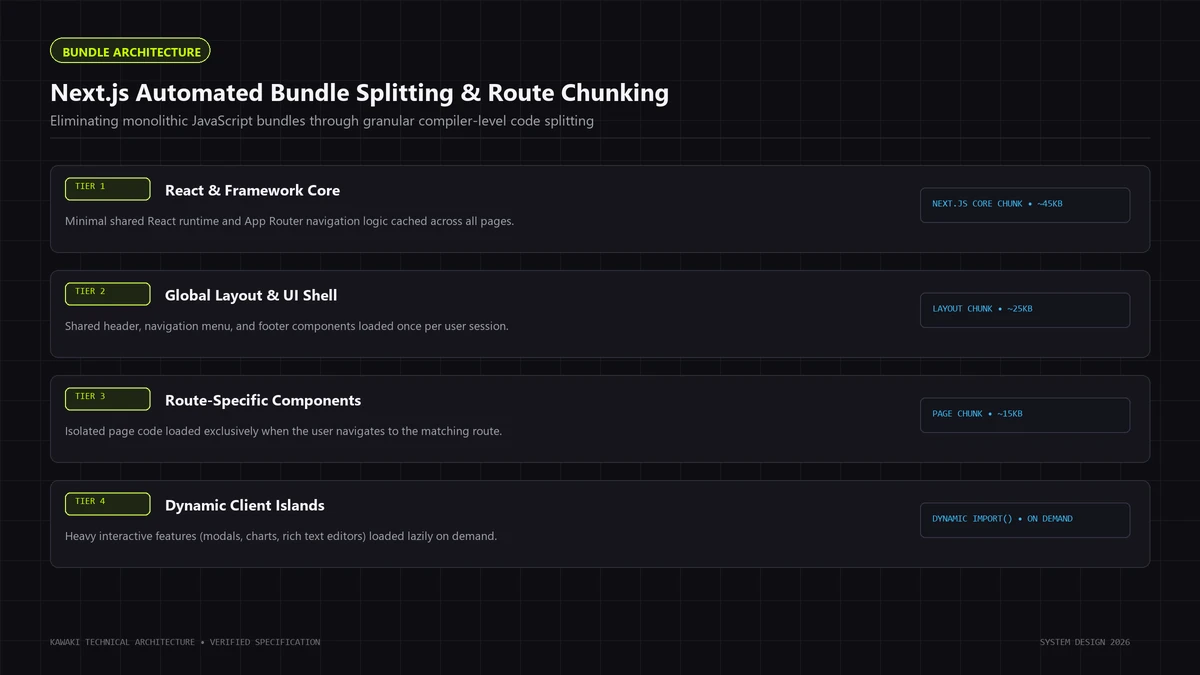
While a 200KB WebP image is decoded off the main thread with minimal CPU overhead, a 200KB JavaScript bundle must be:
- Downloaded over the network.
- Decompressed and parsed into an Abstract Syntax Tree (AST).
- Compiled into machine code.
- Executed on the browser's main thread to attach event listeners and initialize state stores (Hydration).
On low-tier or mid-tier mobile devices, evaluating 300KB of JavaScript can freeze the main thread for 400ms to 800ms, creating severe responsiveness bottlenecks.
How Server Components Reduce Client JavaScript
React Server Components (RSC) fundamentally alter this equation. Server Components themselves are never sent to the browser. Their code, internal logic, and dependencies execute exclusively on the server, emitting only lightweight HTML and serialized JSON data.
Only Client Components—and the modules in their explicit dependency subtrees—are packaged into browser bundles.
┌─────────────────────────────────────────────────────────────────┐
│ Server Component Tree (Zero Client JS)                          │
│ - Markdown parser (marked, remark): 120KB executed on server    │
│ - Date formatting (date-fns): 45KB executed on server           │
│ - Database client (Prisma, pg): 350KB executed on server        │
│ ──► Emits: Pure HTML + Serialized Props                         │
└───────────────────────────────┬─────────────────────────────────┘
                                │ (Network Boundary)
                                ▼
┌─────────────────────────────────────────────────────────────────┐
│ Client Component Leaf (Hydrated)                                │
│ - Interactive button with useState: 2KB shipped to browser      │
└─────────────────────────────────────────────────────────────────┘
Isolating Server Dependencies with server-only
To guarantee that server-only modules and heavy dependencies are never accidentally bundled into client code, install and import the official server-only package:
// lib/data-access.ts
import 'server-only';
import { db } from '@/lib/db';

export async function getSensitiveAccountData(userId: string) {
  return await db.users.findUnique({ where: { id: userId } });
}
If a developer inadvertently imports data-access.ts inside a Client Component, Next.js throws a build-time compilation error, preventing accidental bundle bloat and secret leakage.
Deferring Interactive Leaves with next/dynamic
For complex interactive components that are not visible on initial page load (such as modal dialogues, date pickers, or audio visualizers), use next/dynamic with SSR disabled:
// components/HeavyChartWrapper.tsx
import dynamic from 'next/dynamic';

const DynamicChart = dynamic(() => import('./InteractiveAnalyticsChart'), {
  ssr: false,
  loading: () => <div className="chart-skeleton" style={{ minHeight: 320 }} />
});

export default function HeavyChartWrapper({ data }: { data: ChartData }) {
  return <DynamicChart data={data} />;
}
This splits the heavy charting library (e.g., Chart.js or D3) into a separate JavaScript chunk that is downloaded only when the component enters the viewport or renders.
4. Package Imports & Barrel File Optimization
A widespread cause of unexpected bundle bloat in Next.js applications is the barrel file pattern (index.ts files that re-export hundreds of individual modules).
When you write:
// ❌ ANTI-PATTERN: Barrel import can force bundler to process thousands of modules
import { Check, ChevronRight, Menu } from 'lucide-react';
Even though modern bundlers attempt tree-shaking, parsing a large barrel file during compilation can slow down builds and, in unoptimized setups, leak unnecessary modules into the client graph.
Configuring optimizePackageImports
In current Next.js versions, you can optimize package imports directly in next.config.js (or next.config.mjs):
// next.config.mjs
/** @type {import('next').NextConfig} */
const nextConfig = {
  experimental: {
    optimizePackageImports: [
      'lucide-react',
      'date-fns',
      'lodash-es',
      '@headlessui/react'
    ]
  }
};

export default nextConfig;
This setting instructs the Next.js compiler (Turbopack or Webpack) to transform barrel imports into direct, file-level imports automatically at compile time, eliminating dead code paths and shrinking bundle sizes.
5. Advanced Image Architecture (next/image)
Images frequently account for over 60% of total page weight. An unoptimized banner image is the most common reason websites fail the Largest Contentful Paint (LCP) audit.
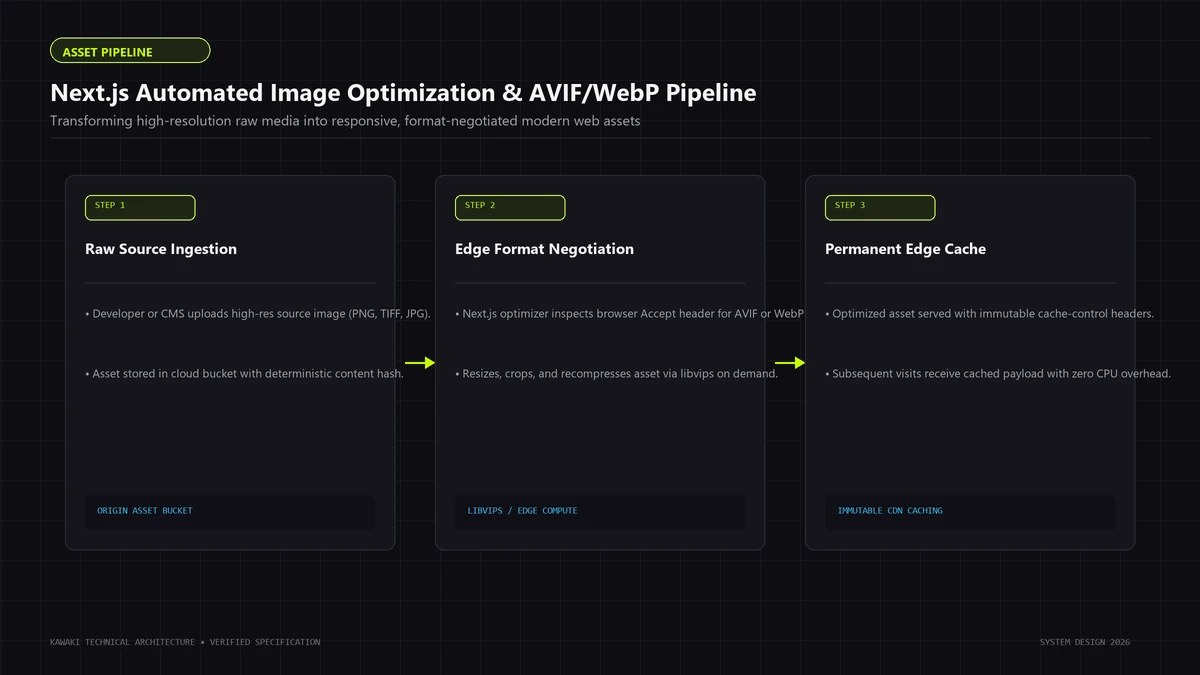
Next.js provides the next/image component, which automates format negotiation, responsive resizing, and layout space reservation (Next.js Documentation).
1. Modern Format Negotiation (AVIF & WebP)
The Next.js image optimization pipeline automatically converts uploaded images into AVIF (when supported by the browser) or WebP. AVIF typically achieves 20% to 40% higher compression efficiency than WebP without visible perceptual degradation.
Ensure your next.config.mjs enables AVIF format generation:
// next.config.mjs
const nextConfig = {
  images: {
    formats: ['image/avif', 'image/webp'],
    deviceSizes: [640, 750, 828, 1080, 1200, 1920],
    imageSizes: [16, 32, 48, 64, 96, 128, 256, 384]
  }
};
2. Sizing and the Critical sizes Attribute
When rendering responsive images that scale with CSS, omitting the sizes attribute is a major mistake. Without sizes, the browser does not know how large the image will appear on screen before downloading it, so it defaults to assuming the image is 100vw (full screen width), downloading desktop-resolution images on mobile screens.
// ✅ OPTIMAL RESPONSIVE IMAGE WITH EXPLICIT SIZES
import Image from 'next/image';

export function ProductCardImage({ src, alt }: { src: string; alt: string }) {
  return (
    <div className="relative aspect-[4/3] w-full overflow-hidden">
      <Image
        src={src}
        alt={alt}
        fill
        sizes="(max-width: 640px) 100vw, (max-width: 1024px) 50vw, 33vw"
        className="object-cover"
      />
    </div>
  );
}
3. The priority Attribute for LCP
If an image is the primary visual candidate above the fold (e.g., a hero banner or product detail photo), add the priority attribute:
<Image
  src="/assets/hero-showcase.webp"
  alt="Editorial Flagship Architecture"
  width={1200}
  height={675}
  priority
  sizes="(max-width: 1024px) 100vw, 1200px"
/>
The priority attribute instructs Next.js to:
- Preload the image in the HTML document
<head>. - Automatically set
fetchpriority="high"on the<img>element. - Disable lazy loading so the browser requests the image immediately upon receiving the HTML stream.
Caution: Apply priority to only one image per page—the actual LCP candidate. Overusing priority causes network contention, delaying stylesheets and fonts.
6. Font Optimization & Zero-Shift Typography (next/font)
Typography is a cornerstone of digital craft, but web fonts are historically responsible for severe Cumulative Layout Shift (CLS) and delayed First Contentful Paint (FCP).
Next.js provides next/font, which optimizes Google Fonts and custom local typefaces at build time (Next.js Documentation).
Documented Capabilities of next/font:
- Self-Hosting Without Third-Party DNS Lookups: When importing Google Fonts via
next/font/google, Next.js downloads the font files at build time and hosts them statically alongside your application assets. The browser never connects to Google servers, eliminating third-party DNS lookups, TLS negotiations, and privacy compliance concerns. - Zero-Shift Font Metric Fallbacks:
next/fontcalculates exact CSS font overrides (size-adjust,ascent-override,descent-override) for the browser's system fallback font. When the custom web font loads and swaps in, the glyphs occupy the identical vertical and horizontal space, effectively eliminating font-induced layout shift (0.00 CLS). - Subsetting Character Sets: Specify the exact character subsets required (e.g.,
subsets: ['latin']) to avoid downloading thousands of unused glyphs.
// app/fonts.ts
import { Plus_Jakarta_Sans, Playfair_Display } from 'next/font/google';

export const jakartaSans = Plus_Jakarta_Sans({
  subsets: ['latin'],
  display: 'swap',
  variable: '--font-sans',
  weight: ['400', '500', '600', '700']
});

export const playfair = Playfair_Display({
  subsets: ['latin'],
  display: 'swap',
  variable: '--font-serif',
  weight: ['400', '600']
});
7. Mastering Largest Contentful Paint (LCP)
Largest Contentful Paint (LCP) measures how quickly the primary content element in the viewport renders. In Next.js applications, LCP is typically:
- A prominent hero headline or introductory paragraph.
- A featured hero photograph or video poster.
- A large banner card in a catalog view.
The 4 Sub-Parts of LCP:
Google breaks LCP down into four sequential phases:
- Time to First Byte (TTFB): The time until the browser receives the first byte of HTML.
- Resource Load Delay: The gap between HTML arrival and the browser initiating the LCP resource request.
- Resource Load Duration: The time required to download the LCP asset over the network.
- Element Render Delay: The time between asset download completion and the browser painting the pixels.
LCP Engineering Checklist:
- Eliminate Server Data Waterfalls: In Server Components, fetch database records in parallel using
Promise.all()rather than awaiting queries sequentially. - Avoid Client-Side Rendering for Above-the-Fold Content: Never place a loading spinner in place of your hero headline or main product image. Render the primary content in initial server HTML.
- Preload the LCP Asset: Use
priorityonnext/imageto ensure the browser discovers the image URL in the document<head>rather than waiting for CSS stylesheets to parse. - Configure CDN Caching: Serve static and cacheable route segments via an edge CDN so initial HTML delivery incurs minimal latency.
8. Interaction to Next Paint (INP) Engineering
In March 2024, Google officially replaced First Input Delay (FID) with Interaction to Next Paint (INP). While FID only evaluated the initial click on a page, INP measures the latency of every user interaction (clicks, taps, keypresses) throughout the entire lifespan of the session.
A "Good" INP score requires visual feedback within 200ms, with responsive web applications targeting under 80ms.
Breaking Up Long Tasks (>50ms)
When a user clicks a button, the browser's main thread must not be blocked by heavy synchronous JavaScript execution. If a JavaScript task exceeds 50ms, any user interaction occurring during that window is queued and delayed.
Long Task Anti-Pattern (>50ms):
[User Clicks] ──► [─── Heavy Synchronous Computation: 180ms ───] ──► [Visual Feedback]
                  (Main Thread Blocked — INP: 180ms ❌)

Optimized Task Slicing:
[User Clicks] ──► [State Update: 15ms] ──► [Visual Feedback: 20ms] ──► [scheduler.yield()] ──► [Background Work]
                  (Main Thread Responsive — INP: 35ms ✅)
Yielding Execution with scheduler.yield()
For heavy computations that must run on the client (e.g., filtering a client-side dataset of 5,000 items), yield control back to the browser between chunks:
// lib/task-scheduler.ts
export async function yieldToMain() {
  if ('scheduler' in window && 'yield' in window.scheduler) {
    // Modern Browser Scheduling API
    return await window.scheduler.yield();
  }
  // Fallback for older browsers
  return new Promise(resolve => setTimeout(resolve, 0));
}
By calling await yieldToMain() during intensive data processing loops, you give the browser an opportunity to paint user input responses and process micro-animations smoothly.
Pushing State to Leaf Components
As established in our Next.js State Management guide, keeping state localized prevents large component subtrees from re-rendering during user interactions. A click that toggles a mobile drawer should only re-render the drawer component—not the entire page layout.
9. Cumulative Layout Shift (CLS) Prevention
Cumulative Layout Shift (CLS) evaluates the visual stability of a web page by measuring unexpected layout movements. A score of 0.00 indicates zero shifts.
Key Architectural Rules for Zero CLS:
- Always Declare Aspect Ratios on Media Containers: When using
next/imagewith thefillprop, wrap the image in a container that defines an explicit aspect ratio (e.g.,aspect-[16/9]oraspect-square) or explicit CSSheightandwidth. - Reserve Minimum Container Heights: Dynamic components that load asynchronously (such as cookie consent dialogs, notification bars, or dynamic promo banners) must have pre-allocated vertical space using CSS
min-height. - Avoid Dynamic DOM Injections Above the Fold: Never insert a newly fetched component above content that the user is already viewing. If a dynamic banner loads late, append it below existing content or render it as an overlay.
10. Server Caching & Edge Delivery Architecture
Caching in Next.js has evolved significantly across recent releases. The current model emphasizes explicit caching via Cache Components and the use cache directive, moving away from older, implicit caching behaviors.
The Modern Next.js Caching Architecture:
The
use cacheDirective:- In current Next.js releases, you can apply
use cacheat the component or function level to cache the output of expensive computations or data fetches. - You can configure cache lifetimes and tags using the
cacheLifeandcacheTagAPIs:
// lib/catalog.ts import { unstable_cacheTag as cacheTag, unstable_cacheLife as cacheLife } from 'next/cache'; export async function getProductCatalog() { 'use cache'; cacheLife('hours'); cacheTag('product-catalog'); return await db.products.findMany(); }- In current Next.js releases, you can apply
On-Demand Revalidation via Tags:
- Instead of clearing caches on arbitrary time intervals, invalidate caches deterministically when mutations occur:
// app/actions/products.ts
'use server';
import { revalidateTag } from 'next/cache';

export async function updateProductPrice(productId: string, newPrice: number) {
  await db.products.update({ where: { id: productId }, data: { price: newPrice } });
  revalidateTag('product-catalog');
}
Edge CDN Delivery Considerations:
- While edge caching provides rapid response times for static assets, actual Time to First Byte (TTFB) depends on multiple real-world factors: visitor location relative to the edge point of presence (PoP), cache hit vs. cache miss ratios, backend database roundtrip latency, and dynamic compute duration. Presenting TTFB as a measured target rather than an assumed guarantee is essential for sound engineering.
For deeper auditing workflows, explore our dedicated website performance optimization services.
11. Third-Party Script Management (next/script)
Third-party scripts—Google Tag Manager, analytics platforms, marketing pixels, and customer support chat widgets—are often the primary cause of main thread contention on production websites.
Next.js provides the next/script component to manage script loading strategies cleanly (Next.js Documentation).
Loading Strategy Decision Guide:
| Strategy | When It Executes | Ideal Use Case |
|---|---|---|
beforeInteractive |
Before any Next.js code hydrates; injected into initial HTML head. | Critical polyfills, security bots (e.g., bot detection required before page interaction). |
afterInteractive (Default) |
Injected immediately after the page becomes interactive. | Google Tag Manager, core analytics, performance monitoring. |
lazyOnload |
Fetched during browser idle time (after all resources have loaded). | Chat widgets, feedback surveys, social media embed widgets. |
worker |
Offloaded to a background web worker via Partytown. | Heavy third-party tracking scripts that would otherwise block the main thread. |
// app/layout.tsx (Third-Party Script Best Practice)
import Script from 'next/script';

export default function RootLayout({ children }: { children: React.ReactNode }) {
  return (
    <html lang="en">
      <body>
        {children}

        {/* Analytics loads after interactive readiness */}
        <Script
          src="https://www.googletagmanager.com/gtag/js?id=G-XXXXX"
          strategy="afterInteractive"
        />

        {/* Customer support chat deferred to idle time */}
        <Script
          src="https://widget.intercom.io/widget/xxxx"
          strategy="lazyOnload"
        />
      </body>
    </html>
  );
}
By deferring non-essential scripts with lazyOnload, you ensure that marketing widgets do not compete with critical hero images or fonts for mobile bandwidth.
12. A Practical Production Architecture
The diagram below illustrates a high-performance Next.js production architecture that unites modern rendering, caching, and asset optimization:
[Incoming User Request]
           │
           ▼
┌────────────────────────────────────────────────────────┐
│  Edge CDN Cache Layer                                  │
│  - Evaluates static cache status                       │
│  - Returns prerendered static shell (sub-second FCP)   │
└──────────────────┬─────────────────────────────────────┘
                   │ (Dynamic Data Required)
                   ▼
┌────────────────────────────────────────────────────────┐
│  Next.js Server Runtime (Node.js / Edge)              │
│  - Evaluates Server Components                         │
│  - Reads from 'use cache' stores (cacheTag / cacheLife)│
│  - Streams Suspense chunks across the open HTTP pipe   │
│  - Renders zero-bundle-size server libraries (parsers) │
└──────────────────┬─────────────────────────────────────┘
                   │
                   ▼ (Serialized RSC Stream + Static HTML)
┌────────────────────────────────────────────────────────┐
│  Browser Rendering Engine                              │
│  - Displays static shell and hero text immediately     │
│  - Preloads LCP image via <link rel="preload">        │
│  - Self-hosted fonts swap with 0.00 CLS               │
│  - Hydrates only isolated Client Component leaves      │
│  - Executes deferred scripts during browser idle time  │
└────────────────────────────────────────────────────────┘
13. Next.js Performance Decision Matrix
| Architectural Goal | Recommended Next.js Technique | Primary Metric Impact |
|---|---|---|
| Instant Header & Nav | Prerender static layout shell; cache at Edge | TTFB / FCP |
| Rapid Hero Image Display | next/image with priority, WebP/AVIF, explicit sizes |
LCP |
| Zero-Shift Typography | next/font with self-hosting & automatic fallback metrics |
CLS |
| Responsive Mobile Clicks | Break long tasks via scheduler.yield(); leaf Client Components |
INP |
| Heavy Data Processing | Keep in Server Components; use server-only |
INP / Bundle Size |
| Non-Critical UI Widgets | Defer loading with next/dynamic({ ssr: false }) |
INP / Bundle Size |
| Marketing Tag Isolation | next/script with strategy="lazyOnload" or "worker" |
LCP / INP |
| Instant Route Navigation | Enable partial prefetching & Cache Components | Perceived Latency |
14. Common Performance Anti-Patterns
Review your codebase against these five frequent architectural pitfalls:
- Marking Route Layouts with
'use client': This forces your entire layout, navigation bar, and all nested children into the client bundle, bloating hydration overhead. - Missing the
sizesAttribute on Responsive Images: When usingfill, omittingsizescauses browsers to download full-resolution desktop images on mobile screens, wasting bandwidth and delaying LCP. - Sequential Database Waterfalls in Server Components: Awaiting independent database queries one after another instead of executing them concurrently with
Promise.all(). - Loading Heavy Third-Party Chat Widgets in the Head: Injecting synchronous customer support scripts into the document head blocks initial rendering and degrades Core Web Vitals.
- Copying Server Data into Client State: Fetching data on the server, passing it to a Client Component, and immediately duplicating it into
useState, forcing redundant client re-renders.
15. Frequently Asked Questions (FAQ)
How do Server Components improve Core Web Vitals?
Server Components can reduce the amount of JavaScript sent to and evaluated by the browser. By executing heavy dependencies (parsers, date utilities, database drivers) exclusively on the server, the browser has less JavaScript to download, parse, and hydrate. This frees up the main thread and directly improves Interaction to Next Paint (INP).
What is the most common reason websites fail Largest Contentful Paint (LCP)?
The most frequent cause is unoptimized above-the-fold media—such as high-resolution hero images lacking modern compression (AVIF/WebP), missing explicit sizes attributes, or failing to use the priority attribute on the next/image component. Another common contributor is slow server Time to First Byte (TTFB) on un-cached dynamic routes.
How does next/font prevent Cumulative Layout Shift (CLS)?
next/font downloads Google Fonts at build time and self-hosts them locally. It automatically calculates CSS font-override properties (size-adjust, ascent-override, descent-override) for the system fallback font. When the custom font file loads, it occupies the exact same dimensions as the fallback font, preventing text reflow and eliminating layout shifts (0.00 CLS).
Why did Google replace First Input Delay (FID) with Interaction to Next Paint (INP)?
FID only measured the initial delay of the very first click or tap on a page. INP evaluates all user interactions across the entire session, measuring the time from user input until the browser paints updated visual feedback. It provides a far more accurate assessment of real-world application responsiveness.
When should I use next/dynamic instead of a regular import?
Use next/dynamic for heavy, non-critical Client Components that are not needed during initial page render—such as modals, rich text editors, graphing libraries, or complex filter drawers. This splits the code into a separate bundle that loads only when required.
Does edge delivery guarantee sub-50ms TTFB?
No. While Edge CDNs minimize physical network distance between the user and the server, actual Time to First Byte depends on cache hit ratios, backend database query latency, geographic distance to origin data stores, and dynamic compute time. Caching static segments is key to achieving optimal TTFB.
What is the difference between Partial Prerendering (PPR) and traditional SSR?
Traditional SSR requires the server to generate the entire page HTML dynamically before responding. Partial Prerendering (PPR) serves a prerendered static layout shell immediately from the edge cache, while streaming dynamic data holes concurrently over the same HTTP connection.
How should third-party tracking scripts be loaded to protect performance?
Load non-critical third-party scripts using next/script with strategy="lazyOnload" so they execute during browser idle time, or offload them to a web worker using strategy="worker". This prevents third-party analytics and chat widgets from competing with critical resources or blocking the main thread.
Engineering High-Performance Web Platforms
High-performance web applications are the product of rigorous architectural decisions: establishing clean component boundaries, minimizing client bundle weights, and designing deterministic caching workflows.
If your team is modernizing an existing Next.js application, untangling Core Web Vitals bottlenecks, or engineering a sub-second digital flagship, explore our website performance optimization services, learn about our custom web development capabilities, or schedule an architectural briefing with Kawaki Studios.
Need Help Engineering Your Web Platform or AI Systems?
From high-performance Next.js architectures to headless Shopify storefronts, custom AI automations, and enterprise WordPress security recovery, Kawaki Studios designs resilient digital infrastructure built to scale.