

Executive Summary / Key Takeaways
An architectural guide to state ownership and API boundaries in Next.js. Learn where state belongs, when to use Route Handlers vs direct server data access, and how to design clean data flow.
- Categorizes state into server state, URL search params, and local component UI state.
- Eliminates redundant global Redux stores in favor of React Server Actions and optimistic updates.
- Ensures clean API encapsulation across edge runtimes and Node persistence layers.
In our previous architectural resource on Next.js Server vs Client Components, we established that the server/client boundary is fundamentally a network serialization boundary. Once you understand where code executes, the next architectural challenge emerges:
Where should state live, where should data be fetched, and where should an API boundary actually exist?
In traditional Single Page Applications (SPAs), the answer was uniform: all state lived in the browser (often inside a monolithic Redux or Zustand store), and all data flowed through an intermediary REST or GraphQL API layer.
The Next.js App Router fundamentally upends this paradigm. By uniting server-side data execution with client-side interactivity, it allows applications to eliminate entire layers of boilerplate. However, this architectural flexibility often leads to confusion. Teams either build unnecessary internal API routes that add latency, or duplicate server data into client stores, creating synchronization bugs and bloated bundles.
At Kawaki Studios, we design custom web platforms and complex web applications around a singular core thesis:
State should live as close as practical to the system that owns it.
Data that belongs to the server should remain server-owned. Interactive UI state belongs where interaction occurs. Shareable navigation state belongs in the URL. And APIs should exist only where an explicit interface boundary provides genuine value.
1. State Is Not One Thing: The 5 Categories of Application State
Treating all application data as generic "state" is the root cause of architectural bloat. In modern Next.js applications, state falls into five distinct categories:
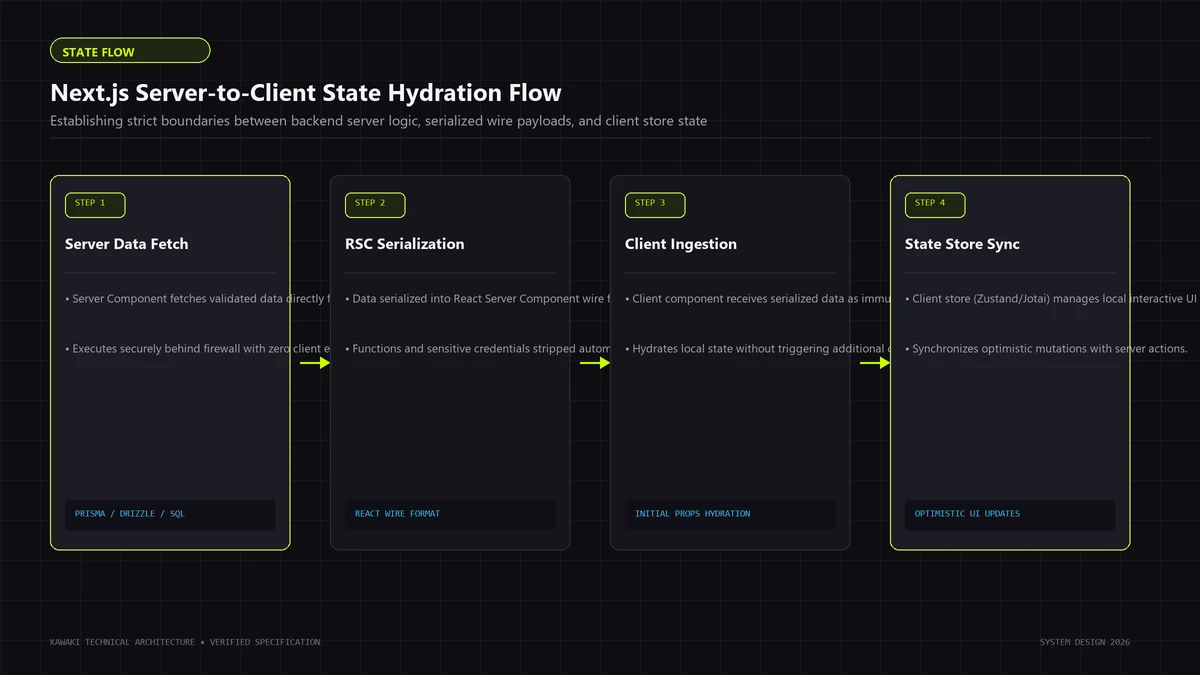
- Server & Domain Data: The source-of-truth business records stored in databases, caches, or third-party APIs (e.g., user account profiles, product catalogs, invoice history). It is durable, shared across sessions, and governed by backend authorization rules.
- Client & UI State: Ephemeral visual state that controls the immediate presentation layer (e.g., modal visibility, mobile menu drawers, active tab indices, accordion expansion). It is transient and specific to a single browser tab.
- Form & Input State: Temporary, uncommitted user inputs undergoing validation before persistence (e.g., text fields, multi-step wizard progress, file upload queues).
- URL & Navigation State: State that determines what slice of data the user is inspecting (e.g., search queries, active filters, sort orders, pagination offsets).
- Cached & Fetched Data: Read-only snapshots of server data temporarily held in memory for fast display, subject to revalidation policies.
When you classify data into these categories before writing code, boundary placement becomes straightforward.
2. Where State Should Live: A 6-Question Decision Framework
When introducing a new piece of state into a Next.js application, evaluate it against this practical diagnostic sequence:
                     [New Piece of State]
                               │
            1. Should it be shareable or survive refresh?
                           ╱ ╲
                        Yes   No
                        ╱       ╲
                 [URL State]   2. Does it originate from a DB or backend?
                                        ╱ ╲
                                     Yes   No
                                     ╱       ╲
                          [Server Data]     3. Is it transient UI feedback?
                                                    ╱ ╲
                                                 Yes   No
                                                 ╱       ╲
                                      [Local UI State]  [Shared Client State]
Diagnostic Questions:
- Who owns the state? If the business logic, database, or identity provider owns the data, it is Server Data. If the user's viewport or interaction owns it, it is Client State.
- Does it need browser interaction? If the state requires immediate keystroke feedback, drag physics, or animation frames, it belongs in a Client Component.
- Should the state survive a page refresh or navigation? If reloading the page should restore the exact view, the state belongs in the URL or on the server—never in ephemeral client memory.
- Should it be bookmarkable or shareable via a link? If a user might copy the URL and send it to a colleague (e.g., filtered search results), it must live in URL search parameters.
- Does the server need to validate or authorize it? If the state controls access to sensitive data or triggers database mutations, it must be validated on the server.
- Is it transient or durable? Transient state (e.g., whether a tooltip is open) belongs in local component state. Durable state (e.g., account settings) belongs in the database.
3. Server-Owned Data: Keeping Data at the Source
Server-owned data represents the core business reality of your application: inventory counts, customer records, permissions, and billing transactions.
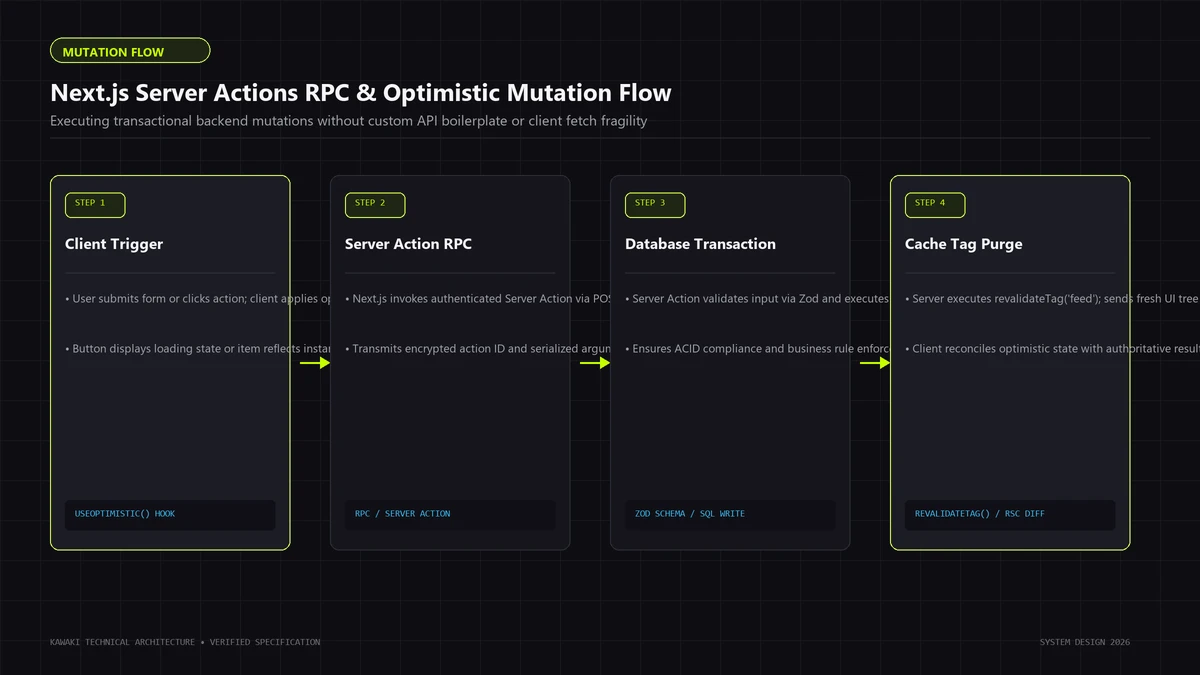
In the Next.js App Router, Server Components can access this data directly:
// app/dashboard/invoices/page.tsx (Server Component)
import { db } from '@/lib/db';
import { getSession } from '@/lib/auth';
import { redirect } from 'next/navigation';
import InvoiceList from './InvoiceList';

export default async function InvoicesPage() {
  const session = await getSession();
  if (!session) redirect('/login');

  // Direct database query on the server — no internal HTTP hop
  const invoices = await db.invoices.findMany({
    where: { organizationId: session.orgId },
    orderBy: { createdAt: 'desc' }
  });

  return (
    <main>
      <h1>Organization Invoices</h1>
      <InvoiceList initialInvoices={invoices} />
    </main>
  );
}
Why Server Ownership Matters:
- No Client State Synchronization: You do not need to dispatch actions, handle loading reducers, or reconcile stale client caches for read-heavy views.
- Zero Exposure of Database Credentials: Connection pools, ORM schemas, and private queries execute inside the secure server boundary.
- Performance Proximity: Server Components execute in close physical proximity to the database (often sub-millisecond local network latency), avoiding high-latency roundtrips over cellular networks.
4. Client State: When Local Interactivity Is Essential
Client state is not an anti-pattern. Modern web applications require rich, tactile interactions that can only execute in the browser.
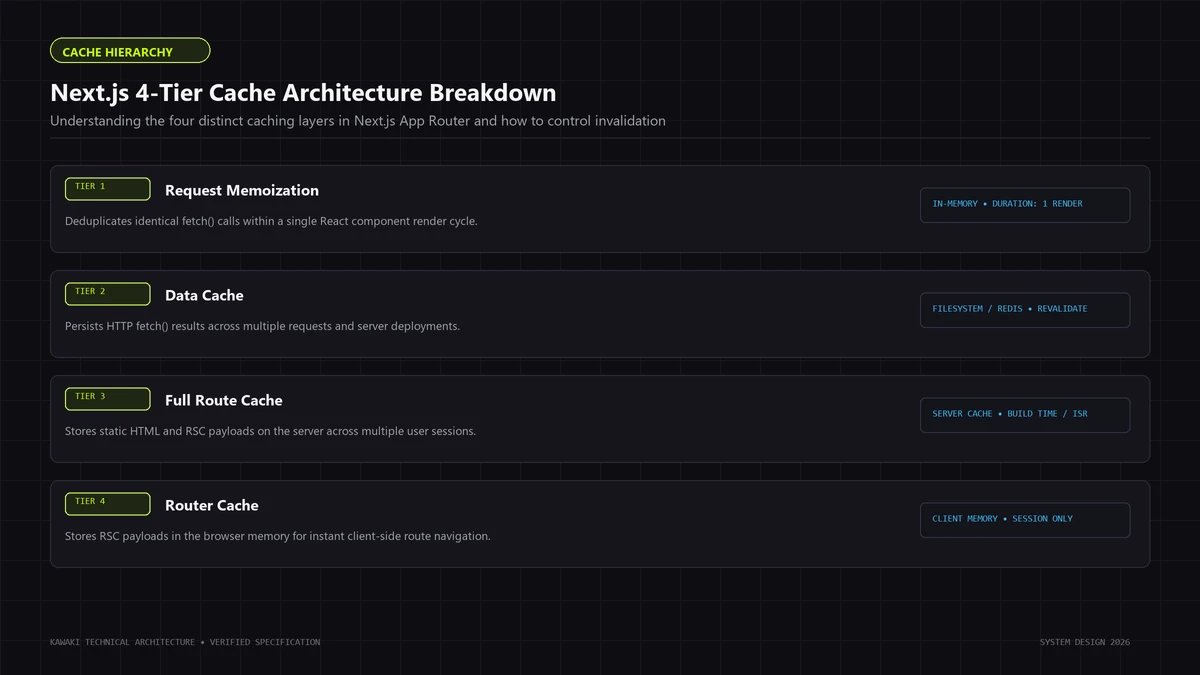
Legitimate Uses of Client State:
- Modal & Drawer Visibility:
const [isOpen, setIsOpen] = useState(false)for dialog overlays and mobile navigation. - Accordion & Tab Controllers: Managing active index states in accessible UI disclosures.
- Drag-and-Drop Positioning: Tracking pointer coordinates and drag bounds during live manipulation.
- Local Form Validation: Instant feedback on password strength, email formatting, and character limits before submission.
- Optimistic UI Displays: Incrementing a like counter or toggling a bookmark immediately while a background mutation processes.
Keep client state as localized as possible. A modal's open state should live in the component that renders the modal, not in a global application store.
5. URL State: The Most Underutilized State Container
One of the most frequent architectural mistakes in modern web applications is storing filter, sort, and pagination state in client memory (useState or a global store) instead of the URL.
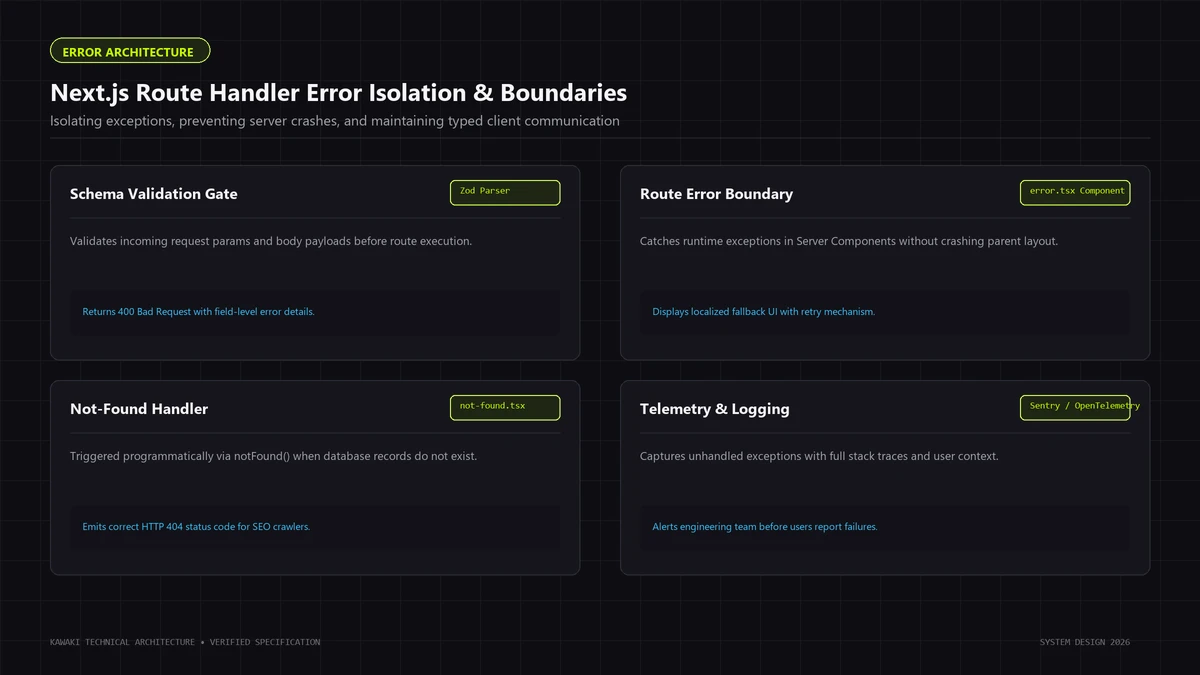
Why URL State Is Superior for Navigation:
- Shareability: Users can copy the URL and send it to teammates, preserving the exact filter configuration.
- Browser History Support: Back and forward buttons work intuitively, restoring previous search views.
- Refresh Resilience: Reloading the page does not reset the user's filtered view.
- Search Engine Discoverability: Faceted navigation paths can be selectively indexed by search crawlers.
Implementing URL State in Next.js:
// components/ProductFilter.tsx (Client Component)
'use client';

import { useRouter, useSearchParams, usePathname } from 'next/navigation';

export default function ProductFilter() {
  const router = useRouter();
  const pathname = usePathname();
  const searchParams = useSearchParams();

  function handleCategoryChange(category: string) {
    const params = new URLSearchParams(searchParams.toString());
    if (category) {
      params.set('category', category);
    } else {
      params.delete('category');
    }
    params.set('page', '1'); // Reset pagination on filter change

    router.push(`${pathname}?${params.toString()}`);
  }

  return (
    <select
      value={searchParams.get('category') || ''}
      onChange={(e) => handleCategoryChange(e.target.value)}
    >
      <option value="">All Categories</option>
      <option value="engineering">Engineering</option>
      <option value="design">Design</option>
    </select>
  );
}
In this pattern, the filter updates the URL. The parent Server Component reads the updated searchParams prop, queries the database with the new filter, and streams updated HTML without complex client state synchronization.
6. API Boundaries: Direct Access vs. Explicit Endpoints
In traditional SPAs, every interaction required an API endpoint:
Traditional SPA Architecture:
[Browser Component] ──(HTTP JSON)──► [/api/products] ──► [Database]
In the Next.js App Router, you have two distinct data paths:
Modern Next.js Architecture:
Path A (Server Component): [Server Component] ──(Direct Function Call)──► [Database]
Path B (Explicit API):     [External Client / App] ──(HTTP JSON)──► [Route Handler] ──► [Database]
The "Unnecessary API Layer" Anti-Pattern:
Many developers migrating to Next.js automatically create an internal Route Handler (/api/products) and then call it from their own Server Components using fetch('https://localhost:3000/api/products').
This introduces:
- Unnecessary HTTP Overhead: Serializing data to JSON, creating an internal HTTP request, routing through the network stack, and deserializing on the other end.
- Loopback Latency: In serverless or containerized environments, internal loopback requests can cause connection timeouts or cold starts.
- Redundant Validation Layers: Writing validation and authorization logic twice—once in the API route and once in the page.
When an Explicit API Boundary Is Actually Necessary:
Create explicit Route Handlers (app/api/.../route.ts) when:
- External Consumers: Third-party developers, mobile applications (iOS/Android), or partner webhooks need access.
- Incoming Webhooks: External services (Stripe, GitHub, Shopify) send automated event payloads.
- Client-Side Polling or Streaming: A client component requires background polling or Server-Sent Events (SSE).
- Public Integrations: Providing public REST endpoints with API key rate limiting and CORS controls.
If the only consumer of the data is your own Next.js frontend, direct server-side data access is cleaner, faster, and more maintainable.
7. Route Handlers: Mechanics and Best Practices
When an explicit HTTP interface is required, Next.js provides Route Handlers (Next.js Documentation).
Route Handlers are defined in route.ts (or route.js) files inside the app directory. They export async functions named after standard HTTP methods: GET, POST, PUT, PATCH, DELETE, HEAD, and OPTIONS.
// app/api/webhooks/stripe/route.ts
import { NextRequest, NextResponse } from 'next/server';
import { verifyStripeSignature } from '@/lib/stripe';
import { db } from '@/lib/db';

export async function POST(request: NextRequest) {
  const payload = await request.text();
  const signature = request.headers.get('stripe-signature');

  // 1. Verify external signature
  const event = verifyStripeSignature(payload, signature);
  if (!event) {
    return NextResponse.json({ error: 'Invalid signature' }, { status: 400 });
  }

  // 2. Process business logic
  if (event.type === 'payment_intent.succeeded') {
    await db.orders.updateStatus(event.data.object.id, 'paid');
  }

  return NextResponse.json({ received: true });
}
Key Architectural Rules for Route Handlers:
- Route Handlers Cannot Co-exist with Pages: You cannot place a
route.tsand apage.tsxin the same route segment (e.g.,app/dashboard/route.tsandapp/dashboard/page.tsxwill conflict). - Default Caching Behavior: In current Next.js versions (v15+),
GETRoute Handlers are not cached by default. They execute dynamically unless configured withexport const dynamic = 'force-static'. - Enforce Server-Side Authorization: Never assume a Route Handler is private. Always inspect incoming session cookies or Authorization headers before fulfilling requests.
8. Server Actions: Purpose-Built Mutation Boundaries
For user-driven mutations originating from your Next.js frontend, Server Actions provide an RPC-style mutation model without the boilerplate of dedicated REST endpoints (Next.js Documentation).
Server Actions are asynchronous functions declared with the 'use server' directive at the top of a file or function scope.
// app/actions/update-profile.ts
'use server';

import { z } from 'zod';
import { getSession } from '@/lib/auth';
import { db } from '@/lib/db';
import { revalidatePath } from 'next/cache';

const ProfileSchema = z.object({
  displayName: z.string().min(2).max(50),
  bio: z.string().max(200).optional()
});

export async function updateProfile(formData: FormData) {
  // 1. Authenticate session
  const session = await getSession();
  if (!session) {
    throw new Error('Unauthorized');
  }

  // 2. Validate input schema
  const parsed = ProfileSchema.safeParse({
    displayName: formData.get('displayName'),
    bio: formData.get('bio')
  });

  if (!parsed.success) {
    return { error: 'Invalid form input' };
  }

  // 3. Execute database mutation
  await db.users.update({
    where: { id: session.userId },
    data: parsed.data
  });

  // 4. Revalidate affected paths
  revalidatePath('/dashboard/profile');
  return { success: true };
}
Critical Security Rule:
A Server Action is a public HTTP endpoint under the hood.
When you mark a function with 'use server', Next.js exposes a callable POST endpoint. The directive does not automatically secure the function. You must:
- Verify user authentication inside the action.
- Verify authorization (does this user have permission to modify this specific record?).
- Validate and sanitize all incoming arguments using a schema validator like Zod.
9. Authentication & Authorization: Where Security Boundaries Belong
Understanding the distinction between authentication and authorization is vital when designing Next.js data boundaries:
- Authentication (AuthN): Confirms who the user is (e.g., verifying a session cookie or JWT).
- Authorization (AuthZ): Confirms what the user is allowed to do (e.g., can user A edit document B?).
┌─────────────────────────────────────────────────────────────────┐
│                      Client / Browser                           │
│  [UI Layer] Checks {user.role === 'admin'} only for display     │
└───────────────────────────────┬─────────────────────────────────┘
                                │ (Network Boundary)
                                ▼
┌─────────────────────────────────────────────────────────────────┐
│                  Server Boundary (Trusted)                      │
│  1. Verify Session Token (AuthN)                                │
│  2. Verify User Permissions for Requested Resource (AuthZ)     │
│  3. Execute Query / Mutation                                    │
└─────────────────────────────────────────────────────────────────┘
Why UI Hiding Is Not Authorization:
Hiding an "Admin Settings" button in a Client Component with {isAdmin && <Button>} is purely a visual affordance. If the underlying Server Action or Route Handler does not re-verify the session and role on the server, any visitor can trigger the action by dispatching a manual POST request.
Rule: Every Server Component, Server Action, and Route Handler must independently verify authorization at the data boundary.
10. Avoiding Unnecessary Client Fetching
In client-heavy applications, developers frequently write useEffect data-fetching hooks:
// ❌ UNNECESSARY CLIENT FETCHING
'use client';

import { useEffect, useState } from 'react';

export default function UserProfile() {
  const [user, setUser] = useState(null);
  const [loading, setLoading] = useState(true);

  useEffect(() => {
    fetch('/api/user')
      .then(res => res.json())
      .then(data => {
        setUser(data);
        setLoading(false);
      });
  }, []);

  if (loading) return <Spinner />;
  return <div>{user.name}</div>;
}
Why This Is Problematic:
- Client Waterfall: The browser must download the JavaScript bundle, parse it, mount the component, trigger the
useEffect, execute the fetch over the network, and re-render. - Layout Shift: The page displays a loading spinner before content arrives, degrading Core Web Vitals (CLS and LCP).
When Client Fetching Is Genuinely Appropriate:
Client fetching is appropriate when:
- Data updates continuously based on user typing (e.g., live typeahead search).
- Data is polled periodically (e.g., monitoring a long-running deployment task).
- Infinite scroll pagination loads subsequent pages as the user scrolls.
For initial page data, fetch on the server in a Server Component and pass the data down.
11. Caching & Revalidation: The Current Next.js Model
Caching in Next.js has evolved significantly. In current Next.js versions (v15+), the framework prioritizes predictability:
Current Caching Primitives:
- Request Memoization (React
cache): Deduplicates identicalfetchrequests or function calls within a single render pass. If three components on the same page request the current user profile, the function executes only once. - Data Cache: Allows data to be cached across requests and deployments when explicitly configured via
fetch(url, { cache: 'force-cache' })orfetch(url, { next: { revalidate: 3600 } }). - On-Demand Revalidation: Server Actions trigger surgical cache purges using:
revalidatePath('/products'): Revalidates all cached data associated with a specific route path.revalidateTag('catalog'): Revalidates allfetchcalls tagged withnext: { tags: ['catalog'] }.
Understanding this lifecycle prevents stale data issues while maintaining fast response times. For deeper performance tuning, review our guide on website performance optimization.
12. A Practical Reference Architecture
The diagram below illustrates an end-to-end data architecture for a production Next.js web application:
[Incoming Request: /workspace/billing]
                 │
                 ▼
┌────────────────────────────────────────────────────────┐
│  Server Page (RSC)                                     │
│  - Authenticates session via cookies                   │
│  - Directly queries database for billing records       │
│  - Reads URL searchParams for active tab               │
└────────────────┬───────────────────────────────────────┘
                 │
                 ├───────────────────────────────────────┐
                 ▼                                       ▼
┌─────────────────────────────────────┐  ┌─────────────────────────────────────┐
│  Static Presentation (RSC)          │  │  Interactive Leaf (Client)          │
│  - Invoice tables                   │  │  - Payment method modal toggle      │
│  - Plan features & pricing copy     │  │  - Optimistic card removal          │
│  - Zero client JS overhead          │  │  - Dispatches Server Action         │
└─────────────────────────────────────┘  └──────────────────┬──────────────────┘
                                                            │
                                                            ▼
                                         ┌─────────────────────────────────────┐
                                         │  Server Action: updatePaymentMethod │
                                         │  - Re-authenticates session         │
                                         │  - Validates input with Zod         │
                                         │  - Calls payment gateway            │
                                         │  - revalidatePath('/billing')       │
                                         └─────────────────────────────────────┘
Notice the clean separation: the page renders server-side, data queries bypass HTTP, interactivity is confined to leaf components, and mutations execute through validated Server Actions.
13. State Ownership Decision Matrix
| Requirement | Recommended Owner | Architectural Rationale |
|---|---|---|
| Modal Open / Closed State | Client Component | Transient visual state; belongs in local useState. |
| Active Search / Filter Query | URL SearchParams | Must be shareable, bookmarkable, and survive refresh. |
| Database Records (Invoices, Users) | Server Data Layer | Source-of-truth business data; directly queried by RSC. |
| Session Authentication Token | Server (HttpOnly Cookie) | Protects tokens from cross-site scripting (XSS). |
| Faceted Filter Selection | URL SearchParams | Enables deep linking and consistent browser history. |
| Drag-and-Drop Item Order | Client Component | High-frequency interaction state during pointer motion. |
| Unsaved Form Input | Client Component | Immediate input validation before server submission. |
| Public API / Webhook Receiver | Route Handler | External callers require standard HTTP/JSON contracts. |
14. Common Architectural Mistakes
Review your Next.js application against these common pitfalls:
- Reaching for Global Client State by Default: Setting up Redux, Zustand, or complex React Context for data that is already managed cleanly by Server Components and URL search parameters.
- Creating Unnecessary Internal API Routes: Building
/api/dataroutes solely for your own Server Components to fetch, introducing latency and serialization overhead. - Duplicating Server Data into Client State: Fetching data on the server, passing it to a Client Component, and immediately copying it into
useState. This creates dual sources of truth that inevitably desynchronize. - Authorizing Only in the UI: Relying on conditional rendering to restrict features without verifying authorization in the underlying Server Action or Route Handler.
- Leaking Secrets via
NEXT_PUBLIC_: Prefixing sensitive environment variables withNEXT_PUBLIC_to access them in Client Components, exposing keys in browser bundles. - Neglecting URL State for Search & Filters: Storing filters in client state so that users cannot share links or use the browser's back button.
15. Frequently Asked Questions (FAQ)
What state belongs in a Client Component?
State that controls immediate visual interactivity (modal visibility, drawer open/close, accordion expansion), temporary form input before submission, animation coordinates, or interactions requiring browser-exclusive APIs (Canvas, Geolocation).
When should state be stored in the URL instead of client state?
Whenever the state controls what content is displayed—such as search queries, category filters, sorting options, pagination numbers, or tab selections. URL state makes the view shareable, bookmarkable, and refresh-safe.
Should Server Components fetch data directly from databases?
Yes. In Next.js App Router, Server Components run exclusively in a secure server environment. Direct database queries via ORMs or SQL clients eliminate HTTP serialization overhead and reduce network latency.
When should I use a Route Handler instead of a Server Action?
Use Route Handlers (route.ts) when you need standard HTTP endpoints for external consumers: third-party webhooks (Stripe, GitHub), mobile apps (iOS/Android), or public REST APIs. Use Server Actions for user-driven mutations originating from your own Next.js frontend.
Are Server Actions automatically secure?
No. Server Actions compile into publicly accessible HTTP POST endpoints. You must authenticate the user session, authorize access to the specific resource, and validate all input data inside the action.
When is a client-side data fetch appropriate?
Client-side fetching is appropriate for dynamic live search (typeahead), infinite scroll pagination, polling for real-time status updates, or fetching non-critical data after the primary page has already loaded.
Where should authorization decisions happen?
Authorization must always happen on the server—inside the Server Component before querying data, or inside the Server Action / Route Handler before executing a mutation. UI conditional rendering is for presentation only, not security.
Does every modern web application need a global state library?
No. Most Next.js applications that properly leverage Server Components for domain data and URL search parameters for navigation require little to no global client state. Local component state and targeted React Context are often sufficient.
Architecting High-Performance Web Applications
Designing clean state and API boundaries reduces code complexity, strengthens security posture, and optimizes runtime performance.
If your team is designing a new web platform, modernizing an existing codebase, or untangling complex application state, explore our web application development services or schedule an architectural briefing with Kawaki Studios.
Need Help Engineering Your Web Platform or AI Systems?
From high-performance Next.js architectures to headless Shopify storefronts, custom AI automations, and enterprise WordPress security recovery, Kawaki Studios designs resilient digital infrastructure built to scale.