
Executive Summary / Key Takeaways
An engineering guide to custom web development vs no-code platforms. Features a 9-dimension decision matrix, architectural scaling limits, and migration strategy.
- Evaluates tech stack choices across a 9-dimension decision matrix including TCO, IP ownership, and data ceilings.
- No-code is optimal for rapid market validation, landing pages, and non-technical editorial autonomy.
- Custom code is required when proprietary business logic, complex relations, and scalable unit economics dictate.
When planning a digital platform or web app, technical leaders face a key architectural choice: build with custom code, or assemble the product on a no-code platform?
The industry is polarized. No-code advocates argue visual builders make traditional coding obsolete for most business use cases, while purists maintain that visual tools cannot withstand real-world enterprise load. Neither dogma is accurate; each addresses distinct requirements across organizational stages.
The Direct Answer: When Should a Business Choose Custom Development Over No-Code?
A business should choose custom development over no-code when the software represents the core commercial engine rather than a static marketing channel—specifically when technical requirements demand:
- Proprietary business logic, specialized computational models, or non-standard transactional flows that visual builders cannot express without fragile workarounds.
- Complex relational data structures, high-volume database operations, or ACID-compliant data integrity exceeding no-code collection and record caps.
- Strict performance budgets and Core Web Vitals guarantees, where milliseconds of page latency directly dictate search rankings and conversion efficiency.
- Deep multi-system API orchestration, bi-directional synchronization with internal enterprise systems, WebSockets, or low-latency background workers.
- Strict security, regulatory compliance, and data sovereignty (such as SOC 2, HIPAA, GDPR, on-premise VPC hosting, or isolated database encryption keys) requiring full code audits.
- Predictable unit economics at scale, where runaway per-seat fees or workload unit taxes on no-code platforms exceed the cost of dedicated cloud infrastructure.
Conversely, if your objective is rapid market validation, a standard marketing or brochure site, a content blog with basic publishing workflows, or an internal administrative tool manageable by non-technical teams, no-code is the objectively superior, more capital-efficient choice.
Building custom code prematurely wastes valuable capital. Remaining on no-code past its architectural limits creates bottlenecks and compounding technical debt. This technical guide provides an engineering framework to evaluate this trade-off.
1. Defining the Paradigms: Custom Development vs. No-Code Platforms
To make a rational architectural determination, we must define what happens beneath the surface in each approach.
+------------------------------------------------------------------------+
|                      THE ARCHITECTURAL SPECTRUM                        |
+---------------------+-------------------+------------------------------+
| Layer               | Custom Web Dev    | No-Code Platform             |
+---------------------+-------------------+------------------------------+
| Presentation (UI)   | Handcrafted React/| Proprietary visual canvas    |
|                     | Semantic HTML/CSS | generating vendor HTML/CSS   |
+---------------------+-------------------+------------------------------+
| Application Logic   | Explicit TS/JS    | Visual workflows, block      |
|                     | functions & state | triggers, managed actions    |
+---------------------+-------------------+------------------------------+
| Data Layer          | Relational SQL    | Managed JSON document store  |
|                     | (PostgreSQL, etc.)| with hard collection limits  |
+---------------------+-------------------+------------------------------+
| Infrastructure      | Docker, Serverless| Multi-tenant proprietary     |
|                     | Edge, AWS, Vercel | cloud walled-garden          |
+---------------------+-------------------+------------------------------+
| Source Control      | Git repositories, | Platform version history     |
|                     | CI/CD pipelines   | (vendor snapshot rollback)   |
+---------------------+-------------------+------------------------------+
What is Custom Web Development?
Custom web development is the engineering discipline of designing, programming, and deploying web applications using direct source code, purpose-built databases, and decoupled cloud infrastructure. Rather than configuring a closed proprietary platform, engineers write explicit logic using modern programming languages (primarily TypeScript, JavaScript, Python, or Go), structured frameworks (such as Next.js, React, or Node.js), and relational databases (such as PostgreSQL or MySQL).
In custom architectures, data models follow normalized schemas with tailored indexing, application state and API boundaries are explicitly governed, and codebases reside in private Git repositories deployable across any cloud. For organizations requiring tailored flagships or software platforms, our dedicated Custom Web Development Services deliver clean-code engineering designed to scale.
What is a No-Code Platform?
A no-code platform is a managed SaaS application that abstracts software development into a graphical user interface. Platforms such as Webflow, Framer, Bubble, Wix Studio, and Shopify allow non-programmers to construct web layouts, data tables, and automated workflows using drag-and-drop canvases, pre-built component blocks, and visual logic trees.
In no-code architectures, code is generated by vendor compilers, data stores are constrained to proprietary schemas, and hosting and runtime maintenance are bundled into recurring subscriptions. The application runs inside closed vendor environments and cannot be exported to independent servers.
The Middle Ground: Low-Code and Headless Architectures
Between full custom development and pure no-code lies a pragmatic middle ground:
- Low-Code Builders: Platforms like Retool providing visual interfaces while permitting arbitrary code injection, custom SQL queries, and bespoke API connectors.
- Headless Architectures: Decoupling a visual no-code CMS (such as Webflow, Sanity, or Strapi) from a custom frontend (such as Next.js). This allows content editors to work visually while developers maintain 100% control over frontend performance, security, and integration logic.
2. The 9-Dimension Decision Matrix
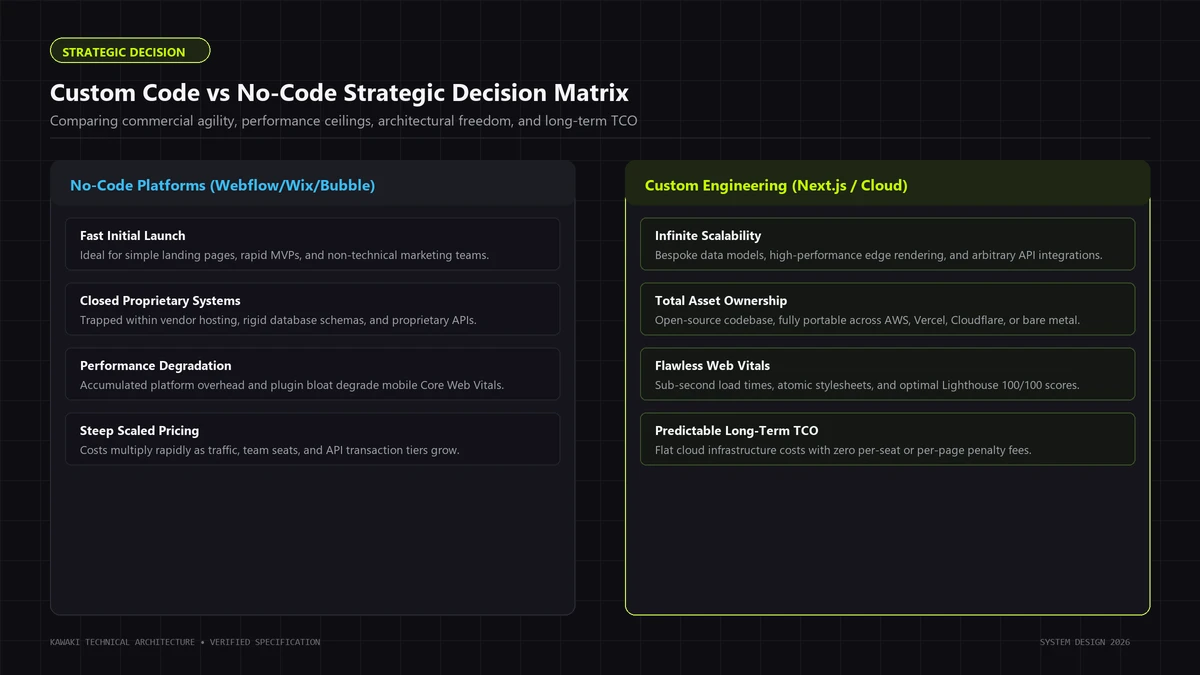
When evaluating an engineering investment, technical leaders require an objective evaluation framework. The matrix below contrasts custom web development against no-code across nine mission-critical dimensions:
| Evaluation Dimension | No-Code Platform | Custom Web Development | Deciding Factor |
|---|---|---|---|
| 1. Launch Speed | High (Days to Weeks). Pre-built templates, instant hosting, and visual tools minimize time to first user. | Moderate to Low (Weeks to Months). Requires foundational architecture, repository setup, and infrastructure deployment. | Urgency of market entry vs need for bespoke features. |
| 2. Flexibility | Constrained. Confined to platform-supported components, plugins, and visual logic rules. | Unconstrained. Full programmatic control over every layer, algorithm, data structure, and external protocol. | Uniqueness of core business logic and transactional flows. |
| 3. Design Control | High for standard layouts. Constrained for non-standard micro-interactions, canvas shaders, or editorial typography. | Total Control. Pixel-perfect rendering down to CSS layout primitives, custom animations, and layout engines. | Brand differentiation requirements and editorial craft. |
| 4. Integrations | Constrained. Dependent on official app stores, Zapier/Make webhooks, and REST wrappers with rate limits. | Unconstrained. Direct native SDKs, streaming WebSockets, gRPC, private VPC peering, and custom microservices. | Complexity of data sync and legacy enterprise systems. |
| 5. Performance Control | Platform-Managed. Subject to vendor runtime bloat, third-party script injection, and global CDN defaults. | Surgical Optimization. Complete control over bundle size, code splitting, edge caching, SSR/SSG/ISR, and asset pipelines. | Impact of Core Web Vitals and page speed on conversion rates. |
| 6. Scalability | Ceilings on data and concurrency. Hard collection caps, database query latency spikes, and workload unit limits. | Near-Infinite Elasticity. Horizontally auto-scaling containers, read-replica databases, and distributed caching. | Anticipated database size, transaction volume, and user concurrency. |
| 7. Maintenance | Zero Infrastructure Ops. Vendor handles security patches, server updates, and SSL certificates automatically. | Active Engineering Required. Requires dependency updates, vulnerability monitoring, CI/CD pipeline management, and backups. | Internal engineering availability and DevOps resources. |
| 8. Ownership/Control | Vendor-Locked. Data exportable, but UI layouts, logic engines, and backend hosting are tied to the platform. | 100% IP Ownership. Source code, git history, database schemas, and infrastructure configs belong entirely to the business. | Valuation requirements, investor diligence, and IP portability. |
| 9. Technical Complexity | Low. Visual designers, marketers, and operations teams build and maintain the site without code. | High. Requires professional software engineers skilled in modern TypeScript, SQL, state management, and cloud architecture. | Organizational capability and long-term hiring roadmap. |
Detailed Dimension Analysis
Dimension 1: Launch Speed
No-code platforms deliver rapid initial velocity. Pre-configured hosting, responsive visual canvases, and managed databases allow teams to publish functional marketing sites or directories in days. Custom web development requires foundational scaffolding—TypeScript configurations, component hierarchies, database schemas, authentication layers, and CI/CD pipelines—establishing a multi-week baseline before release.
Dimension 2: Flexibility
No-code tools operate within a bounded conceptual envelope. When applications demand proprietary calculation models or multi-step workflows, visual builders force teams into fragile workarounds: chained webhook relays, automation middleware, and brittle scripts. Custom engineering grants unconstrained expressiveness: any computable algorithm, background worker, or protocol can be implemented with mathematical precision.
Dimension 3: Design Control
While visual tools offer styling controls, they enforce rigid box-model abstractions. Implementing publication-grade typography, bespoke layout grids, Canvas or WebGL shaders, or fluid scroll-driven storytelling—principles explored in What is Editorial Engineering?—often exceeds visual builder capabilities. Custom CSS, Tailwind, or CSS Modules provide total programmatic authority over rendering layers, font sub-setting, and animations.
Dimension 4: Integrations
No-code platforms typically integrate with external services via standard REST APIs, third-party middleware, or marketplace plugins. These pipelines introduce network latency, polling overhead, and multi-vendor failure points. Custom development communicates directly over native database drivers, streaming endpoints, WebSockets, Server-Sent Events (SSE), and private VPC tunnels, executing data transformations in memory at microsecond speeds.
Dimension 5: Performance Control
In no-code, page speed is governed by vendor architecture. Platforms bundle comprehensive JavaScript runtimes and styling libraries to support visual canvases, delivering heavy payloads that harm Google Core Web Vitals. In custom engineering, developers apply granular code splitting, tree-shaking, static generation, and edge caching to achieve near-instant First Contentful Paint (FCP) and zero Cumulative Layout Shift (CLS). For deeper analysis, explore Next.js Performance Architecture.
Dimension 6: Scalability
No-code architectures enforce hard scaling ceilings: record limits per collection, workflow throughput caps, and concurrency bottlenecks during spikes. Custom applications separate stateless compute from persistence layers, employing read replicas, Redis caches, and CDN edge caching to absorb millions of requests seamlessly.
Dimension 7: Maintenance
No-code abstracts away infrastructure operations: security patches, framework updates, SSL renewals, and server operating systems are maintained entirely by the SaaS provider. Custom applications require active operational stewardship: dependencies must be patched, database indexes monitored, query performance profiled, and infrastructure monitored via automated alerting pipelines.
Dimension 8: Ownership and Control
Building on no-code means operating on rented land. If the platform alters pricing, deprecates features, or suffers outages, your recourse is limited. You cannot export runtime logic or UI code to an independent host. Custom engineering produces portable intellectual property: fully auditable source code in private Git repositories deployable across AWS, Google Cloud, Cloudflare, or bare-metal servers.
Dimension 9: Technical Complexity
No-code lowers the barrier to entry, enabling non-technical stakeholders to create and iterate on web interfaces directly. Custom web development introduces substantial technical complexity: managing state across client and server boundaries, designing relational database normalization, configuring CI/CD automation, handling error boundaries, and mitigating security threats such as Cross-Site Scripting (XSS) and SQL injection.
3. When NO-CODE Is the Better Choice
Engineering discipline means selecting the most capital-efficient tool that satisfies commercial requirements. Building custom software when a no-code solution suffices is an operational mistake. No-code is the superior, more pragmatic choice in several distinct scenarios:
1. Rapid Pre-Revenue MVP Validation
When testing a new business model, your primary risk is market risk (whether anyone wants the product), not technical risk (whether the software can scale to a million users). Spending capital and months writing custom software before validating willingness to pay is inefficient. A founder can assemble an MVP in two weeks using Bubble, Webflow, Airtable, and Stripe, validating demand with minimal exposure. If the hypothesis fails, you pivot with minimal sunk costs.
2. Marketing Websites and Lead-Generation Portals
For corporate websites, agency portfolios, campaign landing pages, and content blogs, no-code platforms like Webflow or Framer are consistently superior to custom-coded codebases. Marketing teams need autonomy: they must publish case studies, modify hero copy, launch campaign pages, and conduct A/B tests daily without filing engineering tickets or waiting for deployments. For a deeper breakdown, consult our guide on Webflow vs Custom Development.
+------------------------------------------------------------------------+
|                 NO-CODE CONTENT MARKETING VELOCITY                     |
+------------------------------------------------------------------------+
| Marketing Team -> Visual Canvas (Webflow) -> Instant Publish (Minutes) |
| vs.                                                                    |
| Marketing Team -> Jira Ticket -> Dev Sprint -> Pull Request -> Deploy  |
+------------------------------------------------------------------------+
3. Early-Stage Startups with Limited Capital
If your company has limited seed capital and lacks dedicated in-house technical co-founders, hiring external custom software agencies to build an initial product can prematurely drain your runway. Using visual builders preserves capital for essential business drivers: customer discovery, sales outreach, content creation, and founder runway. When commercial traction produces consistent recurring revenue, you can invest in a deliberate custom rebuild.
4. Standard E-Commerce Storefronts
Unless you are engineering an omnichannel inventory network across multiple global warehouses or a complex custom product configurator, building a custom e-commerce engine is unnecessary over-engineering. Platforms like Shopify provide PCI-DSS Level 1 checkout security, tax engines, inventory management, and fulfillment integrations out of the box. Attempting to recreate these primitives in bespoke code introduces severe operational liabilities without competitive advantage.
4. When Custom Development Becomes the Better Fit
While no-code excels at rapid deployment and everyday administrative autonomy, its boundaries become apparent when product mechanics diverge significantly from standardized patterns. Custom web development is not universally required for every venture, but it progressively becomes the stronger, more resilient architectural fit under specific technical and operational conditions:
1. Proprietary Business Logic & Complex Workflows
If your software's core value lies in unique computational algorithms—such as dynamic underwriting engines, multi-variable financial models, specialized scheduling algorithms, or automated document parsers—no-code logic trees encounter friction. Visual builders rely primarily on linear trigger-action blocks. Building multi-branch recursion, transactional rollbacks, or asynchronous worker queues in visual interfaces creates fragile workflows that cannot be unit-tested or profiled easily. Custom engineering encapsulates complex logic in testable TypeScript or Python services governed by automated test suites and explicit domain boundaries.
+------------------------------------------------------------------------+
|                     BUSINESS LOGIC ARCHITECTURE                        |
+------------------------------------------------------------------------+
| NO-CODE:   Trigger -> [Zapier] -> Webhook -> [Make] -> Brittle Chain   |
| CUSTOM:    Client  -> REST/tRPC -> Domain Service -> ACID Transaction  |
+------------------------------------------------------------------------+
2. High-Volume Databases and Advanced Relational Models
No-code platforms impose explicit architectural limits on database scale:
- Webflow CMS: Hard ceiling of 2,000 to 10,000 collection items depending on subscription tier.
- Bubble: Database queries slow down significantly when collections exceed 100,000 records without external database integrations.
- Airtable: Record limits per base range from 50,000 to 250,000 on enterprise plans.
When your application manages large or high-velocity datasets—such as multi-tenant audit logs, IoT telemetry, real estate listings, or transaction histories—a normalized relational database (such as PostgreSQL or MySQL) equipped with indexed foreign keys, compound indexes, database triggers, and connection pooling becomes the more performant, reliable foundation.
3. Sub-Second Latency and Performance Guarantees
In highly competitive digital sectors, latency directly impacts revenue. While no-code platforms provide respectable baseline performance for standard pages, they load vendor runtimes, redundant CSS, and generic script bundles that cannot be tree-shaken. When conversion rates drop precipitously for every 100-millisecond delay and Core Web Vitals directly dictate search rankings, custom development provides superior leverage: inlining critical CSS, serving modern image formats from CDNs, prerendering static pages with ISR, and achieving sub-500ms Time to First Byte (TTFB).
4. Enterprise Security, Privacy, and Compliance
Regulated industries—such as healthcare (HIPAA), fintech (PCI-DSS / SOC 2), and legal tech—often involve specialized compliance mandates where custom-engineered infrastructure is the more straightforward, defensible solution:
- Data Sovereignty: The ability to host data exclusively in specific geographic cloud regions or dedicated on-premise VPCs.
- Granular Role-Based Access Control (RBAC): Row-level database security (RLS) ensuring users can access only their authorized records.
- Auditable Source Code: Independent cybersecurity firms must be able to inspect source code line-by-line for zero-day vulnerabilities, memory leaks, and injection risks before granting enterprise certifications.
5. Unit Economics and Escaping the "No-Code Tax"
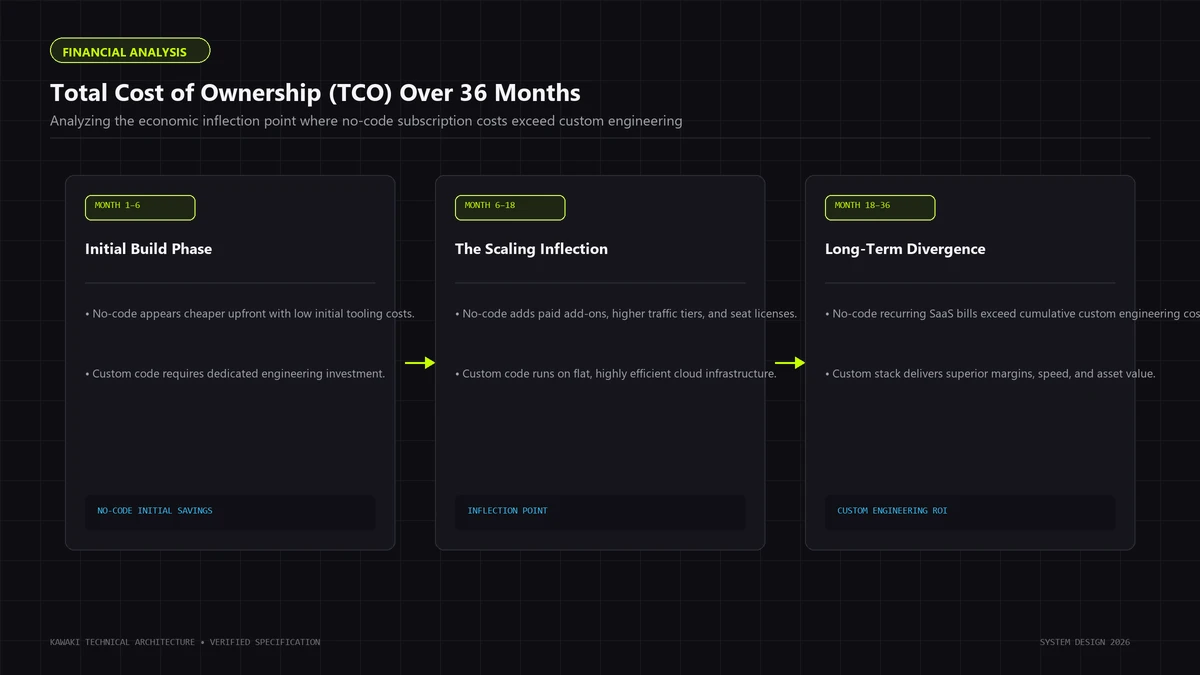
No-code platforms monetize through usage tiers: charging per administrative seat, per hosted record, per monthly workflow execution, or via proprietary "workload units." For early-stage validation, this pricing is often more economical than hiring dedicated DevOps. However, as applications scale into millions of monthly workflow executions, recurring platform fees can outgrow infrastructure costs. Containerized microservices running on modern cloud infrastructure (AWS ECS, Google Cloud Run, Hetzner VPS) process high-volume workloads at predictable, linear unit economics.
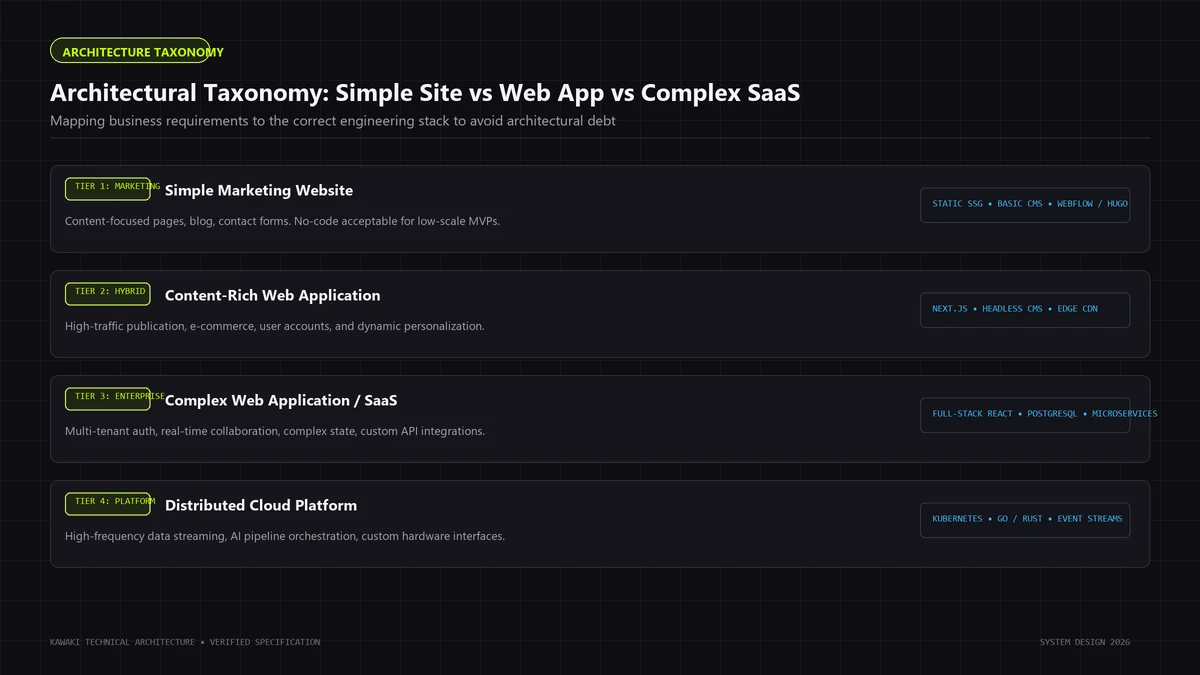
5. The Architectural Taxonomy: Website vs. Web App vs. SaaS Product
A frequent source of organizational confusion is failing to distinguish between digital categories. Building a marketing website using custom code is often wasteful; building a multi-tenant SaaS application on no-code is often fatal. To determine the correct approach, classify your project within this three-tier architectural taxonomy:
+------------------------------------------------------------------------+
|                     DIGITAL PRODUCT TAXONOMY                           |
+---------------------+---------------------+----------------------------+
| Category            | Primary Objective   | Recommended Architecture   |
+---------------------+---------------------+----------------------------+
| Tier 1: Website     | Inform & Persuade   | No-Code (Webflow/Framer)   |
| (Marketing/Content) | Static / CMS Read   | or Custom Static (SSG)     |
+---------------------+---------------------+----------------------------+
| Tier 2: Web App     | Interactive Utility | Hybrid (Low-Code Backend)  |
| (Portals/Tools)     | Authenticated Read/ | or Custom Full-Stack       |
|                     | Write Workflows     | (Next.js + PostgreSQL)     |
+---------------------+---------------------+----------------------------+
| Tier 3: SaaS        | Proprietary Core IP | 100% Custom Engineering    |
| (Commercial Engine) | Multi-Tenant Data,  | Decoupled Services, Git,   |
|                     | High Concurrency    | CI/CD, Auditable Codebase  |
+---------------------+---------------------+----------------------------+
Tier 1: The Content Website & Digital Flagship
- Primary Objective: Deliver brand narrative, showcase case studies, drive search engine discovery, and capture inbound sales leads.
- Data Flow: Unidirectional read-heavy architecture. Content is published by marketing editors and consumed passively by anonymous visitors.
- Optimal Architecture: No-code platforms (Webflow, Framer) or headless content management systems connected to lightweight static sites. Custom full-stack engineering is generally unnecessary here unless high-end editorial styling, sub-second Core Web Vitals, or proprietary interactive tools are required.
Tier 2: The Web Application
- Primary Objective: Provide interactive utility to authenticated users (e.g., customer account portals, supplier dashboards, internal ERPs, inventory management tools).
- Data Flow: Bi-directional read/write architecture. Users authenticate, submit data, trigger business processes, and view customized dashboards.
- Optimal Architecture: If the application serves standard internal operations, low-code tools like Retool or advanced no-code tools like Bubble can serve effectively. However, if the portal is customer-facing, high-volume, or requires bespoke UI components, custom development using Next.js, Node.js, and relational databases is recommended.
Tier 3: The SaaS Platform & Core Digital Product
- Primary Objective: The commercial software product that customers pay to use (e.g., an automated accounting engine, an AI analytics platform, or a multi-sided marketplace).
- Data Flow: Multi-tenant, highly concurrent, distributed transactional data architecture with background task queues and third-party API webhooks.
- Optimal Architecture: 100% Custom Engineering. Building a commercial SaaS on closed no-code platforms introduces valuation discounts, fails institutional technical due diligence, and guarantees an expensive rebuild once user concurrency surges.
6. The Practical Decision Framework & Logic Tree
To determine whether your upcoming initiative warrants custom engineering or no-code tooling, walk through the deterministic logic tree below:
                      [START PROJECT SCOPING]
                                 │
                 Is this project a content-focused
                     marketing or brochure site?
                                 │
                    ┌────────────┴────────────┐
                   YES                        NO
                    │                         │
        Does it require bespoke               │
        shaders, custom animations,           │
        or sub-second Core Web Vitals?        │
                    │                         │
              ┌─────┴─────┐                   │
             YES          NO                  │
              │            │                  │
        [Custom SSG/   [No-Code Builder:      │
         Next.js]       Webflow or Framer]    │
                                              │
         Is this an internal operations tool  │
          manageable by technical staff?      │
                    │                         │
              ┌─────┴─────┐                   │
             YES          NO                  │
              │            │                  │
         [Low-Code:        │                  │
          Retool /         │                  │
          Internal]        │                  │
                           │                  │
         Does the product require proprietary │
         logic, ACID transactions, or custom  │
         database schemas with >100k records? │
                           │                  │
                    ┌──────┴──────┐           │
                   YES            NO          │
                    │              │          │
         [Full Custom     Does it have unique │
          Engineering:    compliance/security │
          Next.js + SQL]  or IP requirements? │
                                   │          │
                            ┌──────┴──────┐   │
                           YES            NO  │
                            │              │  │
                      [Full Custom     [No-Code MVP:
                       Engineering]     Bubble / FlutterFlow]
Architectural Evaluation Checklist
- IP Ownership: Do external investors or acquirers require 100% unencumbered source code ownership? (If Yes -> Custom Code)
- Data Model Complexity: Does your data model require many-to-many relationships, recursive querying, or automated partitioned indexing? (If Yes -> Custom Code)
- Execution Latency: Does your business rely on realtime synchronization, WebSockets, or sub-500ms international response times? (If Yes -> Custom Code)
- Publishing Frequency: Do non-technical marketing specialists need to update layouts and copy daily without engineering intervention? (If Yes -> No-Code or Headless CMS)
7. Real Architectural Examples (Engineering Blueprints)
To ground these concepts in practice, examine four real-world engineering blueprints illustrating how modern companies allocate architecture between custom development and no-code:
Blueprint 1: B2B Multi-Tenant Client Portal with Secure Document Processing
- The Business Requirement: A commercial lending firm requires a client portal where loan applicants upload sensitive financial statements, track multi-stage approval statuses, and communicate with underwriters.
- The No-Code Failure Mode: Building this on a no-code platform introduces severe data privacy liabilities. Client financial records would sit in a shared multi-tenant database without isolated encryption keys, and document processing would require chaining third-party webhook middleware.
- The Custom Architecture: A decoupled Next.js web application utilizing PostgreSQL with Row-Level Security (RLS) policies. Documents are encrypted client-side and streamed directly to private AWS S3 buckets via time-limited presigned URLs. Background OCR and credit validation run on isolated serverless workers.
Blueprint 2: High-Precision Dynamic Financial Calculation Engine
- The Business Requirement: A commercial real estate advisory firm needs an interactive investment model allowing institutional investors to forecast cash flows across diverse debt structures, tax depreciations, and inflation variables.
- The No-Code Failure Mode: Visual builders cannot handle complex matrix algebra in client state. Visual workflows freeze browser threads when running multi-variable iterations, producing degraded user experiences.
- The Custom Architecture: Hand-crafted TypeScript frontend utilizing WebAssembly (Wasm) or compiled JavaScript calculation modules running directly in browser memory. Investors manipulate sliders with 60fps responsiveness and zero network roundtrips.
Blueprint 3: High-Volume Editorial Architecture with Headless CMS
- The Business Requirement: A digital media publication publishing 40 technical essays weekly across international distribution networks, requiring instant search, publication-grade typography, and automated social card generation.
- The No-Code Failure Mode: All-in-one no-code platforms enforce strict collection limits (e.g., 2,000 items) and lack advanced programmatic SEO automation or multi-layered edge caching.
- The Custom Architecture: A hybrid headless architecture. Content editors write in a visual headless CMS (such as Sanity or Strapi). The presentation layer is custom-engineered in Next.js using Incremental Static Regeneration (ISR), compiling articles to edge servers in milliseconds. Learn more in our guide on What is Editorial Engineering?.
Blueprint 4: Decoupled Headless Storefront with Specialized Inventory Rules
- The Business Requirement: A luxury design brand selling configurable furniture requiring a 3D WebGL product customizer, real-time inventory checking across four manufacturing workshops, and bespoke international checkout flows.
- The No-Code Failure Mode: Standard Shopify themes cannot support custom 3D rendering pipelines or dynamic multi-warehouse routing without slowing down page load times.
- The Custom Architecture: A custom Next.js frontend utilizing Three.js for interactive 3D product previews, connected via GraphQL to Shopify's headless Storefront API for secure PCI-compliant checkout, while custom inventory middleware synchronizes factory ERPs in the background.
8. Next.js Architectural Evaluation: When It Excels vs. When It Is Over-Engineering
As the React ecosystem has matured, Next.js has emerged as the default choice for modern web engineering. However, adopting Next.js uncritically can introduce unnecessary complexity. Understanding when Next.js is appropriate versus when it is architectural over-engineering is vital for technology leadership.
+------------------------------------------------------------------------+
|                      NEXT.JS ADOPTION CRITERIA                         |
+------------------------------------+-----------------------------------+
| APPROPRIATE & HIGH-LEVERAGE        | UNNECESSARY OVER-ENGINEERING      |
+------------------------------------+-----------------------------------+
| * High-traffic e-commerce requiring| * Simple brochure marketing sites |
|   ISR and dynamic edge pricing     |   with static monthly copy updates|
| * Large content catalogs (>10k     | * Internal dashboards manageable  |
|   pages) demanding programmatic SEO|   via Retool or standard SPA      |
| * Authenticated SaaS apps with SSR | * Early pre-revenue validation MVPs|
|   and sub-second initial loads     |   testing market demand           |
| * Complex hybrid rendering         | * Pure client SPAs with no SEO or |
|   (combining Server & Client UI)   |   initial paint requirements      |
+------------------------------------+-----------------------------------+
When Next.js Is the Optimal Architectural Choice
- Dynamic E-Commerce and Catalogs: Next.js Server Components (RSC) and Incremental Static Regeneration (ISR) allow teams to prerender millions of product pages at build time while revalidating cache invalidations on demand in the background without rebuild downtime.
- SEO-Dominant Enterprise Platforms: When organic search is your primary customer acquisition channel, Next.js provides complete control over server-rendered HTML, structured schema generation, dynamic OpenGraph generation, and automated sitemap compilation.
- Complex SaaS Applications with Mixed Runtimes: Next.js allows teams to combine static marketing pages, server-rendered authenticated dashboards, and edge-computed API routes in a single unified TypeScript codebase. For detailed implementation patterns, explore our guide to Next.js Performance Architecture.
When Next.js Is Unnecessary Over-Engineering
- Basic Marketing Websites: If your site consists of a home page, about page, services overview, and a contact form with infrequent edits, deploying Next.js introduces unnecessary overhead: maintaining Node runtimes, configuring build caches, and handling framework updates. Use Webflow, Framer, or static HTML/CSS.
- Internal Administrative Utilities: If you are building an internal data entry tool or admin panel for operational staff behind an authentication wall, SEO and initial page load speed do not matter. Building custom Next.js frontend code is significantly slower than spinning up an interface in Retool or Appsmith in an afternoon.
- Non-Technical Editorial Teams: If your marketing department has no software engineers and requires complete visual autonomy over page building, forcing them onto a custom Next.js codebase where layout updates require pull requests creates organizational friction.
9. Migration Strategy: Graduating from No-Code to Custom Development
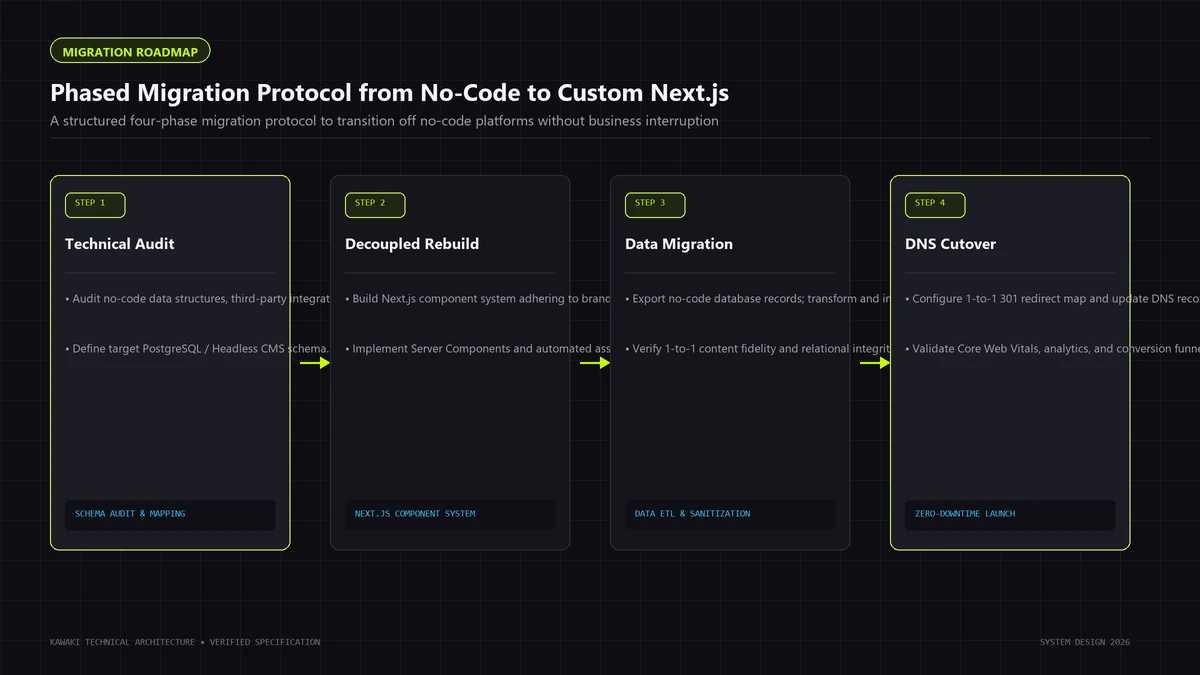
A successful digital product often begins on no-code and transitions to custom development once market validation produces scaling demands. Attempting a monolithic "rip-and-replace" rewrite is a high-risk operational mistake that frequently stalls projects. Instead, employ a disciplined, phased migration protocol:
+------------------------------------------------------------------------+
|               STRANGLER FIG MIGRATION ARCHITECTURE                     |
+------------------------------------------------------------------------+
|                                                                        |
| Incoming User Traffic                                                  |
|          │                                                             |
|          ▼                                                             |
| ┌─────────────────────────────────────────────────────────────┐        |
| │                 REVERSE PROXY / CLOUDFLARE                  │        |
| └──────────────────────────────┬──────────────────────────────┘        |
|                                │                                       |
|               ┌────────────────┴────────────────┐                      |
|               ▼                                 ▼                      |
|       /app/*, /api/*, /checkout         /* (Legacy Content)            |
|               │                                 │                      |
|               ▼                                 ▼                      |
| ┌───────────────────────────┐   ┌───────────────────────────┐          |
| │   NEW CUSTOM CODEBASE     │   │   LEGACY NO-CODE SYSTEM   │          |
| │   (Next.js + PostgreSQL)  │   │   (Webflow / Bubble)      │          |
| └───────────────────────────┘   └───────────────────────────┘          |
|                                                                        |
+------------------------------------------------------------------------+
Step 1: Data Extraction and Schema Normalization
No-code platforms typically store data in denormalized, semi-structured JSON collections. Before writing application code, extract your data via platform APIs and normalize it into a structured relational schema:
- Map flat document fields into relational entities with explicit primary and foreign keys.
- Audit data integrity: clean orphan records, standardize date formats, and resolve schema inconsistencies.
- Implement database migration scripts (using Prisma or Drizzle ORM) to populate your production PostgreSQL database reproducibly.
Step 2: The Strangler Fig Migration Pattern
Rather than taking down the no-code site and attempting a risky launch of a completely new codebase, deploy a reverse proxy (such as Cloudflare or AWS CloudFront) in front of your domain:
- Route all existing traffic to your legacy no-code platform by default.
- Build the highest-value, bottlenecked feature in your custom codebase (e.g., the authenticated
/appportal or custom checkout flow). - Configure the reverse proxy to route
/app/*and/api/*to your new custom infrastructure, while all marketing and blog URLs remain on the no-code platform. - Incrementally migrate additional routes over time until the legacy platform is safely decommissioned.
Step 3: Preserving SEO Equity and Redirect Parity
When migrating content from a no-code CMS to custom code, preserving search rankings requires strict hygiene:
- URL Parity: Retain existing URL slug structures wherever possible.
- 301 Redirect Trees: Map legacy URLs to new canonical destinations with permanent 301 redirects.
- Metadata & Schema: Replicate exact title tags, meta descriptions, OpenGraph cards, and JSON-LD structured data (
Article,Product,BreadcrumbList) so search crawlers experience zero disruption.
10. "Do Not Build Custom Just Because You Can" (The Anti-Over-Engineering Manifesto)
In software engineering, complexity is a liability, not an achievement. The mark of a seasoned technical leader is not how much custom code they can write, but how much code they can successfully avoid writing.
The Developer Vanity Trap
Engineering teams sometimes advocate for custom code because developers find building infrastructure engaging. This is known as Resume-Driven Development (RDD): selecting complex technologies (Kubernetes, microservices, bespoke component libraries) to expand resumes rather than solve commercial problems.
The Hidden Total Cost of Ownership (TCO)
When evaluating custom development, organizations often underestimate the operational tax:
- Maintenance Overhead: Dependencies deprecate, security patches are released continuously, browser standards shift, and runtime environments update.
- Engineering Bottlenecks: Every visual tweak or copy update requires developer time. If engineers maintain basic pages, they are not shipping core features.
- Opportunity Cost: Capital spent building infrastructure that a modest no-code tool could handle is capital diverted from customer acquisition and growth.
The Modern Pragmatic Rule
Exhaust no-code platforms first. Push them to their demonstrable limits. When you encounter concrete, measurable bottlenecks—when database collection limits block new listings, when visual builders introduce unresolvable security risks, or when slow page load times demonstrably impair conversion rates—only then should you commission custom software engineering.
11. Frequently Asked Questions (FAQ)
1. Can a business start on no-code and migrate to custom development later?
Yes. Starting on no-code (Webflow, Framer, or Bubble) allows teams to validate demand, refine user workflows, and discover product-market fit with minimal capital expenditure. Once revenue is established and technical constraints emerge, you can transition to custom code using the Strangler Fig migration pattern without disrupting operations.
2. Is custom web development always more expensive than no-code?
Initially, yes: custom development requires specialized engineers and higher upfront capital. At scale, however, total cost of ownership can reverse. No-code charges escalating fees based on seats, traffic, and workflow operations. At volume, custom code on modern cloud infrastructure is often far cheaper than enterprise no-code platform taxes.
3. Does no-code produce worse SEO results than custom development?
Not inherently. Platforms like Webflow and Framer generate clean HTML and provide strong metadata controls. However, for large-scale catalogs (>10,000 pages) or competitive search verticals where millisecond Core Web Vitals dictate rankings, custom engineering (using Next.js SSR/ISR) delivers asset control and dynamic schema manipulation no-code cannot match.
4. Who owns the intellectual property in no-code versus custom development?
With no-code platforms, you own your uploaded content and data, but the platform vendor owns the underlying software architecture, compiler, and runtime environment. You cannot take your Bubble or Webflow application and host it on an independent server. With custom web development, your organization owns 100% of the intellectual property: the source code, database schemas, API architecture, and deployment configurations belong entirely to you in private Git repositories.
5. When is headless architecture a better choice than pure no-code or pure custom code?
Headless architecture is ideal when you need to empower non-technical content teams while maintaining complete control over frontend performance, security, and specialized user interactions. By decoupling a headless CMS (like Sanity, Strapi, or Webflow CMS) from a custom Next.js frontend, marketing teams can publish visually while software engineers maintain total control over code quality, edge caching, and multi-system API integrations.
12. Strategic Conclusion & Engineering Protocol
Choosing between custom web development and no-code is not a debate over ideology; it is a calculation of technical requirements, capital efficiency, and organizational maturity.
- Choose No-Code when speed-to-market is your primary metric, when you are validating an early-stage product hypothesis, when your application fits naturally into standard templates, or when non-technical teams need autonomous publishing control.
- Choose Custom Web Development when your software is the core commercial asset of your enterprise, when you require proprietary business algorithms, when your database models exceed standard collection caps, when you demand sub-second Core Web Vitals guarantees, or when enterprise security and compliance necessitate complete code auditability.
Pre-Project Architectural Scoping Checklist
Before writing a line of code or signing a SaaS contract, evaluate your project against this checklist:
- Is this digital platform a content-led marketing channel, or an authenticated software application?
- Can our business logic and data schema be expressed within standard no-code widgets without fragile multi-webhook workarounds?
- What is our projected database volume over the next 24 months, and does it exceed platform collection caps?
- Are our target performance metrics achievable within managed platform asset bundles?
- What are the ongoing Total Cost of Ownership (TCO) implications of per-seat or per-workload pricing as we scale?
- Does our organization have the engineering resources to maintain custom infrastructure responsibly?
If your organization has outgrown the limits of visual builders and requires publication-grade digital flagships, high-performance web applications, or structured migration from legacy platforms, explore our engineering practice:
- Bespoke Engineering Capabilities: Explore our full range of Custom Web Development Services to evaluate our architectural tiers and technical standards.
- Technical Performance Blueprints: Review our comprehensive guide to Next.js Performance Architecture to understand sub-second rendering pipelines and Core Web Vitals optimization.
- Platform Comparison Deep-Dive: Read our detailed analysis on Webflow vs Custom Development: When Ambitious Brands Need to Graduate to Code.
- High-End Digital Craft: Discover how leading brands merge publication-grade typography with scalable engineering in What is Editorial Engineering?.
Start an Architectural Scoping Consultation
Ready to scope your web platform with disciplined engineering? Schedule an architectural consultation with our engineering team to evaluate technical feasibility, performance budgets, and custom development roadmaps.
Need Help Engineering Your Web Platform or AI Systems?
From high-performance Next.js architectures to headless Shopify storefronts, custom AI automations, and enterprise WordPress security recovery, Kawaki Studios designs resilient digital infrastructure built to scale.