Executive Summary / Key Takeaways
An engineering decision framework for choosing between Shopify Liquid and Headless Shopify. Features a 12-dimension decision matrix, root-cause speed analysis, optimization sequence, and migration guide.
- Compares monolithic Liquid rendering against modern decoupled Storefront API architectures.
- Analyzes total cost of ownership, developer velocity, and app ecosystem trade-offs.
- Outlines the exact operational metrics that trigger a headless migration milestone.
When scaling an e-commerce brand on Shopify, technical leaders and founders eventually confront an architectural fork in the road: should you continue investing in a Shopify Liquid theme, or should you decouple your frontend and transition to a headless architecture?
The Direct Answer: When Should You Stay on Liquid vs. Go Headless?
A growing store should stay on Shopify Liquid whenever its catalog follows standard e-commerce conventions, its non-technical team requires visual autonomy in the Theme Editor, and performance bottlenecks stem from unoptimized assets or script bloat rather than templating limitations. A store should only consider headless Shopify when non-standard product customization, multi-surface omnichannel publishing, complex international micro-frontends, or custom enterprise middleware demand programmatic frontend control that visual theme architectures cannot accommodate without fragile compromises.
Neither architecture is inherently superior. Shopify Liquid provides an exceptionally resilient, fully managed Shopify-hosted theme architecture with hosting and CDN delivery included. Headless Shopify unlocks granular frontend authority and composable flexibility, but transfers substantial engineering complexity, ongoing maintenance, and infrastructure costs directly onto your organization.
This guide provides an engineering-level decision framework to evaluate the architectural trade-offs, diagnose genuine performance bottlenecks, and determine whether headless commerce is a strategic asset or an expensive liability for your business.
1. Shopify Liquid and Headless Are Different Architectural Models
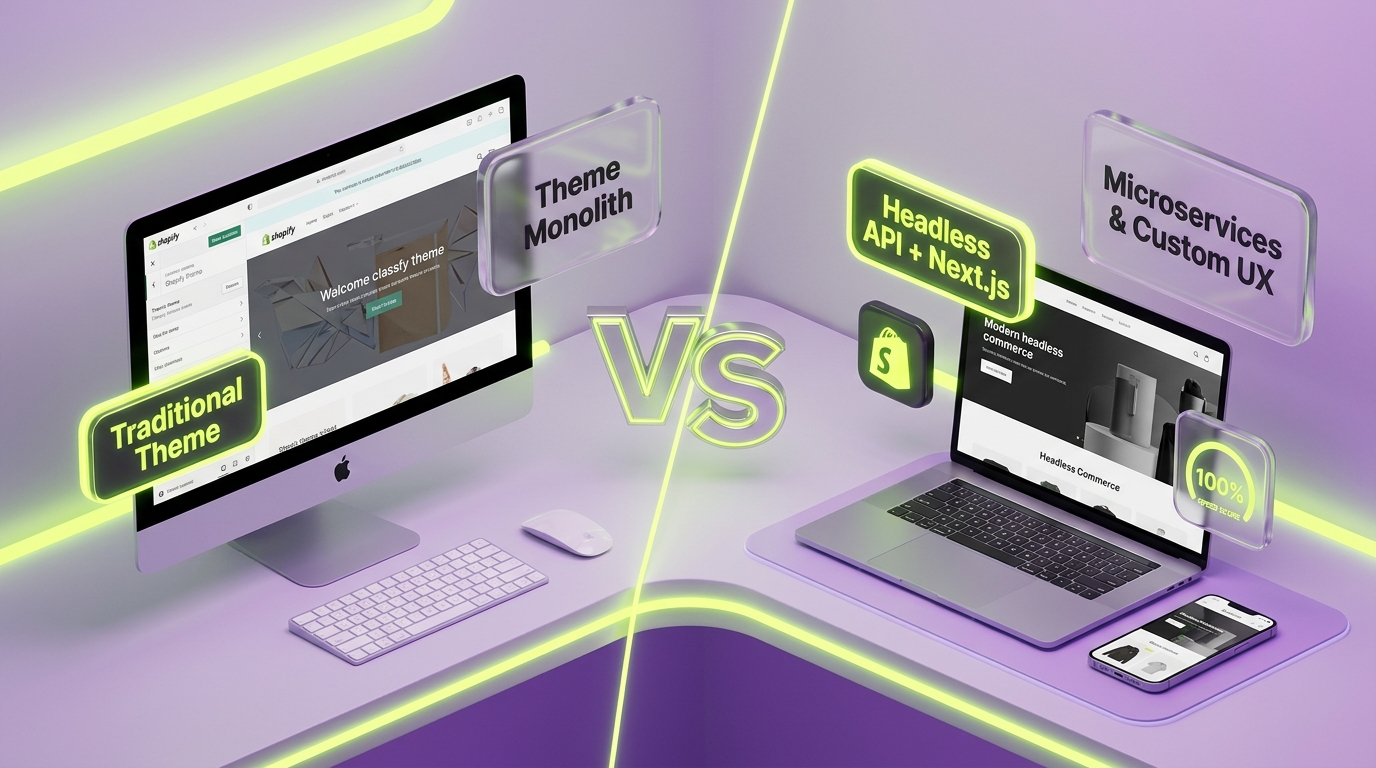
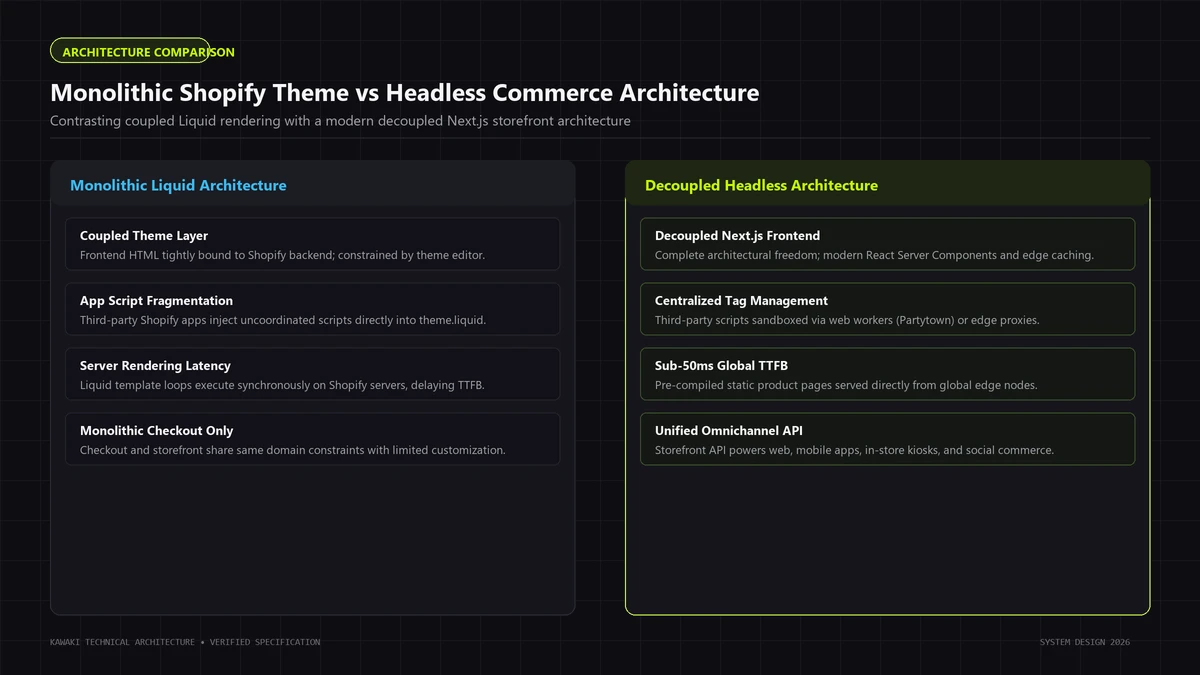
To make an objective technical evaluation, you must first understand the fundamental structural differences between a Shopify-hosted theme architecture and a decoupled headless architecture.
+------------------------------------------------------------------------+
|             SHOPIFY THEME ARCHITECTURE VS. HEADLESS SHOPIFY            |
+------------------------------------+-----------------------------------+
| Shopify Liquid Architecture        | Headless Shopify Architecture     |
| (Shopify-Hosted Theme System)      | (Decoupled Composable System)     |
+------------------------------------+-----------------------------------+
| ┌────────────────────────────────┐ | ┌───────────────────────────────┐ |
| │ Presentation Layer (Liquid)    │ | │ Custom Frontend (Hydrogen/etc)│ |
| │ HTML, CSS, Vanilla JS, Sections│ | │ Edge CDN (Oxygen / Vercel)    │ |
| └───────────────┬────────────────┘ | └───────────────┬───────────────┘ |
|                 │ Direct Memory    |                 │ GraphQL / REST  |
| ┌───────────────▼────────────────┐ | ┌───────────────▼───────────────┐ |
| │ Shopify Core Platform          │ | │ Storefront API / Middleware   │ |
| │ Business Logic, Cart, Checkout │ | └───────────────┬───────────────┘ |
| └───────────────┬────────────────┘ |                 │ Internal Sync   |
| ┌───────────────▼────────────────┐ | ┌───────────────▼───────────────┐ |
| │ Managed Shopify Infrastructure │ | │ Shopify Core (Orders/Catalog) │ |
| │ Cloudflare CDN, DB, SSL, PCI   │ | │ Checkout Domain (PCI-DSS)     │ |
| └────────────────────────────────┘ | └───────────────────────────────┘ |
+------------------------------------+-----------------------------------+
Shopify Liquid: Shopify-hosted theme architecture
Liquid is an open-source, Ruby-based server-side templating engine created by Shopify. In a Shopify-hosted theme architecture:
- Integrated Presentation Layer: The presentation layer (HTML, CSS, Liquid tags, and client-side JavaScript) lives directly inside Shopify's Online Store theme system.
- Server-Side Rendering: When a customer requests a product page (
/products/linen-shirt), Shopify's servers fetch the product record from their internal database, parse the Liquid template, inject the data, and stream rendered HTML directly to the browser via Shopify's integrated Cloudflare CDN edge. - Unified Admin Integration: The Shopify Theme Editor (Online Store 2.0) binds directly to template JSON schemas, allowing non-technical operators to add sections, reorder blocks, and configure theme settings with immediate visual preview.
- Platform-Managed Operations: Merchants do not operate separate web servers, configure container pipelines, manage edge cache invalidation rules, or renew SSL certificates. Everything runs inside Shopify's managed infrastructure.
For brands planning a performance-first storefront within this ecosystem, our dedicated Shopify Development Services deliver bespoke Liquid section architectures designed to maximize speed without adding fragile third-party apps.
The Headless Shopify Architecture (Decoupled)
Headless commerce decouples the frontend presentation layer from the backend transactional and catalog engine:
- Decoupled Frontend: The customer-facing web application is engineered as an independent software application. Because Shopify's Storefront API is framework-agnostic, teams can build using Shopify's official React-based Hydrogen framework, Next.js, Remix, Nuxt/Vue, Astro, or custom frontend stacks. Frontend hosting can leverage Shopify's native Oxygen edge platform (supported directly for Hydrogen deployments) or separate cloud infrastructure such as Vercel, Cloudflare, or AWS.
- API Communication: The frontend communicates with Shopify via the Storefront GraphQL API or Customer Account API to query product catalogs, fetch localized prices, check real-time inventory, and execute cart mutations.
- Separation of Concerns: Shopify handles transactional core capabilities—payment gateway routing, PCI-DSS Level 1 checkout compliance, inventory reconciliation, tax calculation, and order fulfillment—while the independent frontend governs rendering mechanics, routing, caching, and third-party API orchestration.
2. When Shopify Liquid Is the Better Fit
Building custom software when a managed platform already solves the business problem is an expensive operational error. For the vast majority of e-commerce brands, Shopify Liquid is not merely adequate—it is the objectively superior, more capital-efficient architectural choice.
Liquid is the stronger fit under the following commercial and operational conditions:
1. Standard E-Commerce Catalog & Navigation Models
If your business sells physical or digital products using standard transactional conventions—collections, product detail pages (PDPs), variant selectors (size, color, material), drawer carts, and standard checkout—Liquid natively supports these flows with battle-tested reliability. Re-engineering collection filtering, search pagination, and customer account portals from scratch in a custom React application adds months of overhead without enhancing the buyer's experience.
2. Marketing and Merchandising Team Autonomy
Non-technical teams require daily autonomy. Marketers must launch promotional campaigns, publish landing pages, reorder product grids, update announcement banners, and configure seasonal discounts without writing engineering tickets or awaiting CI/CD deployments. The Shopify Theme Editor (OS 2.0) provides native visual section management. In a headless setup, reproducing that same visual agility requires licensing, configuring, and maintaining an enterprise headless CMS (such as Sanity, Contentful, or Strapi), creating duplicate content repositories and administrative friction.
3. Reliance on the Shopify App Ecosystem
Shopify's commercial power stems from its massive ecosystem of turn-key application integrations: reviews (Yotpo, Okendo, Judge.me), subscriptions (Recharge, Skio), customer loyalty (Smile, LoyaltyLion), back-in-stock alerts, and dynamic product recommendations. In Liquid, these apps inject native app blocks or theme app extensions with minimal configuration. In a headless environment, traditional app blocks do not function; your engineering team must build custom API integrations, write custom UI components, and maintain middleware for every single app used.
4. Lean Engineering Resources and Cost Discipline
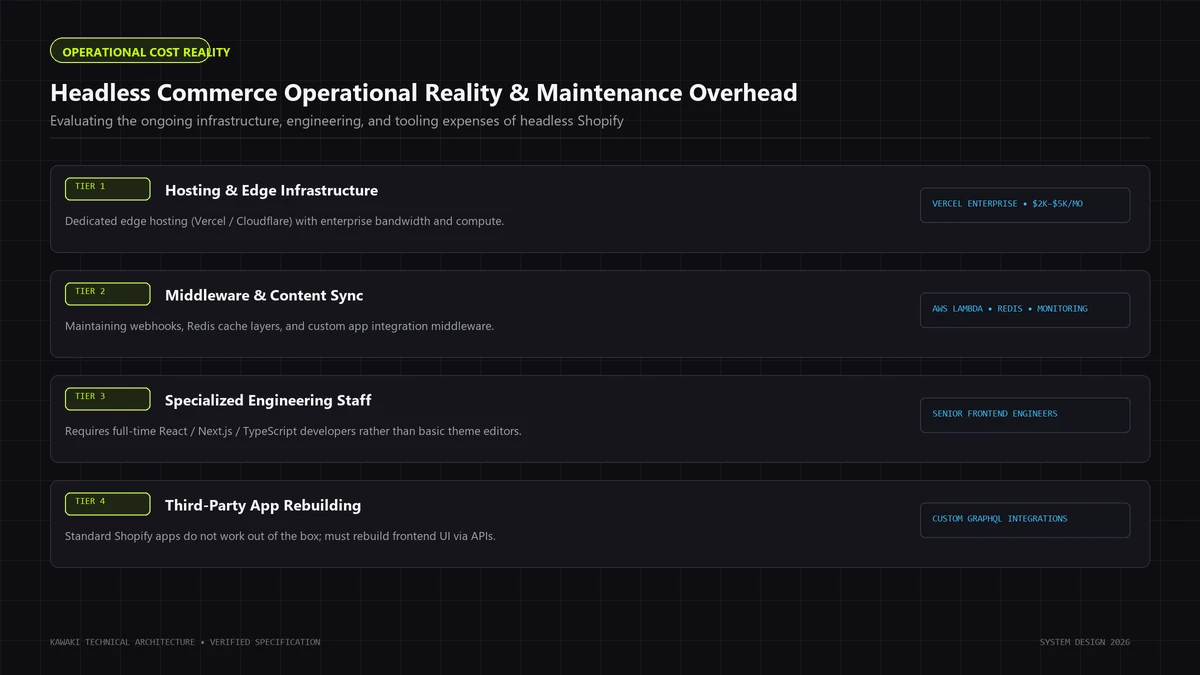
A bespoke Liquid theme requires zero external hosting costs, zero container orchestration, and minimal ongoing DevOps maintenance. Operating a headless store requires ongoing engineering retainers or dedicated in-house software engineers skilled in modern TypeScript, GraphQL, state management, and edge caching architectures, alongside secondary cloud hosting subscriptions (Vercel, AWS) and headless CMS fees.
+------------------------------------------------------------------------+
|                     OPERATIONAL VELOCITY COMPARISON                    |
+------------------------------------------------------------------------+
| LIQUID STORE:   Merchandiser -> Shopify Theme Editor -> Instant Publish|
| vs.                                                                    |
| HEADLESS STORE: Merchandiser -> Headless CMS -> Webhook -> Edge Build  |
|                 (Or dev ticket required if layout exceeds CMS schema)  |
+------------------------------------------------------------------------+
3. When Headless Shopify Becomes the Better Fit
While Liquid provides unmatched operational convenience, it operates within clear structural boundaries. When an e-commerce brand's digital requirements diverge fundamentally from traditional templated commerce, headless Shopify becomes an architectural asset worth its operational cost.
Headless Shopify becomes the stronger fit under the following technical scenarios:
1. Highly Specialized Storefront Interactions & Configurators
If your core commercial offering relies on intricate client-side interactions—such as a 3D WebGL product customizer, an interactive room visualizer, multi-step bespoke bundling flows with dynamic pricing calculations, or complex subscription logic—Liquid's server-rendered model introduces severe friction. While you can embed React widgets inside Liquid, doing so creates hybrid architecture debt (conflicting state management, duplicated bundle downloads, and layout shift). A dedicated React/Next.js frontend gives software engineers complete control over the DOM, state machines, and canvas rendering layers.
2. Omnichannel Catalog Distribution & Multi-Surface Publishing
If your organization sells products across multiple digital surfaces simultaneously—a web flagship, a native iOS/Android mobile application, interactive retail kiosks, and conversational commerce endpoints—maintaining separate presentation layers for each platform leads to fragmented catalog logic. With headless Shopify, your unified Storefront GraphQL API serves as the single source of truth across all consumer surfaces.
3. Publication-Grade Editorial Commerce & Specialized Content Models
High-end luxury brands and digital flagships often blend long-form editorial storytelling with transactional commerce. While Shopify's native blog and page models are functional for standard articles, they lack advanced content modeling primitives (such as nested relational blocks, dynamic author profiles, multi-layer asset taxonomies, and modular narrative components). Pairing a dedicated headless CMS (such as Sanity or Strapi) with Next.js enables publication-grade typography, scroll-driven narrative motion, and seamless transactional embeds. To understand the design principles behind this approach, read our analysis on What is Editorial Engineering?.
4. Advanced Frontend Tooling and Automated Quality Engineering
Enterprise engineering organizations often mandate strict development standards: static TypeScript type-checking, component-driven storybooks, automated end-to-end integration testing (Playwright or Cypress), automated pull request preview environments, and Git branch preview deployments. Modern React ecosystems provide mature tooling for these workflows, whereas traditional Liquid theme development workflows (Theme Kit, Shopify CLI) remain comparatively constrained.
4. The Real Trade-Off: Simplicity vs Control
The decision between Shopify Liquid and Headless is not a test of technical sophistication; it is a strategic calculation balancing operational simplicity against architectural control.
+------------------------------------------------------------------------+
|                   THE COMMERCE ARCHITECTURAL SPECTRUM                  |
+------------------------------------------------------------------------+
| MAXIMUM SIMPLICITY                                     MAXIMUM CONTROL |
|                                                                        |
| Standard Shopify Theme ──► Bespoke Liquid Theme ──► Headless (Next.js) |
| (Off-the-shelf)            (Clean Custom Code)      (Decoupled Stack)  |
|                                                                        |
| * Zero DevOps              * Zero DevOps            * Full UI Control  |
| * Native Theme Editor      * Native Theme Editor    * Multi-Surface    |
| * Turn-Key Apps            * Sub-Second Latency     * Custom Edge API  |
| * Vendor Constrained       * Scalable Foundation    * High Ops Burden  |
+------------------------------------------------------------------------+
What You Gain with Headless
- Total Presentation Authority: You control every single byte of HTML, CSS, and JavaScript delivered to the client, enabling custom code-splitting, critical asset inlining, and bespoke animation pipelines.
- Framework Freedom: You leverage the broader React/Next.js component ecosystem, modern state management libraries, and edge computing runtimes.
- Decoupled Release Cycles: Frontend feature updates can be deployed independently without altering backend Shopify configurations or risking template regression.
What You Lose with Headless
- Turn-Key App Plug-and-Play: Every third-party service (reviews, search, filtering, wishlist, loyalty) requires bespoke frontend implementation, custom state handling, and ongoing API maintenance.
- Native Preview and Theme Editor: Without substantial engineering investment in custom headless preview middleware, marketing teams lose the intuitive, real-time visual editing experience of Online Store 2.0.
- Integrated Support Surface: When an issue arises in Liquid, Shopify support can inspect the entire system. In headless, when a cart mutation fails or page latency spikes, your engineering team must diagnose whether the defect resides in your Next.js application, the edge CDN layer, third-party middleware, or Shopify's Storefront API.
5. Shopify Liquid vs Headless Decision Matrix
To provide clarity for executive and technical teams, the matrix below contrasts Shopify Liquid against Headless across twelve mission-critical operational and architectural dimensions:
| Evaluation Dimension | Shopify Liquid Theme Architecture | Headless Shopify Architecture | Deciding Factor |
|---|---|---|---|
| 1. Development Complexity | Generally Lower to Moderate. Built with standard HTML, CSS, JavaScript, and Liquid syntax familiar to specialized Shopify developers. | Generally Higher Implementation Complexity. Typically requires dedicated software engineering expertise in modern frontend frameworks (such as Hydrogen, Next.js, or Remix), GraphQL, and caching strategies. | In-house engineering capabilities and long-term technical resources. |
| 2. Launch Speed | Typically Faster. Built-in checkout, cart functionality, native customer routing, and platform-managed hosting allow quicker initial deployment. | Often Longer Implementation Timeline. Frequently requires custom routing, cart state synchronization, checkout handoffs, and third-party API wiring depending on scope. | Urgency of commercial launch vs requirement for bespoke frontend experiences. |
| 3. Storefront Flexibility | Bounded by Theme & Section Architecture. Well-suited for standard grid, list, and detail patterns; may encounter friction with complex client-side applications. | Broad Architectural Freedom. Offers granular programmatic control over viewports, client-side routing, WebGL canvas elements, and multi-step UI flows. | Specificity of product presentation and custom interactive tooling requirements. |
| 4. Performance Control | Substantial but Guardrailed. Strong server-side TTFB delivered via Shopify's managed CDN edge; frontend performance is heavily bounded by app scripts and media hygiene. | Granular Implementation Control. Enables fine-grained code-splitting, static generation, edge caching, and bundle optimization, though poor implementation can still degrade performance. | Impact of Core Web Vitals and page speed on conversion rates. |
| 5. CMS / Content Flexibility | Standard Structured Content. Native Shopify pages, blogs, and metafields handle standard merchandising well, but offer limited complex relational content schemas. | More Flexible Relational Content Modeling. Can connect to dedicated headless CMS platforms (such as Sanity, Contentful, or Strapi) with tailored relational schemas. | Scale of editorial publishing and content-to-commerce integration depth. |
| 6. Integrations & Apps | Native Turn-Key Integration. Many Shopify App Store plugins install with automated theme app extensions and native app blocks. | Custom API Integration Work. Apps requiring customer-facing widgets typically require custom GraphQL queries, custom UI components, and ongoing API maintenance. | Reliance on off-the-shelf marketing, review, and loyalty SaaS plugins. |
| 7. Experimentation & Testing | Standard Tooling. A/B testing is commonly managed via client-side scripts (which may introduce layout shift) or server-side theme duplication. | Advanced Edge Routing Opportunities. Enables server-side or edge-middleware experiment routing that can minimize visual layout shifts when properly configured. | Sophistication of conversion rate optimization (CRO) team and testing frequency. |
| 8. Developer Dependency | Lower Ongoing Dependency. Merchandisers and marketers can frequently build, edit, and publish pages independently using the visual Theme Editor. | Typically Higher Developer Dependency. Layout changes outside pre-configured CMS schemas often require developer involvement, pull requests, and deployment cycles. | Marketing agility requirements vs tolerance for engineering bottlenecks. |
| 9. Maintenance & Updates | Platform-Managed Maintenance. Shopify manages platform security, core dependencies, SSL certificates, and database migrations. | Ongoing Application Maintenance. Engineering teams typically maintain application dependencies, framework upgrades, edge configurations, and API version deprecations. | Ongoing DevOps availability and infrastructure maintenance budgets. |
| 10. Hosting & Infrastructure | Included in Shopify Platform. Managed hosting, global CDN edge, and bandwidth are bundled directly within the Shopify subscription. | Depends on Chosen Architecture. Can leverage Shopify's Hydrogen on Oxygen hosting, or separate cloud infrastructure (Vercel, AWS, Cloudflare) with independent hosting costs. | Total Cost of Ownership (TCO) constraints and infrastructure budgeting. |
| 11. Platform Cohesion | Fully Native. Checkout, customer accounts, discounts, gift cards, international markets, and taxes function seamlessly within the theme layer. | Requires Integration Orchestration. Frontend must manage handoffs to Shopify checkout domains and maintain session token persistence across domains. | Operational friction acceptable to achieve custom frontend capabilities. |
| 12. Total Operational Complexity | Generally Lower. Single centralized admin dashboard manages catalog, content, orders, and appearance. | Typically Higher. Frequently involves managing multiple administrative surfaces (Shopify Admin, Headless CMS, hosting provider, GitHub repository, monitoring tools). | Organizational maturity and willingness to manage composable tech stacks. |
6. When a Shopify Store Is Actually Slow
A pervasive misconception in the e-commerce industry is that Shopify Liquid is fundamentally slow, and that transitioning to a headless architecture is the only way to achieve sub-second page loads and green Core Web Vitals scores.
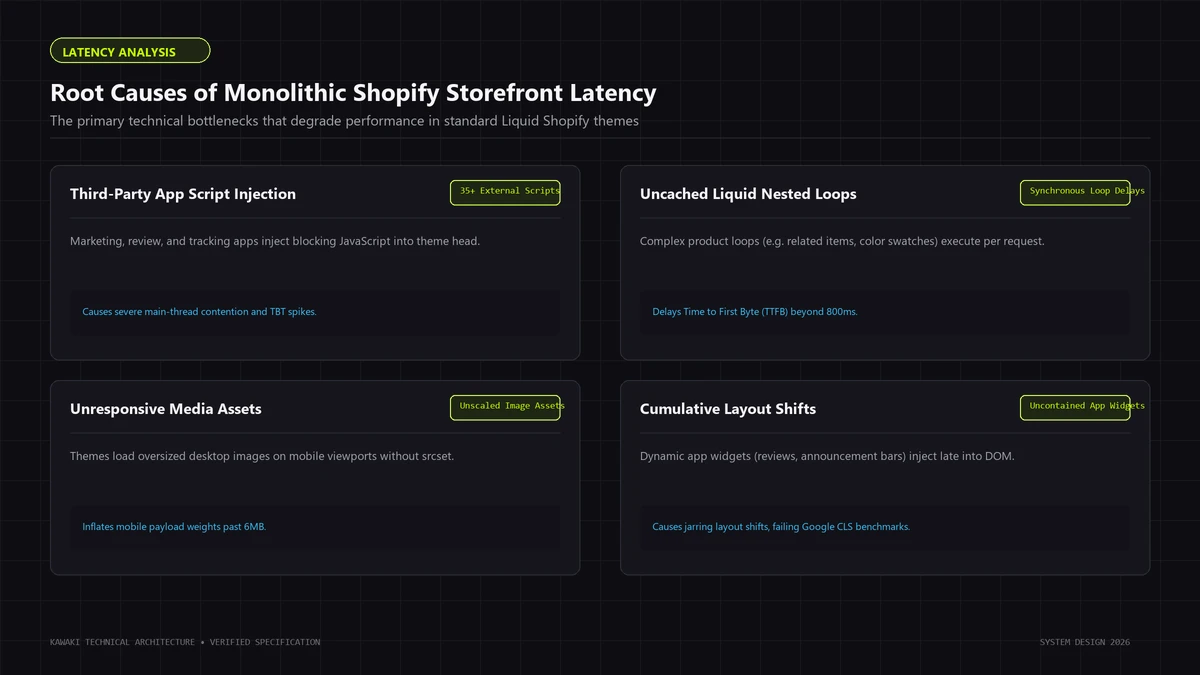
This diagnosis is technically incorrect. Liquid itself is a lightweight, compiled C/Ruby templating engine capable of server-rendering complex layouts in under 50 milliseconds. When a Shopify store suffers from sluggish page loads, high Interaction to Next Paint (INP), or failing Largest Contentful Paint (LCP), the root cause almost always resides in frontend implementation defects rather than platform limitations.
+------------------------------------------------------------------------+
|                 ROOT CAUSES OF SHOPIFY STOREFRONT LATENCY              |
+------------------------------------------------------------------------+
| 1. Third-Party Script Bloat  │ 15-30 marketing pixels, chat widgets,    |
|                              │ and heatmaps blocking the main thread.   |
| 2. App Injection Clutter     │ Orphaned script_tags from uninstalled    |
|                              │ apps executing zombie network requests.  |
| 3. Unoptimized Media Assets  │ 5MB uncompressed hero banners and GIFs   |
|                              │ lacking responsive srcset directives.    |
| 4. Commercial Theme Bloat    │ 800KB of generic vendor CSS & jQuery     |
|                              │ supporting hundreds of unused toggles.   |
| 5. Inefficient Liquid Loops  │ Nested n^2 collection loops and deep     |
|                              │ metafield querying on initial render.    |
+------------------------------------------------------------------------+
The Real Culprits Behind Sluggish Shopify Stores
1. Third-Party Marketing Script & Tag Bloat
The primary driver of degraded Core Web Vitals on e-commerce stores is unmanaged third-party JavaScript: Facebook Pixel, TikTok Pixel, Google Tag Manager, Pinterest, Klaviyo tracking, Hotjar heatmaps, affiliate trackers, and customer service live chat widgets (Gorgias, Zendesk). When dozens of external scripts compete for browser execution, they saturate the main thread, delay First Contentful Paint (FCP), and drive Interaction to Next Paint (INP) into failing thresholds. Migrating a store to headless while retaining the same 25 unvetted marketing scripts will yield an equally sluggish headless store.
2. App Overhead and Zombie Script Injections
Historically, Shopify apps integrated by injecting external JavaScript files via the script_tags API. When merchants uninstall an app from their admin, these external script references often remain hardcoded inside theme.liquid. We frequently audit stores where 10 to 15 zombie scripts continue executing network requests on every page view for apps uninstalled years prior.
3. Image and Media Weight
E-commerce teams frequently upload multi-megabyte PNGs or uncompressed JPEGs directly to the Shopify CDN without setting responsive image dimension parameters. Serving a 3840px wide hero banner to an iPhone user over a mobile network delays Largest Contentful Paint by several seconds. Liquid provides native image filters (image_url, image_tag, widths) that automatically generate responsive srcset and sizes attributes when correctly implemented.
4. Commercial Marketplace Theme Bloat
Off-the-shelf themes purchased from the Shopify Theme Store are engineered to satisfy thousands of different merchant configurations. To achieve this versatility, they bundle massive CSS frameworks, multi-megabyte JavaScript libraries, slider plugins (Swiper, Slick), and modal libraries—90% of which your specific store never utilizes.
5. Inefficient Liquid Template Code
While Liquid compiles rapidly, inefficient template code can create server-side rendering latency:
- Nested Loops: Running nested
forloops across large collections (e.g., iterating through 50 products, and within each product iterating through 100 variants or tags) introduces $O(n^2)$ computational complexity. - Uncached Metafield Calls: Querying deep JSON metafields repeatedly inside tight loops rather than assigning them to local variables.
- Unpaginated All-Products Queries: Querying
collections.all.productson initial page load forces Shopify's database to retrieve hundreds of records before emitting the first byte of HTML.
7. Liquid Optimization Before Going Headless
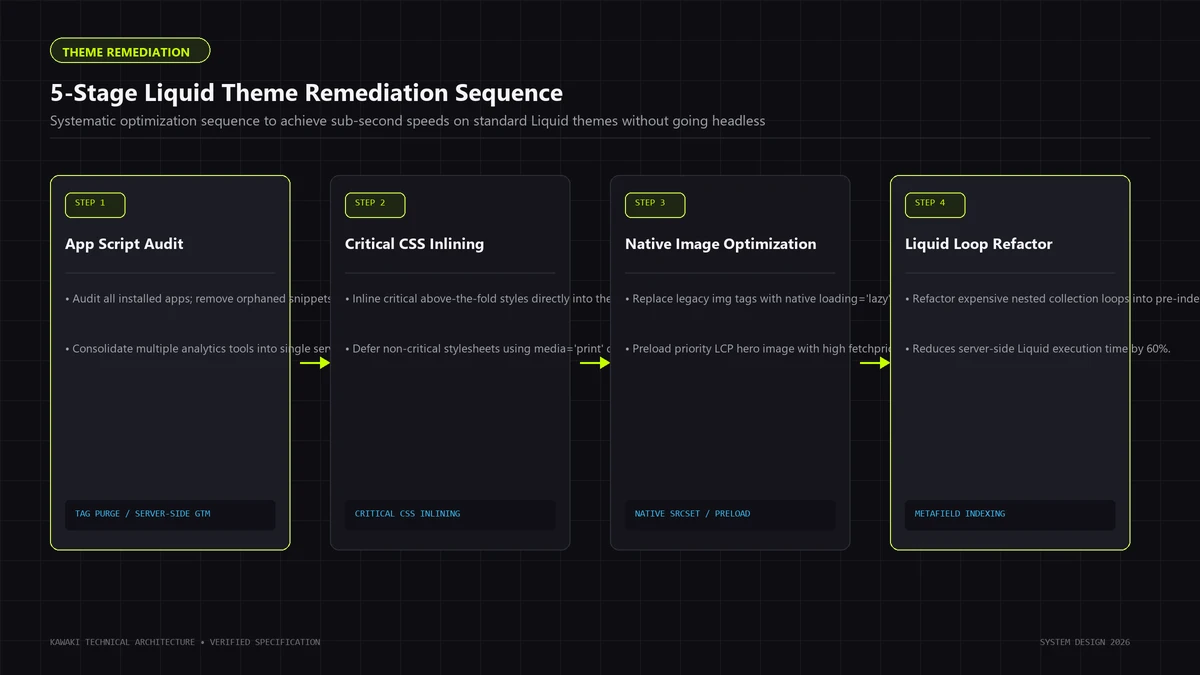
Before committing six figures in capital and months of engineering runway to a headless rebuild, technical leaders must systematically exhaust disciplined Liquid optimization. In over 80% of e-commerce performance audits, a methodical code and asset cleanup achieves sub-second load times on native Liquid architecture.
Follow this battle-tested five-stage optimization protocol:
[Stage 1: Script Audit & Tag Governance]
                 │ Purge zombie apps; migrate tracking to server-side GTM.
                 ▼
[Stage 2: Media Modernization & Responsive Sizing]
                 │ Implement responsive srcset, native lazy-loading, WebP/AVIF.
                 ▼
[Stage 3: Liquid Code Profiling & Loop Flattening]
                 │ Audit render times via Shopify Theme Inspector; excise n^2 loops.
                 ▼
[Stage 4: Critical Path CSS & Font Streamlining]
                 │ Strip unused vendor CSS; inline critical styles; preload WOFF2.
                 ▼
[Stage 5: App Native Consolidation]
                 │ Replace heavy JS widgets with native OS 2.0 app blocks.
Stage 1: Script Audit & Tag Governance
- Audit Active Scripts: Inspect browser DevTools Network waterfalls. Identify every third-party domain requesting JavaScript execution.
- Excise Zombie App Code: Review
layout/theme.liquidandsnippets/to purge orphaned script references from previously uninstalled applications. - Implement Server-Side Tagging: Migrate client-side marketing pixels (Meta CAPI, TikTok, Pinterest, Google Analytics) to Server-Side Google Tag Manager (sGTM) or Cloudflare Zaraz. Moving tracking execution from the user's mobile browser to a cloud proxy instantly frees main-thread capacity and eliminates INP bottlenecks.
Stage 2: Media Modernization & Responsive Sizing
- Enforce Native Liquid Image Helpers: Replace hardcoded
<img>tags with Shopify's modernimage_taghelper, providing explicitloading="lazy",decoding="async", and comprehensivewidthsarrays:
{{ product.featured_image | image_url: width: 1200 | image_tag:
  widths: '375, 550, 750, 1100, 1500',
  sizes: '(min-width: 1200px) 600px, 100vw',
  loading: 'lazy',
  decoding: 'async',
  alt: product.title | escape
}}
- Eliminate Animated GIFs: Convert autoplaying hero GIFs into lightweight, loop-muted MP4 or WebM video containers, reducing asset payloads by up to 80%.
Stage 3: Liquid Code Profiling & Loop Flattening
- Profile with Shopify Theme Inspector: Use the Chrome Theme Inspector extension to identify slow-rendering Liquid sections and snippets.
- Eliminate Nested Iterations: Replace nested loops by indexing data structures into flat arrays or leveraging Shopify's native collection filtering parameters.
- Local Variable Assignment: Cache expensive Liquid operations using the
{% assign %}tag outside of loops rather than re-evaluating filters repeatedly.
Stage 4: Critical Path CSS & Font Streamlining
- Purge Unused CSS: Audit theme stylesheets using Chrome DevTools Coverage tabs. Excise unused legacy CSS rules and vendor frameworks.
- Optimize Web Fonts: Preload critical font files in the document
<head>using WOFF2 format, and ensurefont-display: swapis declared to prevent Flash of Invisible Text (FOIT). Limit font weight variants to essential styles.
Stage 5: App Native Consolidation
- Replace External Widgets with Native Code: Re-engineer common e-commerce features (such as slide-out drawer carts, free shipping progress bars, accordion FAQ blocks, and variant swatches) in clean, native Liquid and vanilla JavaScript rather than relying on bloated monthly SaaS plugins that inject external script bundles.
If, after completing this disciplined optimization sequence, your storefront still fails to satisfy your commercial objectives due to fundamental constraints in client-side state, non-standard visual customizers, or multi-surface distribution, only then does headless commerce represent a rational engineering next step. For deeper analysis on frontend rendering models, explore our guide to Next.js Performance Architecture.
8. When Headless Shopify Makes Architectural Sense
When technical requirements truly exceed Liquid's boundaries, headless Shopify unlocks capabilities that traditional theme architectures cannot replicate. Below are the primary scenarios where headless architecture delivers demonstrable commercial value:
1. Bespoke Product Customizers & Interactive WebGL Engines
Luxury fashion, configurable furniture, bespoke jewelry, and customizable industrial equipment frequently require interactive 3D product visualizers or real-time configurators. Customers adjust dimensions, materials, finishes, and accessories, expecting instantaneous 60fps visual updates.
- The Liquid Limitation: Managing complex client state, 3D WebGL scene graphs (via Three.js), and dynamic price calculation algorithms inside a server-rendered Liquid template produces fragile code architectures that easily desynchronize from the Shopify cart.
- The Headless Advantage: An isolated custom frontend (using Hydrogen, Next.js, or similar modern stacks) manages application state natively using modern state engines (Zustand, Redux, or React Context), rendering WebGL canvases smoothly while synchronizing configured line items with Shopify's Cart API in the background.
2. Complex Frontend Requirements & Seamless Client-Side Navigation
- Instantaneous Route Switching: Single-page application (SPA) architectures and modern component routers enable instant, app-like page transitions without full-page browser reloads.
- Persistent Audio/Video Contexts: Media and lifestyle brands can maintain continuous podcast streams, video backgrounds, or ongoing interactive sessions while customers navigate through product catalogs without audio stutter or state interruption.
- Optimistic Cart UI: Instantaneous visual cart feedback—adding an item to the cart updates the counter and drawer UI in zero milliseconds before the network request resolves, synchronizing with the Storefront API asynchronously.
3. Omnichannel Multi-Surface Distribution
High-growth retail enterprises often manage diverse digital touchpoints from a single catalog:
- A high-performance web flagship.
- Native iOS and Android mobile apps for VIP loyalty members.
- Point-of-Sale (POS) interactive customer displays in physical retail stores.
- B2B wholesale ordering portals with customer-specific negotiated pricing tiers.
By adopting a headless architecture, your development team maintains a singular backend catalog and order processing pipeline in Shopify, while querying identical GraphQL endpoints across web, mobile, and physical touchpoints.
4. Advanced Edge Personalization & Layout-Shift-Free Experimentation
Traditional client-side A/B testing scripts often inject visual modifications into the browser DOM after initial render, which can introduce noticeable content flicker (Cumulative Layout Shift) and compromise user experience. With a decoupled frontend deployed to edge runtimes (such as Shopify Oxygen, Vercel Edge Middleware, or Cloudflare Workers), teams can execute server-side experiment assignment at the edge before HTML delivery, serving tailored variants with minimal layout shift and fully crawlable markup.
For an end-to-end technical reference on decoupled storefront engineering, review our comprehensive Headless Shopify Development Guide.
9. Headless Shopify Architecture Explained
To successfully design, deploy, and maintain a headless store, engineering teams must master the decoupled request lifecycle. The diagram below illustrates how modern headless commerce distributes responsibility across independent layers:
+------------------------------------------------------------------------+
|                 HEADLESS SHOPIFY REQUEST LIFECYCLE                     |
+------------------------------------------------------------------------+
|                                                                        |
| [Incoming Web Visitor]                                                 |
|          │                                                             |
|          ▼                                                             |
| ┌─────────────────────────────────────────────────────────────┐        |
| │ GLOBAL EDGE NETWORK / CDN (Vercel / Cloudflare / Oxygen)    │        |
| │ Edge Middleware: Geo-routing, A/B assignment, auth headers   │        |
| └──────────────────────────────┬──────────────────────────────┘        |
|                                │                                       |
|               ┌────────────────┴────────────────┐                      |
|               ▼                                 ▼                      |
| [Static Edge Cache: ISR / SSG]      [Dynamic Serverless Function]      |
| (Instant HTML for 95% of traffic)   (Authenticated Cart, Search)       |
|                                                 │                      |
|                                ┌────────────────┴────────────────┐     |
|                                ▼                                 ▼     |
|                   ┌───────────────────────────┐   ┌──────────────────┐ |
|                   │ STOREFRONT GRAPHQL API    │   │ HEADLESS CMS     │ |
|                   │ (Shopify Commerce Core)   │   │ (Sanity/Strapi)  │ |
|                   └─────────────┬─────────────┘   └──────────────────┘ |
|                                 │                                      |
|                                 ▼                                      |
|                   ┌───────────────────────────┐                        |
|                   │ SHOPIFY CHECKOUT GATEWAY  │                        |
|                   │ (PCI DSS Level 1 Domain)  │                        |
|                   └───────────────────────────┘                        |
|                                                                        |
+------------------------------------------------------------------------+
The Architectural Components
1. The Presentation Layer (Decoupled Frontend)
The frontend is engineered as an independent client-facing application. Because Shopify's Storefront API is framework-agnostic, engineering teams can choose the frontend architecture that best fits their stack—such as Shopify's official React-based Hydrogen framework, Next.js App Router, Remix, Nuxt/Vue, or Astro. Modern headless storefronts frequently employ static generation, incremental revalidation, and edge caching to prerender catalog pages while querying dynamic inventory and customer state via client or edge routines.
2. The Storefront API Layer
The frontend communicates with Shopify via the Storefront GraphQL API (version-pinned, e.g., 2026-04). GraphQL ensures that the client queries only the precise fields required for rendering (e.g., product title, price, featured image), eliminating the over-fetching typical of REST endpoints and reducing network payloads.
3. The Headless Content Management Layer (CMS)
Non-catalog editorial content—such as brand journalism, lookbooks, size charts, FAQ repositories, and homepage modular sections—can reside in a dedicated headless CMS (such as Sanity, Contentful, or Strapi). The decoupled frontend fetches content via GraphQL/REST during page compilation or runtime rendering, blending rich storytelling blocks with real-time Shopify product availability.
4. The Global Edge Delivery Network
Deploying the frontend can leverage Shopify's native Oxygen platform (which provides global edge deployment optimized for Hydrogen) or independent cloud edge platforms (such as Vercel, Cloudflare Pages, or AWS). Edge middleware can handle geolocation routing (directing regional visitors to localized currencies and translations) before requests reach origin servers.
5. What Shopify Still Handles (The Transactional Engine)
A common misconception is that going headless means abandoning Shopify. In reality, Shopify remains the robust commercial backbone, handling:
- Secure, PCI-DSS Level 1 compliant checkout processing.
- Payment gateway integrations (Shop Pay, Apple Pay, PayPal, credit cards).
- Tax compliance calculation (Shopify Tax, Avalara).
- Native discount code and gift card validation.
- Inventory management, backorders, and multi-location warehouse routing.
- Order fulfillment, shipping label generation, and customer transactional emails.
10. The Hidden Costs of Headless
Before approving a headless migration, business and technical executives must account for the compounding operational liabilities that vendor marketing often obscures. Decoupling your frontend is not a one-time project; it represents a permanent transition into software product stewardship.
+------------------------------------------------------------------------+
|                     THE HIDDEN COSTS OF HEADLESS                       |
+------------------------------------------------------------------------+
| 1. High Engineering Overhead  │ Requires dedicated full-stack software  |
|                               │ engineers for everyday layout changes.  |
| 2. Secondary Cloud Hosting    │ Compounding monthly bills for Vercel/   |
|                               │ AWS, edge bandwidth, and compute tiers. |
| 3. Headless CMS Licensing     │ Enterprise CMS subscriptions (Sanity,   |
|                               │ Contentful) scaling on API usage.       |
| 4. App Re-Engineering         │ Custom-building frontend components for |
|                               │ reviews, subscriptions, and filtering.  |
| 5. Cache Invalidation Ops     │ Webhook orchestration handling race     |
|                               │ conditions between inventory & pricing. |
| 6. Monitoring & Security Debt │ Operating Sentry, uptime alerts, and    |
|                               │ maintaining sprawling npm dependencies. |
+------------------------------------------------------------------------+
The Six Hidden Operational Taxes
1. Ongoing Engineering Dependency
On a Liquid store, a non-technical marketing coordinator can build and publish a seasonal landing page in two hours using theme section blocks. On a headless store, unless your team has engineered a sophisticated, flexible component schema inside a headless CMS, creating a non-standard layout often requires an engineering ticket, a designer mock-up, a developer pull request, code review, and a production deployment.
2. Hosting & Cloud Infrastructure Costs
Liquid hosting and global CDN bandwidth are bundled within your Shopify subscription. In headless setups, hosting infrastructure depends on the selected architecture: deploying Hydrogen on Shopify's native Oxygen edge platform can consolidate hosting under Shopify, whereas custom deployments on third-party cloud platforms (such as Vercel, Cloudflare, or AWS) introduce independent infrastructure subscriptions, edge bandwidth tiers, and serverless execution costs.
3. Enterprise Headless CMS Licensing Fees
Shopify's native admin is designed to edit Liquid templates. To empower marketing teams in a headless architecture, you must license an external headless CMS. While starter tiers are inexpensive, enterprise tiers for platforms like Contentful or Sanity quickly reach thousands of dollars annually as administrative seats and API call volumes grow.
4. The App Re-Engineering Tax
When a merchant wants to install a new customer review app, loyalty widget, or subscription portal on a Liquid store, installation takes minutes. In headless, standard app blocks cannot inject themselves into your decoupled React application. Your engineers must write custom React components, manage client-side state, query third-party REST/GraphQL APIs, and handle error boundaries. When third-party vendors update their APIs, your team is responsible for ongoing maintenance.
5. Complex Cache Invalidation Pipelines
In an e-commerce environment, stale data causes lost revenue: displaying an outdated price or showing an out-of-stock product as purchasable creates customer service crises. In headless, keeping static edge caches synchronized with live inventory requires robust webhook pipelines. If inventory changes in Shopify, a webhook must trigger on-demand cache revalidation at the edge in real time. Handling webhook failures, network timeouts, and out-of-order delivery requires seasoned backend engineering.
6. Maintenance, Dependency Security & Observability
A custom decoupled codebase relies on modern open-source package dependencies. Your engineering team must continuously monitor vulnerabilities, apply security patches, manage framework upgrades, and maintain observability tooling (such as Sentry for client/server error tracking and Datadog for API performance monitoring).
11. Migration: Liquid to Headless
If your technical evaluation confirms that headless is necessary, executing the migration requires rigorous architectural discipline. A poorly planned headless transition can destroy years of accumulated search engine authority and disrupt conversion funnels.
Follow this technical migration protocol to ensure zero operational disruption:
[Phase 1: URL & Metadata Parity]
             │ Map exact slug parity: /products/*, /collections/*, /pages/*
             ▼
[Phase 2: Structured Data & Canonical Mapping]
             │ Replicate JSON-LD Product, BreadcrumbList, and OpenGraph schemas.
             ▼
[Phase 3: Analytics & Event Dispatch Parity]
             │ Wire GA4 e-commerce events (view_item, add_to_cart, begin_checkout).
             ▼
[Phase 4: Cart State & Checkout Domain Handoff]
             │ Maintain seamless session persistence across headless cart & Shopify checkout.
             ▼
[Phase 5: The Strangler Fig Reverse Proxy Rollout]
             │ Route high-value custom paths first; incrementally migrate remaining routes.
Critical Migration Disciplines
1. Strict URL Slug Parity
Preserve existing Shopify URL path structures wherever possible:
- Products:
/products/[handle] - Collections:
/collections/[handle] - Pages:
/pages/[handle]
Altering your slug taxonomy during a platform rebuild forces search engines to rediscover and re-evaluate your entire catalog, triggering severe organic ranking volatility. Where URL modifications are non-negotiable, configure permanentHTTP 301redirect maps at the edge layer.
2. Search Metadata & JSON-LD Structured Data Parity
Ensure your decoupled frontend dynamically renders identical search engine signals:
- Canonical Link Tags: Explicit self-referential canonical tags on all indexable pages.
- Robots Directives: Precise meta robots tags preventing indexing of faceted filter queries or internal search results.
- Schema.org Structured Data: Inject comprehensive JSON-LD
Product,Offer,AggregateRating,Brand, andBreadcrumbListschemas directly into initial server-rendered HTML.
3. Analytics & Conversion Tracking Parity
Re-implement full e-commerce tracking across all user interaction touchpoints:
- Dispatch standardized Google Analytics 4 (GA4) e-commerce data layer events:
view_item_list,select_item,view_item,add_to_cart,remove_from_cart,view_cart, andbegin_checkout. - Implement server-side tracking pipelines (Meta Conversions API, Google Tag Manager Server Container) to prevent tracking loss caused by client-side ad blockers and browser privacy restrictions.
4. The Cart-to-Checkout Transition
In headless architectures, the customer shops on your custom domain (www.yourbrand.com), but completes payment on Shopify's PCI-compliant checkout domain (checkout.yourbrand.com or yourbrand.myshopify.com). Ensuring an effortless transition requires:
- Utilizing the Storefront Cart API to manage cart state in browser localStorage/cookies.
- When the customer clicks "Checkout," generating a secure Shopify
checkoutUrlwith embedded customer access tokens and cart line items, seamlessly forwarding the visitor to checkout without session drops.
5. Incremental Migration via the Strangler Fig Pattern
Rather than attempting a high-risk "all-at-once" cutover, consider migrating incrementally using a reverse proxy (Cloudflare Workers or AWS CloudFront):
- Route all baseline traffic to your existing, stable Liquid theme by default.
- Build your most bottlenecked feature—such as a complex 3D product customizer or a high-velocity landing page—in the custom headless Next.js codebase.
- Configure the reverse proxy to route
/products/custom-itemor/pages/configuratorto your headless infrastructure, while leaving the rest of the store on Liquid. - Incrementally expand headless route coverage as your team validates operational stability.
12. When NOT to Go Headless
In software engineering, acknowledging boundaries is the hallmark of technical maturity. Below are real-world commercial profiles where pursuing a headless Shopify build is an operational mistake:
1. Stores Whose Current Requirements Do Not Justify Added Engineering and Operational Complexity
Decoupled storefront architecture should never be adopted based on speculative prestige or arbitrary revenue thresholds. A store should stay with a Shopify-hosted theme whenever its technical and commercial profile operates effectively within the native theme system:
- Storefront Requirements: If your product presentation follows standard e-commerce patterns—collection grids, standard product detail pages, standard variant selectors, and drawer carts—a bespoke Liquid theme fully satisfies customer expectations without the overhead of custom state management.
- Integrations & Ecosystem: If your conversion stack relies heavily on off-the-shelf Shopify app extensions, app blocks, and customer review widgets, staying on Liquid preserves native plug-and-play compatibility and avoids custom API integration debt.
- Team Capability: If your daily operations are managed by merchandisers, visual designers, and marketing generalists rather than dedicated frontend software engineers, theme section editing preserves team autonomy and eliminates developer bottlenecks.
- Content Modeling: If your storytelling needs are comfortably handled by standard Shopify pages, native blogs, and JSON metafields, licensing and configuring an external headless CMS adds unnecessary administrative friction.
- Performance Constraints: If storefront latency stems from unoptimized hero imagery, third-party tracking tags, or obsolete scripts, executing a disciplined Liquid cleanup protocol addresses the root cause directly without requiring a platform rebuild.
- Experimentation Needs: If your CRO program conducts standard landing page or creative A/B tests through theme variants or native tooling, edge-routing infrastructure is an unnecessary operational overhead.
- Operational Budget: Operating a headless storefront introduces secondary infrastructure considerations, CMS licensing tiers, and ongoing development retainers. When capital is more effectively allocated toward inventory acquisition, creative production, and customer acquisition, Liquid provides superior capital efficiency.
2. Brands Without Dedicated Engineering Staff
If your company does not employ full-time software engineers or maintain an ongoing development retainer with an experienced software engineering agency, do not go headless. When a decoupled storefront experiences an edge cache breakdown, a broken checkout handoff, or a GraphQL rate-limit stall during peak sales periods, you cannot call Shopify customer support to fix your custom frontend code.
3. Organizations Dependent on 15+ Third-Party Shopify Apps
If your marketing, merchandising, and retention strategies rely heavily on an assortment of commercial Shopify plugins—such as spin-to-win popups, automated product badges, tiered discount tables, and bundle bars—a headless migration will stall. Re-engineering these plugins as custom React components consumes hundreds of engineering hours, and you will continually fight API compatibility regressions.
4. Teams Seeking a "Magic Bullet" for Page Speed
If your current Liquid store is slow because marketing uploads 8MB hero banners, runs 20 unvetted advertising pixels, and installed 15 overlapping Shopify apps, migrating to headless will not solve your speed issues. The disciplined optimization sequence outlined in Section 7 will yield superior performance gains at a fraction of the capital expenditure.
13. A Practical Shopify Architecture Decision Tree
Use this deterministic logic tree during your executive architecture scoping sessions to identify the correct path:
                      [START ARCHITECTURE SCOPING]
                                   │
                   Does your product require non-standard
                     3D WebGL configurators, multi-surface
                    apps, or complex custom state machines?
                                   │
                      ┌────────────┴────────────┐
                     YES                        NO
                      │                         │
          Does your company have                │
          dedicated full-stack engineers        │
          & budget for separate hosting?        │
                      │                         │
                ┌─────┴─────┐                   │
               YES          NO                  │
                │            │                  │
          [Headless:    [Bespoke Liquid Theme   │
           Next.js +     with Embedded React    │
           Storefront]   Configurator Widget]   │
                                                │
                          Are you experiencing severe speed
                           bottlenecks or failing Core Web Vitals?
                                                │
                                   ┌────────────┴────────────┐
                                  YES                        NO
                                   │                         │
                     Have you executed a rigorous            │
                     Liquid asset, script, and app audit?    │
                                   │                         │
                             ┌─────┴─────┐                   │
                            YES          NO                  │
                             │            │                  │
                       [Evaluate   [Execute 5-Stage          │
                        Headless]   Liquid Optimization]     │
                                                             │
                                   Is marketing autonomy and low
                                   maintenance your primary driver?
                                                             │
                                                ┌────────────┴────────────┐
                                               YES                        NO
                                                │                         │
                                          [Clean Bespoke           [Hybrid Headless
                                           Liquid Theme            or Specialized
                                           (Online Store 2.0)]     Custom Frontend]
The Architectural Tiers Summary
- Tier 1: Optimized Standard Theme: Best for stores testing initial product-market fit with minimal capital exposure.
- Tier 2: Clean Custom Liquid Theme (Bespoke Engineering): Best for growing brands requiring brand differentiation, sub-second performance, and total Theme Editor autonomy without infrastructure complexity. Explore our tailored Custom Web Development Services to evaluate our architectural standards.
- Tier 3: Headless Composable Architecture (Hydrogen / Custom Frontend): Best for enterprise brands, omnichannel retailers, and products requiring non-standard interactive software engines or multi-surface publishing.
14. Frequently Asked Questions
Is headless Shopify faster?
Not automatically. A well-engineered headless storefront (built with Hydrogen, Next.js, or similar modern frameworks) can achieve exceptional performance through static generation, incremental revalidation, and edge caching. However, a bloated headless site with unvetted third-party scripts, unoptimized client-side hydration, and heavy JavaScript bundles will perform worse than a lean Liquid theme. Performance is a reflection of engineering discipline—asset optimization, tag governance, and payload budgeting—not the templating framework alone.
Is Shopify Liquid bad for performance?
No. Shopify Liquid compiles server-side into lightweight HTML in tens of milliseconds, and Shopify serves rendered pages from an integrated global Cloudflare CDN. Sluggish Liquid stores are almost always caused by third-party tracking scripts, unoptimized commercial themes, and heavy uncompressed imagery, not the Liquid templating language.
Is headless Shopify worth it for a small store?
Typically not. For stores whose storefront requirements fit standard e-commerce patterns and whose teams rely on visual theme editing, the additional development overhead, hosting infrastructure, and ongoing engineering dependency rarely justify the investment. A well-engineered custom Liquid theme provides superior capital and operational efficiency.
When should a Shopify store move to headless?
A store should transition to headless only when concrete business requirements cannot be fulfilled within Liquid: when building bespoke 3D WebGL product customizers, unifying e-commerce across multiple digital touchpoints (web, mobile apps, kiosks) from a single API, or integrating publication-grade editorial storytelling via a dedicated headless CMS.
Can Shopify Liquid be optimized instead of rebuilding?
Yes. In the majority of e-commerce performance audits, executing a disciplined optimization protocol—purging orphaned app scripts, migrating marketing tags to server-side Google Tag Manager (sGTM), implementing responsive image_tag helpers, and streamlining theme CSS—restores sub-second loading times and passing Core Web Vitals on existing Liquid themes without a costly rebuild.
Does headless improve SEO automatically?
No. Search engines rank pages based on content quality, backlink authority, user experience, and technical signals (clean HTML, fast Core Web Vitals, semantic schema, logical URL structure). Both Liquid and headless can achieve flawless technical SEO. In fact, headless migrations introduce substantial SEO risk if URL slug parity, 301 redirect trees, and server-rendered structured data are mismanaged during deployment.
What does headless Shopify add that Liquid doesn't?
Headless Shopify unlocks complete frontend architectural freedom: the ability to build complex client-side applications in modern frameworks (Hydrogen, Next.js, Remix, etc.), integrate a dedicated headless CMS with more flexible relational content modeling, serve app-like transitions without page reloads, and power multiple independent consumer touchpoints (web, native iOS/Android apps, IoT, POS) from a single centralized Shopify commerce engine.
15. Related Shopify Engineering Guides
Choosing between Shopify Liquid and headless commerce is a strategic architectural calculation, not a design trend. By understanding your real technical requirements, respecting the hidden operational costs of decoupled systems, and exhausting native optimization first, technical leaders can allocate capital effectively and build e-commerce platforms designed to endure.
If your team is evaluating an e-commerce replatforming initiative or seeking to extract maximum performance from your storefront, explore our technical capabilities and blueprints:
- Tailored Commerce Engineering: Review our dedicated Shopify Development Services to explore our approach to clean Liquid themes, custom section architectures, and headless builds.
- Technical Headless Implementation: Read our detailed architectural blueprint on Headless Shopify Development: The Architecture of High-Velocity Commerce.
- Modern Frontend Performance: Explore our deep dive into sub-second web architecture in Next.js Performance Architecture.
- Custom Code vs Visual Builders: Learn when ambitious digital platforms outgrow visual tools in Custom Web Development vs No-Code: Architectural Trade-Offs, Decision Matrix, and Scaling Limits.
Plan Your Shopify Architecture Consultation
Ready to evaluate whether an optimized Liquid theme or a decoupled headless architecture is right for your growth roadmap? Schedule an architectural consultation with our engineering team to audit your performance bottlenecks, review technical feasibility, and plan a disciplined development roadmap.
Need Help Engineering Your Web Platform or AI Systems?
From high-performance Next.js architectures to headless Shopify storefronts, custom AI automations, and enterprise WordPress security recovery, Kawaki Studios designs resilient digital infrastructure built to scale.